
Kerry Hataley
Forum Replies Created
-

Kerry Hataley
MemberNovember 6, 2025 at 8:51 am in reply to: Rolling New Unit of Measure schedule ID -
::
I depends on where you are at in the process…
1. Check for Batch Recovery – Tools>>Utilities>>Batch Recovery (Used when in the middle of posting)
2. Find the Batch in GL and Delete then re-enter.
It is hard to say with out more info and screen shots of where you are at in the process.
Check links may also be needed.
Kerry
-
Kerry Hataley
MemberMarch 28, 2025 at 6:27 am in reply to: Error Number = 9469 Stored Procedure taAnalyticsDistribution -
Kerry Hataley
MemberFebruary 5, 2025 at 11:02 am in reply to: GP 18.7 Windows Server 2025 Compatibility -
-
-
Kerry Hataley
MemberMay 9, 2024 at 6:15 am in reply to: GP 18.6.1695 (2023) Hung Quote from 12/31/99::Good Morning Clay,
So I want to say these are ‘orphan’ records, but the ‘XXXXX’ tells me it is from a ‘test’ print. I have NO idea how you got those inside SOP.
Do you have an integration or were trying to develop one?
OK, so my SQL side tells me you need to delete them from the following tables:
You need to delete them in REVERSE ORDER to how DEX creates them…
SOP10202 – SOP Line Comments
SOP10106 – SOP User Defined
SOP10200 – SOP Details Line
SOP10100 – SOP Header
REMEMBER – TEST in a <TEST> company first and make a backup…
-
Kerry Hataley
MemberMay 3, 2024 at 9:28 am in reply to: Two companies with same Name in same GP instance::Good Morning Rick,
So there are a couple of concerns that you need to think about…
1. Is there any report, check or such that will display the ‘Company’ name and is that going to be the CORRECT LEGAL name that can be used.
For example I have my company registered in both US and Canada with the same name (Nanook Software, Inc) – I do not want US / CND for marketing reasons.
How I get around it is with the <space> trick. Since Dexterity (Programming in Dynamics GP) has code to strip spaces at the beginning and end of the Company Name, you need to **HIDE** the <space> in the Name. I hope the name is NOT a single word.
So for me I use:
Nanook<space>Software,Inc for US
Nanook<space>Software,<space>Inc for Canada
You see the <space> added to the ‘ ,Inc ‘
Now for single word company names, you have a problem – you must add a char somewhere.
You can add an extended ascii char or even a non printing ascii char- with care.
WARNING – DO NOT JUST change it in the SQL Table SY01500, it will create issues. I looked into the source code, you will have problems.
For the users, not to get confused I would suggest using one of the many tools that changes the background colour for each company. (Winthroup – GP Power Tools and WilloWare – GP PowerPack have tools available)
I hope this helps.
-
Kerry Hataley
MemberMay 3, 2024 at 8:52 am in reply to: GP 18.6.1695 (2023) Sales Cards Customers Deletion::Hello Clay,
A couple of *** ADVICE NOTICES ***
- I am assuming you have a Record Retention Policy and are following that. Thus there are no tax records or Management Reporting needed for these customers.
- You have data archived and management has signed off that these can be customers transactions can be removed from the accounting system.
To delete any Customer the following conditions must be true…
- The Customer needs to have a zero balance
- The are no ORDERS for the customer
- ALL transactions are in history
Next, you need to remove all sub-ledger Receivable Transaction and Sales Transaction records.
I always run BOTH, just in case someone entered a sale in SOP or Receivables.
STEPS
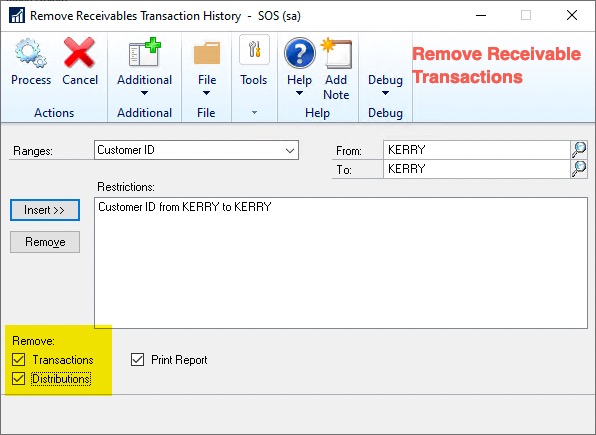
- Remove Historical Transactions (Receivable – Non SOP Sales)
- Sales >> Utilities >> Remove Transaction History
- Range = Select ONLY the Customer you want to DELETE
- Verify that ‘Transactions’ and ‘Distributions’ are selected (Bottom left corner)
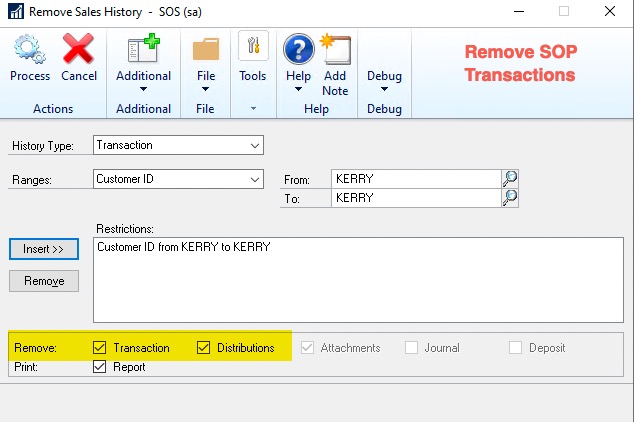
- Remove Sales History (SOP Sales)
- Sales >> Utilities >> Remove Sales History
- History Type = Transaction
- Range = Select ONLY the Customer you want to DELETE
- Remove both ‘Transaction’ and ‘Distribution’
- DELETE Customer
That is it…

-
Kerry Hataley
MemberApril 3, 2024 at 9:25 pm in reply to: GP 18.6.1695 (2023) Inventory Item Update Tool?::Hi Clay,
To add to Chris’s comments and PSTL tools. These are designed to do a single item at a time.
You can create a macro to do this but if you are talking about 10k or more items this would take a very long time.
To accomplish this you will need to develop code that can manage the process via a mapping file.
The second consideration is if you have 3rd party products. PSTl tools will NOT handle those.
Look to hire a GP data expert.
-
::
H Eddie,
So a couple of things here…
1. I am assuming you mean GP 18.6… GP2018 is a different product and is NOT the modern life cycle.
2. What version are you on?
3. You need to have a Support agreement with Microsoft to legally move to 18.6 from and older version.
4. Your partner that pays your support agreement will have access to the software.
Let me know if you need anything else
-
-
::
Good Morning Howard,
GP is smart, in that it will use the NEWEST exchange Rate that fits the date range.
(Time is also a consideration)
Example:
Transaction Date = 2024-04-03 it will use 1.37000
EXCHANGE TABLE
DATE TIME RATE EXPIRY DATE
2024-04-04 12:00.00 AM 1.38000 2024-05-01
2024-04-03 12:00.00 AM 1.37000 2024-05-01
2024-04-02 12:00.00 AM 1.36000 2024-05-01
2024-04-01 12:00.00 AM 1.35000 2024-05-01
So if you do Daily and it is NOT an automated process (Manually Entered) I suggest you at least set the expiry date 1 week, incase the person responsible is away.
I would also highly suggest you set the times always to 12:00.00 AM – this makes sure you are doing true days.
-
Kerry Hataley
MemberApril 3, 2024 at 9:32 pm in reply to: GP 18.6.1695 (2023) Inventory Item Update Tool? -
::
Good Morning Calvin…
This is a limitation of National Account, well not really – it is designed to be that way…
A child can not push credits to the parent or another child.
You need to do the following:
1a. Create a debit memo for the child (debit AR, credit Suspense)
1b. Apply the credit memo for the child to this created debit memo
2a. Create a credit memo to parent/other child (debit Suspense, credit AR)
2b. Apply the new credit memo to the parent/other child
Kerry