
Mastering D365 Field Service: Agreements, Entitlements, and NTEs



This is part 5 of UG Expert Scott LeFante’s Mastering D365 Field Service series, covering lessons learned from years of bumps and bruises. Check out the rest of the series:
- Part 1: Scheduling and Resource Optimization
- Part 2: Mobile Apps
- Part 3: Connected Field Service
- Part 4: Asset Management
Agreements, Entitlements, and NTEs: Where the Money Conversations Live
This is the part of Field Service that determines whether your invoices match what the customer expected or whether your accounts receivable team spends every Friday explaining a bill to someone who’s already annoyed. I’ve sat with folks that had to field those calls time and time again. It is not a good use of anyone’s Friday, and definitely not on a recurring basis. Get this part right and it’s invisible. Get it wrong and it’s another thing people remember about the implementation — for the wrong reason.
Agreements: Your Recurring Work Order Factory
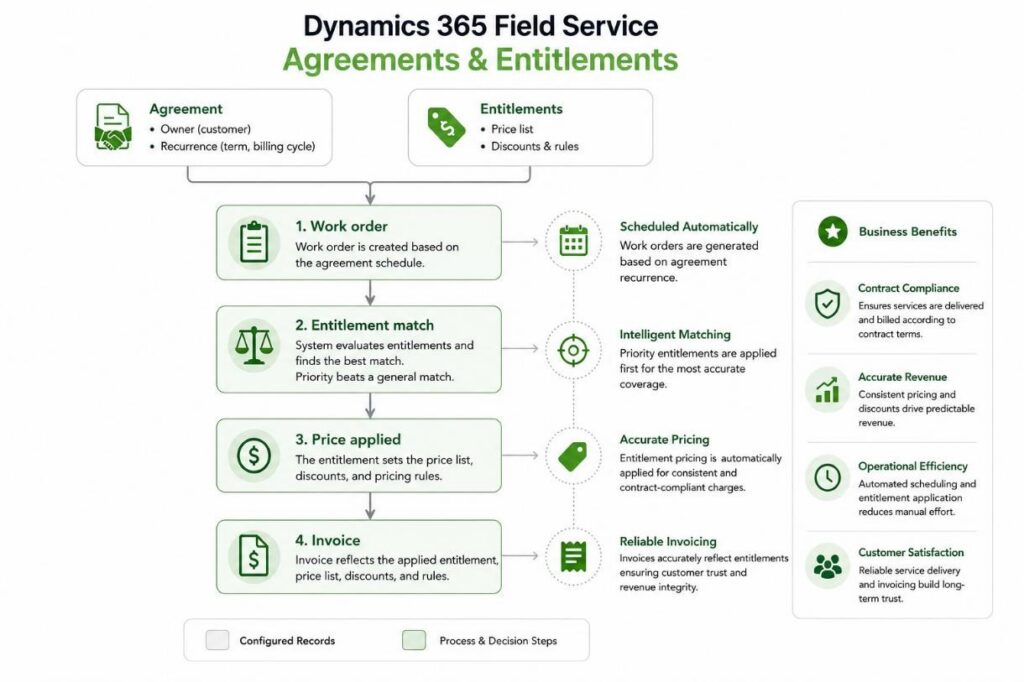
An agreement is what generates work orders on a schedule, monthly preventive maintenance being the classic example, without a dispatcher manually creating each one.
Under the General tab you set up Booking Setups, which control recurrence and which resources or territories the generated work should prefer, and you set a Record Generation Time, which decides what time of day the work orders, invoices, and related records get created. Skip that last setting and you’ll be wondering why maintenance work orders are popping into the queue at 2 AM.
The gotcha that catches almost everyone eventually, myself included in an earlier project: Agreement processes run under the permissions of whoever owns the agreement, whether that’s a system user or a team. If you set a real person as the owner and that person leaves the company, their account gets disabled, and the agreement quietly stops generating work orders. There’s no error banner or no dramatic failure, just silence until someone notices a customer hasn’t had a maintenance visit in three months.
My recommendation: Own agreements with a dedicated service account or team, never a named human, and treat that as a must have, not a nice-to-have. I treat it as a non-negotiable now specifically because I didn’t used to.
Entitlements: What the Customer is Actually Owed and What They Aren’t
Work order entitlements apply price lists or discounts to work order products and services based on attributes of the work order itself. Worth knowing up front, because I’ve had to deliver this news to a sales team once: Entitlements affect price, not cost, and they don’t support quantity or limit-based rules.
You cannot natively build the “first 10 service calls free” or “one free hour of labor” as an entitlement; it just doesn’t work that way. For those of you that know entitlements from a customer service perspective, you know you can give X number of hours, or Y number of cases included. That’s a no-no in field service. If your sales team promised that in a contract, you’ll be building it with custom logic, not out of the box configuration. Find that out before the contract gets signed rather than after, because I’ve watched it get discovered after.
Entitlements get narrowed using entitlement applications: service account, asset category, customer asset, and incident type, in various combinations. When multiple entitlements could apply to the same work order, the system checks for an explicit priority value first and only falls back to “most specific entitlement wins” as a tiebreaker when priorities are equal or blank.
Build your entitlements from general to specific, and test (I mean actually test the happy path and exception paths) which one wins in an overlap scenario rather than assuming the system will guess correctly. It will do exactly what you configured, which is not always the same thing as what you intended. That gap between configured and intended has cost me an afternoon or two.
NTEs: The Polite Warning Before the Invoice Argument
Not to exceed values cap what a customer or your own organization will accept without triggering a special approval step. There are three flavors:
- Price NTE: The maximum that the customer accepts without extra sign off
- Cost NTE: The maximum that your organization accepts internally; useful when subcontractors or vendors are involved
- Price and cost margin NTE: Both limits derived from a defined margin percentage instead of flat dollar amounts
If a margin-based NTE applies to a work order, it takes over completely and the separate price or cost NTEs are ignored for that work order; they don’t stack.
Matching also follows a strict order: Service account first, then billing account, then anything with no account mapping at all.
NTEs depend on Calculate Price and Calculate Cost being enabled in Field Service Settings. So, if warnings aren’t appearing, that’s the first thing to check right after ensuring whether the setting is even turned on in the first place. I’ve checked everything except that setting before. Not my proudest troubleshooting session.
Here’s the detail that trips people up because it feels like it should work differently: NTE is a warning, not a hard stop. A technician can absolutely blow past it and complete the work order anyway. If your organization needs a hard stop rather than a strongly worded heads up, you need an approval process layered on top because out of the box, NTE is a very polite suggestion that stressed out technicians under deadline pressure will occasionally ignore. I don’t blame them. I’d probably ignore it too on a bad day.
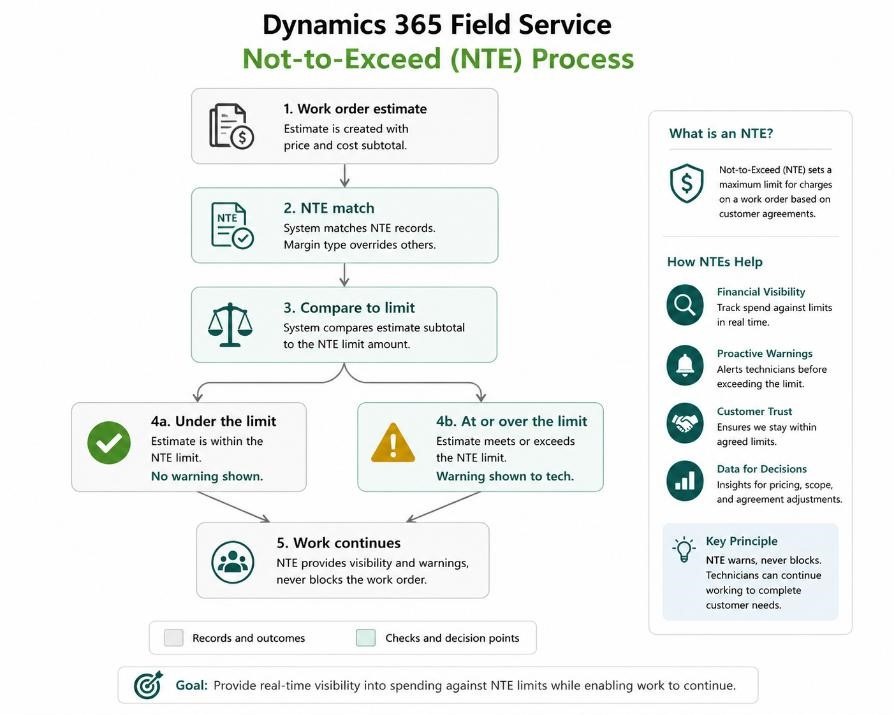
One thing worth calling out that the diagram can’t fully capture: The matching step has its own pecking order before margin type even enters the picture; service account first, then billing account, then no account mapping at all. So, a work order can fail to match on service account, fall back to billing account, and still land on a completely different NTE than the one you were expecting when you built the thing.
Time Keeping: Three Mechanisms Wearing One Trench Coat
Ask someone how Field Service tracks technician time and they’ll usually describe it as one feature. In reality, it is three working together. I didn’t fully appreciate that distinction until I had to troubleshoot why “automatic” time tracking wasn’t matching reality:
- Booking timestamps. Every time a booking status changes, the system logs it, along with which device made the change (mobile versus desktop, and whether the mobile app was online or offline at the time). This is the raw data everything else is built from.
- Time entries. Generated either automatically from those booking timestamps (set Time Entry Generation Strategy to Auto Generate from Booking Timestamps in Field Service Settings) or entered manually. Manual entry and time off requests are supported in both the mobile app and the web app.
- Booking journals and actuals. Journals calculate travel time versus working time from the timestamps. When the work order hits Closed-Posted status, the system generates actuals from the time entries, and those actuals are what drive your cost and profitability reporting. If you’re also running Project Operations, time entries align to the same underlying entity, so technicians and project consultants share one time capture system instead of two that never reconcile.
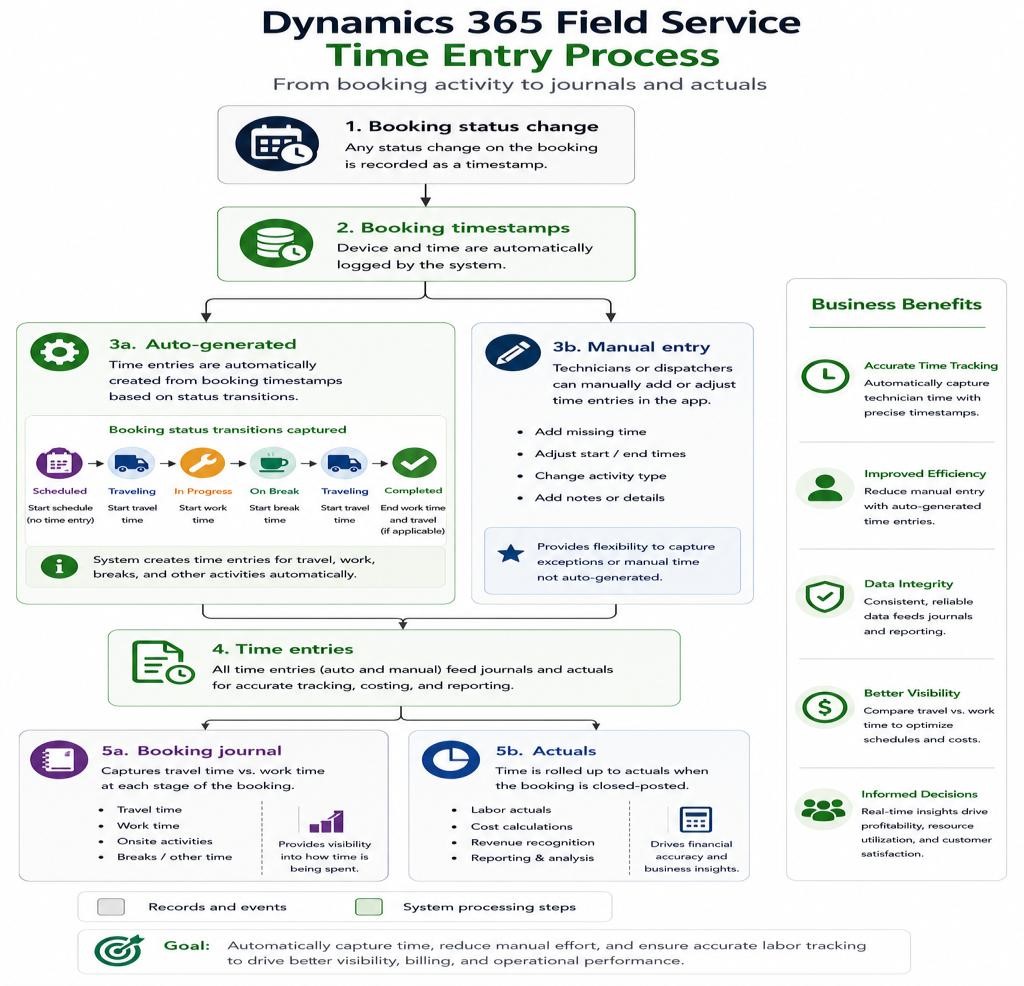
The part I’ve learned to be slightly obsessive about: Automatic time tracking is only as honest as your technicians’ booking status discipline. If a tech forgets to mark travel started, does the whole job, and updates every status at 5 PM in one batch because they were slammed, your beautifully automated time entries are now a work of historical fiction with real financial consequences.
I’ve reconciled that fiction against actual payroll before. It is not a fun afternoon. Booking status hygiene isn’t a nice to have; it’s the thing your billing accuracy is quietly resting on. Train it, monitor it, and treat a pattern of end-of-day batch updates as a coaching conversation, not a shrug.
My Final Words…At Least For Now
None of the individual pieces here are complicated…in isolation. Scheduling, mobile, IoT, asset management, agreements, entitlements, NTEs, and time keeping are each reasonably well documented and reasonably well designed by Microsoft.
What breaks implementations are the seams between them. I know that because I’ve been the one standing in a few of those seams (just being completely honest — we’ve all been there and if you say you haven’t….hmmm).
A scheduling engine that’s only as good as the asset data feeding it. A mobile app that’s only as fast as the sync profile scoping it. An IoT integration that’s only as useful as the thresholds tuning it. Money features that are only as trustworthy as the ownership and discipline behind them.
If you want a genuinely reliable Field Service environment, the unglamorous, thorough, slightly obsessive work of getting the data model and configuration right up front is not optional. It’s the whole job. The dashboards and the AI agents just make good data look impressive and bad data look expensive. I know that because I’ve watched both versions happen, sometimes in the same org, six months apart.
Go check your resource time zones. I’ll wait. I mean it this time…maybe.
