
Why Most D365 Field Service Implementations Fail



I’ve made most of these mistakes, so you don’t have to. I’ve been implementing Field Service since before it was called Field Service, and I’ve spent most of that time in the field, in design workshops, and in the recovery projects that follow when things go sideways. This is the talk I gave at Community Summit, and I wanted to put it in writing because the pattern behind it is too common to only say out loud once.
Here’s the thing nobody tells you at go-live. Implementations don’t fail at go-live. They fail slowly. Most of the Field Service environments I get called into weren’t broken on day one. They were healthy at launch, then adoption dipped a little, then a handful of workarounds crept in to cover the gaps nobody wanted to deal with, and those workarounds eventually hardened into shadow systems that nobody officially owns anymore. Eighteen months later, I’m sitting in a room with a client asking whether they need to start over.
They almost never do.
The 6 Failure Patterns
Every recovery project I’ve worked traces back to one or more of the same six patterns. If you’re running Field Service today, use this as your own honest checklist.
1. Over-customization
This is the one I see most. Someone builds a custom entity or a plugin before anyone asks whether standard configuration could have solved the same problem. There’s no documented business case behind it, no prioritization against what the business actually needs, and no process to check the old customization against what’s now available out of the box. A year later, nobody on the team can explain why half of it exists.
The fix is more discipline than technology. Ask first whether the outcome can be achieved with configuration alone, and if the answer is yes, stop there. Require a documented business case before any customization gets approved, prioritize with something like MoSCoW so you’re only building for true must-haves, and revisit your existing customizations against new out-of-box capability at every release. If configuration gets you 80% of the way there, don’t customize to chase the last 20%.
2. Broken mobile experience
You can tell this one is happening when technicians start calling dispatch to report status instead of updating the app, and paper workarounds start resurfacing in the field even though a formal rollout already happened. Usually, the root cause is simple: The app was designed and tested in a conference room, not outdoors, in gloves, with a weak signal.
Fixing it starts with subtraction. Strip the app back down to the fields that technicians need for roughly 90% of jobs and pilot it in real conditions instead of a demo environment. Bring in the technicians who care about usability and put them on the design team, and get real users into the system early and often, not just at UAT.
3. Poor data model
This shows up as duplicate or inconsistent customer and asset records, preventive maintenance schedules firing against assets that are malformed or duplicated, and entitlement or warranty logic that’s quietly misconfigured until it turns into a billing dispute. The common thread is that nobody owns data quality once the project team disbands.
The good news is this almost never requires a re-migration, just a health check. Diagnose which tables are broken and leave the sound ones alone, standardize your asset categories and naming conventions, and rebuild entitlement and warranty logic only where it’s genuinely broken. Then assign clear, ongoing data ownership so it doesn’t lapse again the moment the project ends.
4. Disconnected process
Field Service and Finance running separate invoicing logic is the classic version of this. Work orders close and then sit unbilled for weeks, nobody owns the touchpoints between systems, and integration gaps get discovered in production instead of during design, usually by an unhappy customer or an unhappy CFO.
Fixing it starts with mapping every system touchpoint across ERP, CRM, warehouse, and finance, then assigning clear data and process ownership across each connected system. Fix the highest friction handoff first. Don’t try to fix everything at once.
5. Change management gaps
Training happened once, at go-live, and never again. Technicians openly resent the system because nobody asked them what they needed before it was built. There are no internal champions advocating for the tool, and leadership treats adoption problems as a training issue instead of what they actually are, which is a design or communication problem. Worth repeating: 45% of Field Service projects fail because they focused on the technology instead of the people using it.
The fix is to keep technicians and dispatchers informed and involved well past go-live, build a real train-the-trainer model with internal champions, and let users suggest what changes next instead of just receiving updates handed down to them. Organizational change management should be funded as its own workstream, not an afterthought bolted onto the technical build.
6. No clear KPIs
Nobody can say definitively whether the implementation worked. First-time fix rate, utilization, and cycle time were never baselined; reporting exists, but nobody reviews it on a regular cadence, and success ends up measured by whether the org went live rather than by any actual outcome.
Define three to five measurable outcomes before touching anything — things like fix rate, utilization, cycle time, and CSAT — and baseline your current numbers before recovery work starts. Review a simple dashboard weekly for the first 90 days and tie each phase of recovery to a measurable checkpoint rather than just a completion date.
Where Does Your Organization Stand?
Score yourself honestly against these six principles.
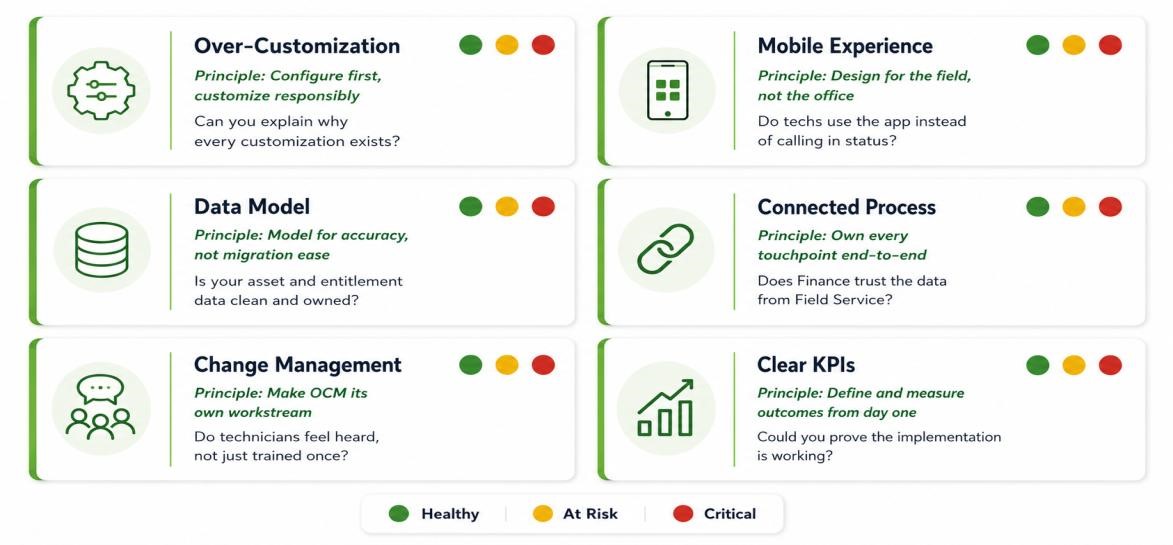
- Configure first, customize responsibly. Can you explain why every customization exists?
- Design for the field, not the office. Do your techs actually use the app instead of calling in status?
- Model for accuracy, not migration ease. Is your asset and entitlement data clean and owned?
- Own every touchpoint end to end. Does Finance actually trust the data coming from Field Service?
- Make change management its own workstream. Do technicians feel heard, rather than just trained once?
- Define and measure outcomes from day one. Could you prove the implementation is working?
If you’re landing on yellow or red for more than one of these, keep reading.
Recovery, Not Reimplementation
Here’s the part that matters most. A struggling Field Service environment almost never needs a full reimplementation. It needs a structured recovery, and that recovery tends to follow the same four phases regardless of industry.
- Stabilize. Roll back whatever is actively breaking things and re-enable the native features you already paid for and quietly stopped using.
- Simplify. Strip out the clutter, unused fields, custom complexity, dead configuration, anything that’s adding friction without adding value.
- Re-platform selectively. Rebuild only what’s genuinely broken and leave the unbroken alone. This is not a green field project.
- Retrain. Train on what changed, not everything from scratch, and measure adoption as you go instead of assuming it happened.
A Composite Example
Picture a regional HVAC and mechanical services company, 14 months past go-live. Dispatchers were keeping a shadow Excel sheet for scheduling exceptions. Techs were calling dispatch to report status instead of using the app. Duplicate asset records were causing preventive maintenance schedules to misfire, and work orders were closing but sitting unbilled for weeks because Finance and Field Service were running separate invoicing logic.
The recovery followed the same four phases. Stabilize meant rolling back two custom scheduling plugins and re-enabling Schedule Assistant with proper configuration. Simplify meant paring the mobile app from more than 40 fields down to the 12 the techs needed. Re-platforming selectively meant rebuilding only the asset data model and nothing else. Retrain meant a two-week train-the-trainer push focused only on what had changed.
Ninety days later, the shadow scheduling sheet was retired, mobile adoption was up, and invoice lag had been cut significantly. No reimplementation project required.
What You Probably Don’t Need to Rebuild
This is the part that brings clients relief every time. A sound data model with a handful of problem tables doesn’t need to be torn out. Integrations that work, even if they’re not pretty, don’t need to be redone. Entitlement logic that’s misconfigured, not properly designed, needs to be fixed, not replaced, and the institutional process knowledge your team already carries is an asset, not a liability. Recovery targets the failure, not the whole system.
What to Fix First
Quick wins, measured in weeks. Roll back the customizations that are actively breaking things. Clean up the mobile app’s fields and clutter. Fix the priority and status configuration that’s confusing dispatch. None of this is glamorous work, but it’s fast and visible to those who have been living with the pain.
Structural fixes, measured in months. Rebuild the data model for tables that are genuinely broken, not just messy. Re-architect the integrations across systems so gaps stop surfacing in production. Redesign the entitlement and warranty logic that’s been causing billing disputes.
The sequencing matters more than people think. Run the quick wins first to rebuild trust with the field and with leadership, while the structural work proceeds quietly in parallel. Nobody stays patient through a six-month rebuild if they don’t see anything improve in the first six weeks.
3 Priorities for Monday Morning
First, score your org against the patterns above, honestly. Then, pick the highest-friction issue you can fix this month and ship that one quick win. And finally, before you let anyone scope a full reimplementation, make sure you’ve actually diagnosed the real problem first.
Most Field Service environments I walk into are not lost causes; they’re implementations that decayed quietly because nobody was watching for the signs, and the fix usually costs a fraction of what a reimplementation would. It starts with an honest look at where you stand.
If any of this sounds familiar, I’d rather talk it through with you than watch another organization go down a reimplementation path they don’t need.
