
Mastering D365 Field Service: Scheduling and Resource Optimization



This is part 1 of UG Expert Scott LeFante’s Mastering D365 Field Service series, covering lessons learned from years of bumps and bruises.
I’ve been involved in many field service implementations. I’ve seen the good, the bad, and the ugly.
Heck, when I first started out, I made some bonehead mistakes. I’ve bolted on constraints I didn’t understand, synced way more data to a mobile device than any technician needs and found out the hard way that a sensor with an itchy trigger finger will generate a hundred alerts a day if you let it (that was a fun one). Nobody hands you a manual for this stuff that covers the parts that go wrong. You learn it by living through it.
This isn’t an “I implemented Field Service once, now I’m an expert” post. Mastering it takes time and effort. You take your bumps and bruises. You get some of it wrong. And eventually, you understand the craft instead of just following a setup guide.
Keep in mind, this platform is NOT stagnant; it continuously evolves. As a result, you need to evolve with it. What I’m sharing here is what years of doing this, including the parts I got wrong early on, have taught me.
This is for the people who configure/build and run these environments: admins, makers, and developers. I hope this provides some guidance. It’s not an all-inclusive manual but should give you some insights into what I’ve seen and experienced over the years.
Scheduling and Resource Optimization: Where I’ve Watched Most Implementations Quietly Die
Everything downstream of scheduling depends on scheduling being right. I learned that one early and expensively. Get this wrong and every other feature in Field Service just becomes a very expensive way to log complaints faster.
Dynamics gives you three scheduling paths. In my experience, most organizations end up leaning on all three depending on volume and how much they actually trust the machine:
- Manual, on the schedule board. A dispatcher drags bookings around by hand. This is fine for small teams or chaotic days. However, it doesn’t scale past a certain headcount without someone losing their mind, and I’ve watched that happen in real time.
- Booking Assistant. A recommendation tool for scheduling one job at a time. You filter by distance, territory, skill, whatever matters. The dispatcher still makes the call; the system just narrows the options. This is a solid middle ground when you want some automation but aren’t ready to hand over the keys yet.
- Resource Scheduling Optimization (RSO). A separately licensed add-in that schedules many jobs at once, optimizing for travel time, skill match, and territory. This is the one where I see people misconfigure the most often. Get it right, and you’ll keep your sanity. Get it wrong, and well, enjoy the pain we’ve all gone through.
RSO needs three things configured before it will do anything useful, and I’ve had to relearn each of these the hard way at least once:
1. A Scope
This defines which resources and which requirements (read: work orders, or whatever schedulable entity you’re using) get pulled into a given optimization run, plus the time window.
Scope is built from system views, so if your views are sloppy, your scope is sloppy, and the optimizer will cheerfully do the wrong thing very efficiently. I’ve seen a bad view quietly exclude half a technician pool for weeks before anyone noticed.
2. A Goal
This is where you set engine effort (Very Light through Very Intense, trading run time for thoroughness), decide whether travel time factors in historical traffic data, and pick constraints and objectives.
Constraints are binary: a resource either meets them or doesn’t, no partial credit. Objectives are the things RSO tries to optimize in priority order, like minimizing travel or maximizing utilization. You can’t invent new constraints out of thin air, but you can absolutely misuse the ones provided. I have.
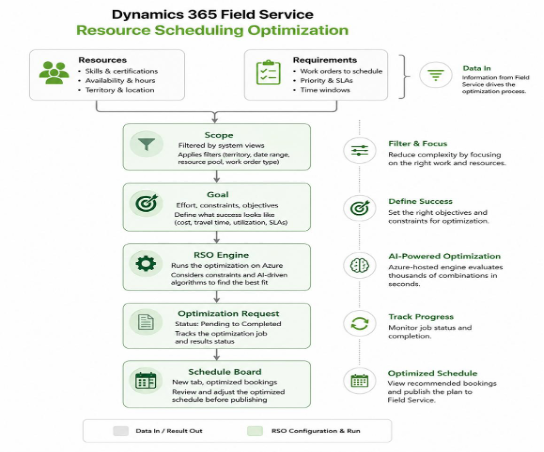
3. Resources Set Up Correctly
This sounds obvious until you’re three weeks into a project and half your technicians aren’t getting scheduled at all. Ask me how I know. Common culprits:
- The bookable resource’s Optimize Schedule flag isn’t set to Yes on the Resource Scheduling Optimization tab
- Time zone on the resource record is wrong or blank, which quietly breaks working hours calculations
- A resource is marked location agnostic, but the related requirement isn’t, so RSO treats them as a remote worker with nothing to travel to
- Skills and characteristics aren’t populated, so filtering and matching has nothing to bite into
The lesson that took me longer than it should have: Start every RSO rollout with the lightest engine effort and the fewest constraints you can get away with, get a working run, and then add complexity one piece at a time. Bolting on every constraint on day one and then trying to debug why nothing schedules is a special kind of self-inflicted suffering. I’ve put in that suffering, so you don’t have to.
The New Player: The Scheduling Operations Agent
The 2026 release wave brought a more autonomous scheduling layer, the Scheduling Operations Agent (SOA), which leans further into AI-driven matching. This is where RSO runs on a schedule you trigger and optimizes against a defined goal, SOA is built to factor in live signals, technician skill, asset priority, and IoT alert severity, to make scheduling decisions with less manual dispatcher intervention. Think of it as RSO’s more opinionated younger sibling.
I’ll be honest, I’m still forming my full opinion on it, because that’s how this industry works. Something new shows up, it looks great in a demo, and the real verdict only comes after you’ve watched it run for a few months in production. If you’re evaluating it, treat it the way I’d treat any agentic system making decisions with real operational consequences: Pilot it on a subset of territories first, keep a human in the loop on exceptions, and don’t assume day one behavior matches day ninety behavior. I’ve been burned by assuming a system’s early behavior was its permanent behavior. Don’t repeat that one.
