
Mastering Dynamics 365 Project Operations Part 1: Sales, Planning, Resourcing, and Time



Ask ten project managers where the real plan for their project lives, and at least six of them will point you toward a spreadsheet, not toward Dynamics. That’s the entire problem Project Operations exists to fix, and it’s also the tell that most implementations haven’t fixed it yet.
It’s a different application than the Field Service series, but the same underlying platform and, honestly, some of the same bruises. If you’ve been through that series with me, a few things here are going to feel oddly familiar, and that’s not a coincidence. I’ll point it out when it happens, because understanding where these two applications share plumbing under the hood will save you real confusion later.
Project Operations exists to solve a specific and genuinely painful problem: Sales, resourcing, delivery, and finance usually run as four separate conversations held together with spreadsheets, email threads, and someone’s personal system of remembering who’s free next month. I’ve sat in enough status meetings built entirely on stale spreadsheet exports to know exactly how that story ends.
Project Operations is Microsoft’s attempt to make those four conversations into one system of record instead of four competing ones. Like everything else I’ve written about in this kind of platform, it mostly succeeds when the people configuring it understand what’s happening underneath and mostly disappoints when they don’t.
Before Any of This: Which Deployment Are You On?
This must come before the modules, not buried inside one of them, because it changes what’s even true for the rest of this article, and for the rest of this series.
Project Operations doesn’t ship as one single product; it comes in three deployment types:
- Lite, also called Core: Runs entirely inside Dataverse, no separate ERP back end. Sales, planning, resourcing, and basic time and expense all live here, but project accounting stays lightweight. There’s no separate legal entity layer, no deep revenue recognition, and no general ledger underneath it.
- Resource/Non-Stocked, integrated with Dynamics 365 Finance: Built for services businesses that don’t carry physical inventory, consulting, IT services, construction-adjacent practices. This is where concepts like contracting units and owning companies exist, because this deployment connects into the Project management and accounting module inside Finance.
- Stocked/Production, integrated with Finance plus Supply Chain Management: For organizations that manufacture or need real inventory and production tracking running alongside project delivery.
Here’s the part that should get your attention: Switching deployment types after you’ve already implemented one isn’t a configuration change; it’s closer to a full re-implementation, data migration included. Microsoft doesn’t provide a supported upgrade path between them. So, if you’re reading this and you genuinely don’t know which deployment your organization is running, or worse, nobody’s deliberately chosen yet that’s the real first task here, before anything else in this article.
Deal Management: From Opportunity to a Contract That Means Something
Every project in this system technically starts life as a sale, and the sales side of Project Operations has more going on under the hood than it looks like from a glance at the quote form.
Project quotes are not sales quotes wearing a different hat
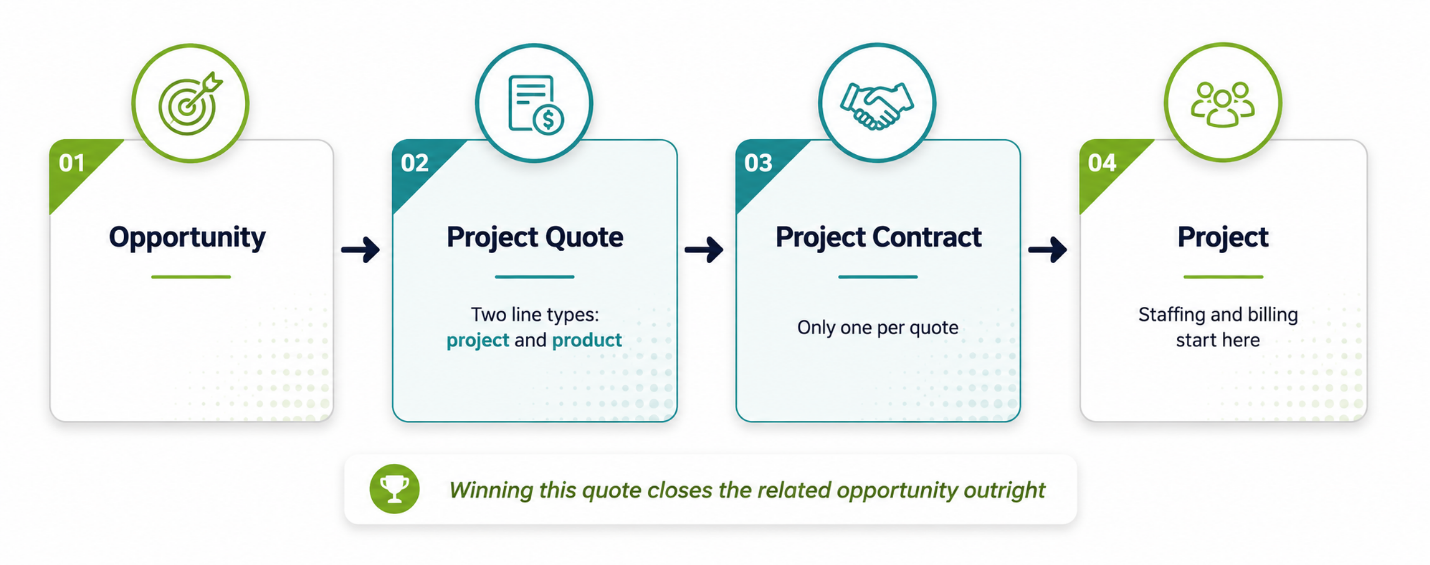
Project Operations quotes are technically built on top of Dynamics 365 Sales quotes, and I’ve watched people assume that means they behave the same way. They don’t. A project quote carries two distinct types of lines, one for the actual project work and one for products, which a standard sales quote doesn’t need to distinguish. More importantly, a sales quote can have multiple orders attached to it, while a project quote can only ever have one project contract attached.
And here’s the behavioral difference that catches people off guard during their first go-live: Winning a regular sales quote can leave the related opportunity open, but winning a project quote closes the related opportunity outright. If your sales team is used to the old rules and suddenly finds opportunities closing out from under them the moment a project quote is won, that’s not a bug; that’s just project quotes playing by a different rulebook than the one they’re used to.
Contracting units, owning companies, and other things worth understanding before you configure them
This is the deployment-specific content I flagged at the start. If you’re on Lite or Core, contracting units and owning companies don’t exist in your environment, skip straight to the next subsection. If you’re on either ERP-integrated deployment, this is where those two concepts, which get conflated constantly, matter. I want to pull them apart cleanly because getting this wrong early causes real financial reporting pain later.
The owning company is the legal entity that accounts for the cost and revenue on a deal, pulled from the Project management and accounting side of Finance and Operations. The contracting unit is the division or practice that owns delivering the project, which is a completely different question than which legal entity the money runs through. You can set resource costs per contracting unit.
Here’s where it gets genuinely interesting: If one contracting unit borrows a resource from another division or practice, which borrowing has its own cost rates, sometimes called transfer prices, resource borrowing rates, or exchange prices depending on who you ask, and those rates can be set up in the lending division’s own currency. This is real multinational, multi-practice cost accounting, living quietly inside what looks like a simple staffing decision.
Project price lists, and the zero-dollar mistake waiting to happen
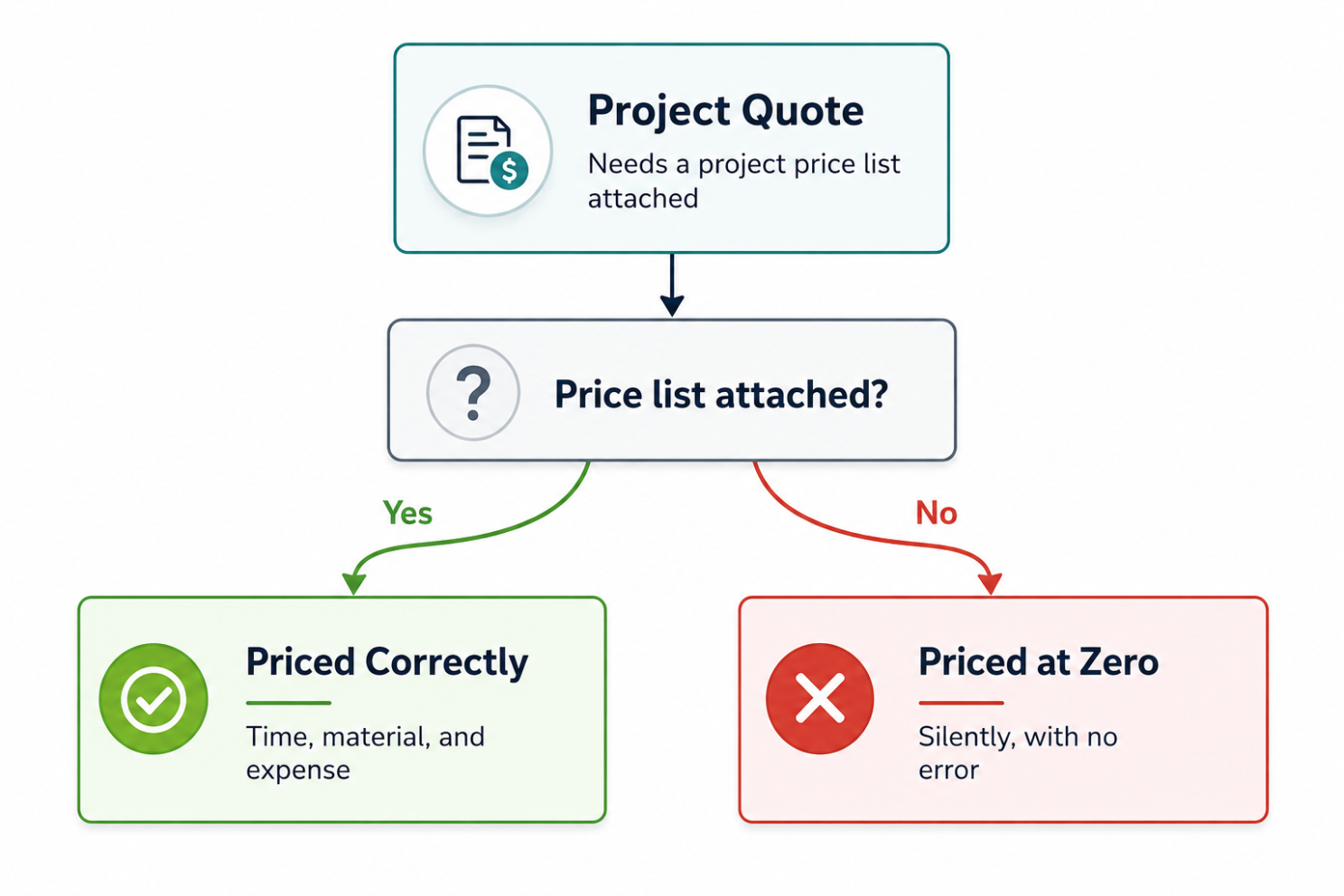
Here’s a gotcha that I’d bet money shows up in every Project Operations implementation at least once: Project quotes rely on their own dedicated entity called project price lists, separate from the price lists you might already know from other parts of Dynamics. These price lists name the price time, material, and expense transactions, both estimated and actual, for any project tied to that quote. Skip attaching one, and the system doesn’t error out dramatically; it just quietly prices everything at zero. I’ve seen a project run for weeks with real hours logged against it before someone in finance asked why the revenue report showed nothing but goose eggs. The system genuinely warned about it on the quote. Nobody read the warning. Read the warning.
Quoting is getting genuinely smarter, but check the release status before you build a process around it
There are two recent additions worth knowing about, and worth being honest about where they stand right now rather than treating them as settled functionality.
Time-phased estimates would let sales and cost prices on quote and contract lines update automatically based on effective dates, instead of someone manually tracking price changes over a long engagement. As of this writing, though, that capability is still working toward general availability, with Microsoft’s own stated target landing at the end of September 2026. If you’re reading this before then, don’t build your quoting process around it existing yet, check the current release status first.
What-if Analysis is further along in the sense that it shipped, but it shipped labeled Preview, not general availability. It gives you a real simulation workspace inside a project quote, letting you adjust staffing, quantities, and pricing across multiple scenarios, compare the financial outcomes side by side, and apply the winning scenario back to the draft without starting a new revision. It’s genuinely useful once it’s stable. It’s worth piloting in a non-production environment first, which is Microsoft’s own recommendation for it, not just my usual caution talking.
If your sales team is still manually copying a quote three times in a spreadsheet to compare staffing scenarios, this is where that manual effort eventually goes away, just not with the same confidence you’d apply to a fully GA feature yet.
Project Planning: Where Microsoft Project Quietly Lives Inside This Whole Thing
Once a deal is won and a project exists, planning happens through Microsoft Project for the web capabilities built directly into Project Operations. If you or your project managers have ever used Microsoft Project in any of its previous lives, the muscle memory mostly transfers work breakdown structures, Gantt views, task dependencies, milestones.
What’s worth paying attention to here isn’t the individual features, which are genuinely familiar to anyone who’s planned a project before. It’s the fact that this plan isn’t sitting in a separate tool disconnected from everything else in the system. The tasks you define here are what eventually get resourced, staffed, tracked for actuals, and billed against, all inside the same data model.
A task that exists only in someone’s separately maintained project plan document is a task the rest of this platform has no idea exists. That disconnect is exactly the kind of silo Project Operations was built to eliminate in the first place.
If your project managers are still planning in a standalone file and only occasionally synchronizing it back into the system, you haven’t adopted Project Operations; you’ve adopted an expensive place to store a copy of a plan you’re managing somewhere else.
Resource Management: Aligning the Right Person to the Right Project Without Losing Your Mind
This is the module where I’ve watched the most genuine organizational anxiety play out, because resourcing decisions touch real people’s schedules and real project margins at the same time. Getting it wrong is expensive in both directions.
Generic resources, roles, and the placeholder that keeps planning honest
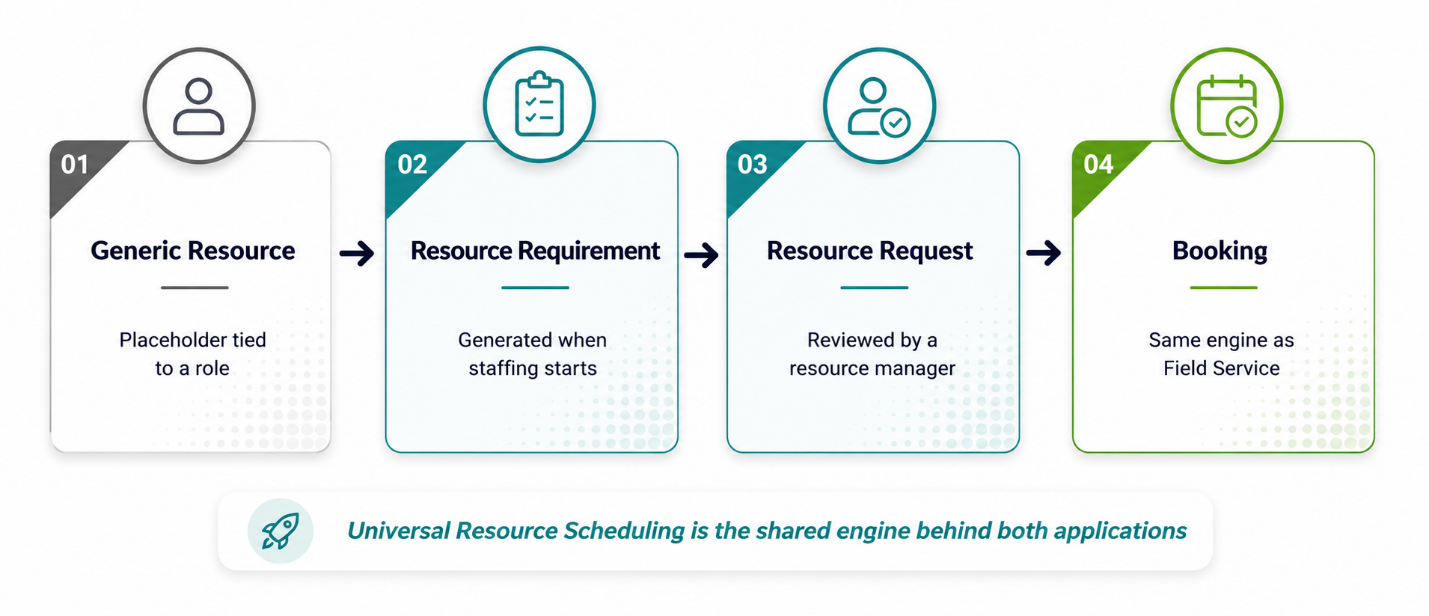
Early in a project’s life, you often don’t know which specific human is going to do the work; you just know you need “a senior developer” or “a project manager with healthcare experience.” Project Operations manages this through resource roles, each carrying its own set of required skills and proficiency levels, and generic resources that function as placeholders on the project team until someone staffs a real person against them.
The project manager automatically gets added to the team the moment they create the project. This is a small, nice touch. Every other seat starts life as a generic placeholder tied to a role rather than a name.
Once you’re ready to staff a generic resource, you generate a resource requirement from it. That requirement is what flows into the actual resourcing process, resource requests that resource managers can see, evaluate, and match against real people.
The schedule board you might already recognize
Here’s the moment I promised earlier. If you’ve spent any time in the Field Service side of this platform, the mechanism that ooks a resource against a project requirement runs through the same underlying scheduling and booking concepts as Field Service does. It’s not a coincidence and it’s not a superficial UI similarity; they’re genuinely built on shared plumbing. That means some of what you already learned about how bookings, availability, and resource records behave in Field Service carries over here. It also means some of the same categories of mistakes carry over too.
Getting a resource’s working hours or time zone wrong breaks scheduling accuracy in Project Operations for the same underlying reason it breaks Resource Scheduling Optimization in Field Service. Same engine, different front door.
The resource manager’s actual dashboard
Resource managers get a dashboard built around a few genuinely useful views: active resource requests aggregated by role or by project, unassigned resource demand showing requirements that haven’t even been formally submitted as requests yet, and utilization by role comparing actual billable utilization against target.
That unassigned demand view deserves more attention than it usually gets because it’s your early warning system. A pile of unsubmitted requirements sitting quietly in that view is future understaffing that hasn’t announced itself loudly yet. By the time it does announce itself, it’s usually as a project manager escalating about a resourcing gap two weeks before they needed someone to start.
Time and Expense: Where the Actual Work Becomes an Actual Number
Everything upstream of this: the quote, the plan, the staffing, is a forecast. Time and expense entries are where forecasts turn into fact and where the project’s real financial performance starts getting written down.
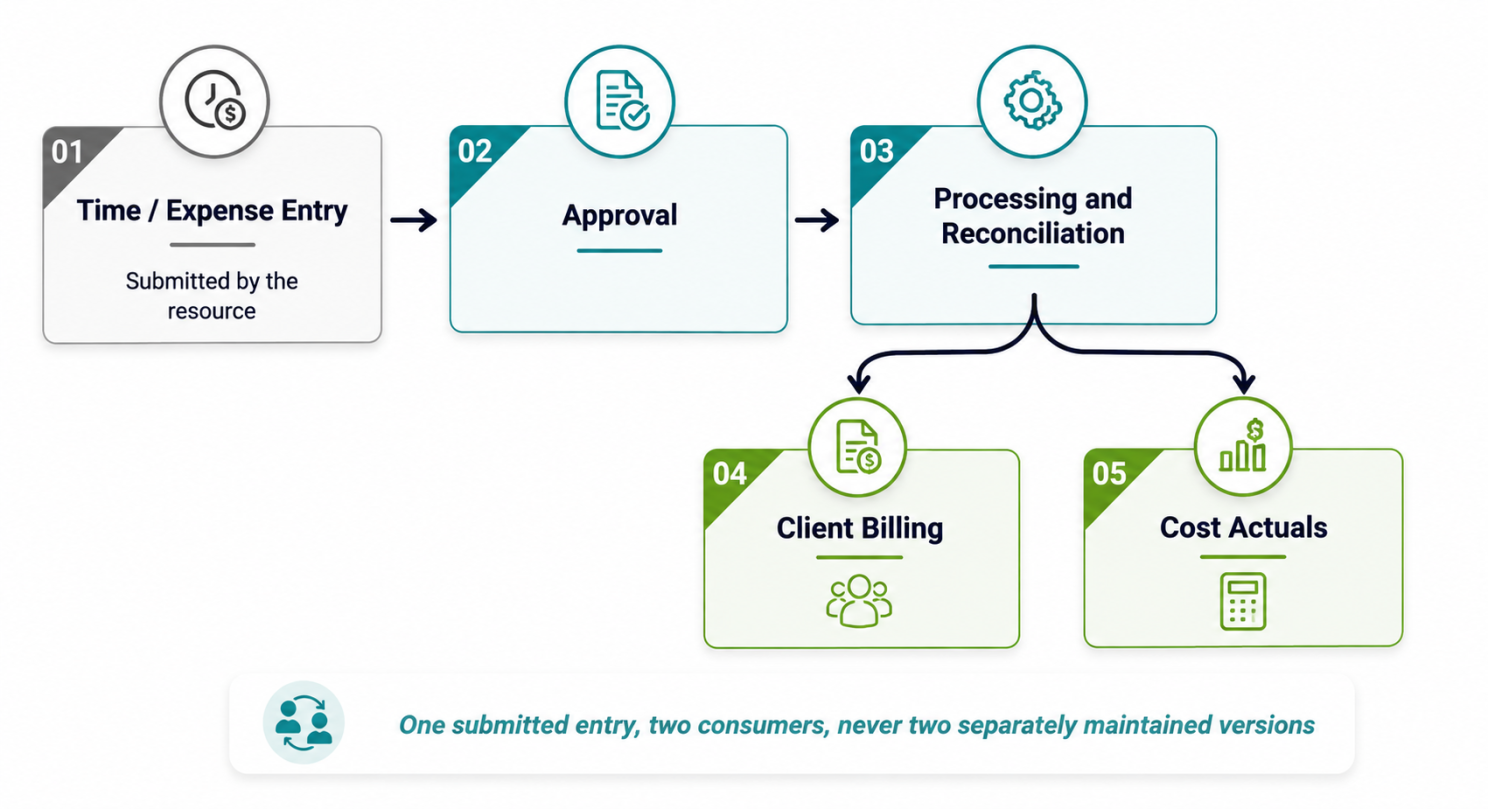
Consultants and project resources submit time and expense reports that flow through approval, processing, and eventual reconciliation, feeding both client billing and internal cost tracking from the same set of entries rather than two separately maintained versions of the truth.
If this table sounds structurally similar to the time entry mechanism I walked through in the Field Service series, that’s because it largely is. This platform really does try to reuse the same underlying time capture concept across its different applications rather than reinventing it per app, which I genuinely respect even when it occasionally means a setting in one app has consequences you didn’t expect in another.
It’s worth knowing going into this that Microsoft has been pushing real Copilot agent capability, specifically at this part of the platform, aimed at expenses, time entry, and approvals, trying to take the tedious data entry and first-pass review off a human’s plate.
I’ll give this the same honest treatment I gave the scheduling and service agents in the Field Service series. It’s genuinely promising for the parts of time and expense that are pure administrative friction, categorizing an expense, flagging a missing receipt, nudging someone who hasn’t submitted their timesheet. It is not a replacement for someone reviewing whether the hours logged against a fixed-price project make any sense against the work delivered.
Let the agent manage the paperwork. Keep a human owning the judgment calls, at least until you’ve watched it operate long enough to trust it with more.
Closing Thoughts, For Now
Four modules in and the pattern should already be familiar if you’ve read the rest of what I’ve written about this platform. None of these pieces are individually complicated. A quote, a plan, a staffed resource, a submitted timesheet — each one is a simple thing on its own.
What makes Project Operations either genuinely powerful or genuinely frustrating is whether those four pieces are configured to talk to each other honestly, project price lists attached, generic resources converted to real staffing instead of left as permanent placeholders, plans maintained in the system instead of off in someone’s personal file.
Financials, budgeting, and revenue recognition are still ahead of us. Honestly, that’s the part of this platform with the most opportunities for expensive mistakes. So, it’s getting its own proper treatment rather than a rushed paragraph at the end of this one. For now, get the front half of the lifecycle right. Everything downstream of a bad quote or a badly staffed project just inherits that mistake with better-looking reports attached to it.
