
Dynamics 365 Publishers and Prefixes



In the last article in this ALM series, we looked at solution management best practices: using separate environments, packaging changes in solutions, keeping those solutions focused, naming components consistently, and having users test changes.
There’s another simple practice that can make a big difference as your Dynamics 365 environment grows: using a custom publisher and prefix.
Publishers help identify where custom components came from. That may not seem especially important when your environment is small, but over time, it becomes incredibly useful for understanding who created what.
What Is a Publisher?
When you create a new solution in Dynamics 365, that solution is associated with a publisher. One of the most visible parts of the publisher is its prefix. That prefix becomes part of the internal name for custom components created under that publisher.
For example, a custom column might look something like: ren_catsordogs.
The ren_ portion is the publisher prefix. That small bit of text can tell you something important about where the component came from.
Why Prefixes Matter
In a Dynamics 365 environment, changes may have been made by:
- Your internal team
- A consulting partner
- An ISV
- Microsoft
- Previous administrators or vendors
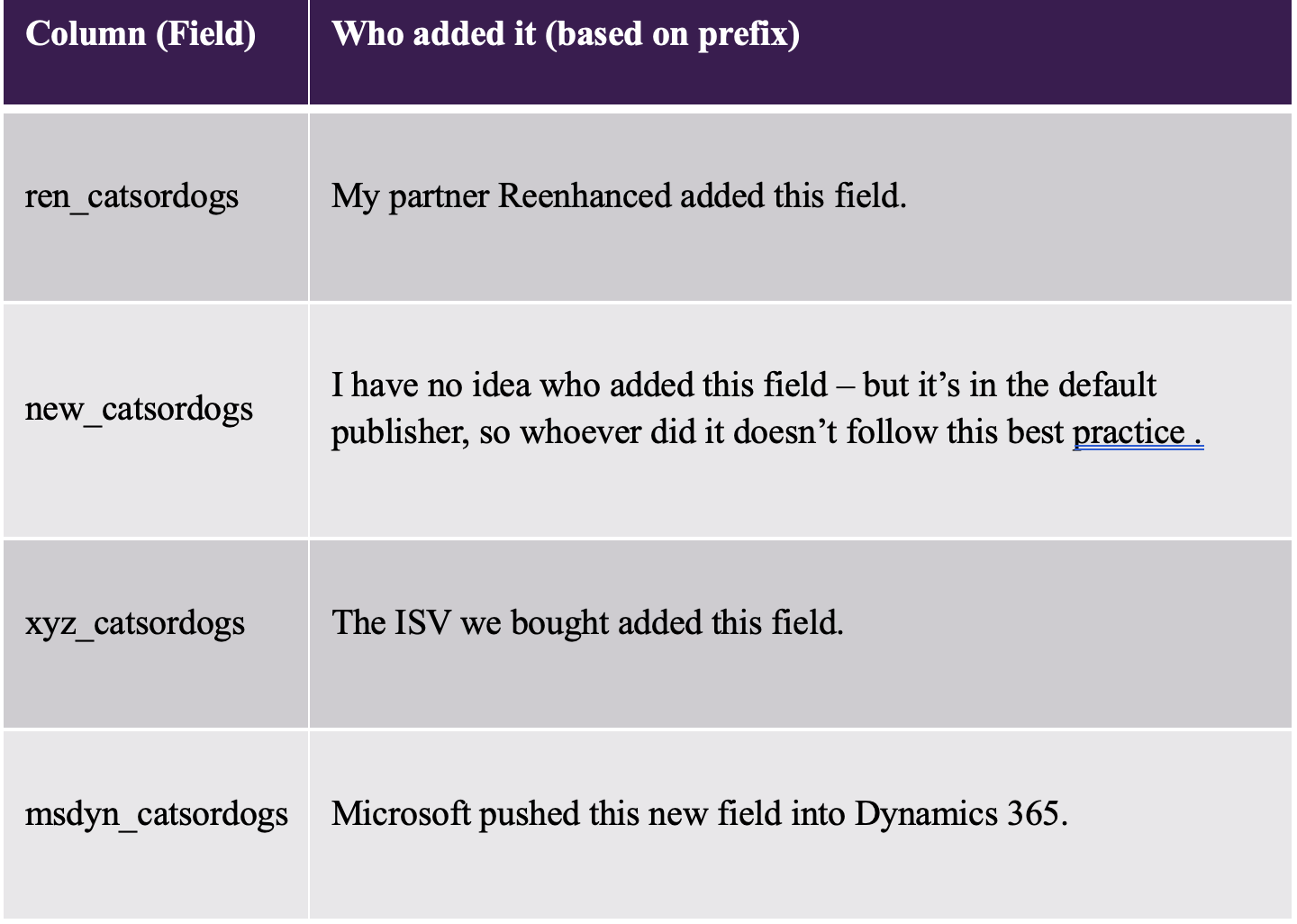
Without some kind of standard, it can become difficult to determine where a custom component originated. A publisher prefix gives you a clue. Here’s how this could work in a live environment:
Publishers Give You Traceability
As you can see in the table above, the real value of publishers is traceability. As your Dynamics 365 environment grows, you need ways to understand its history by simply looking at a component’s schema name.
If you find a custom field, table, or other component, the prefix can immediately help answer Where did this come from?
That can be useful when:
- Troubleshooting an issue
- Reviewing old customizations
- Working with multiple implementation partners
- Investigating whether a component is custom or Microsoft-delivered
- Taking over administration of an existing environment
A consistent publisher strategy makes the system easier to understand.
Set Up a Publisher for Your Changes
If you don’t already have one, the most important best practice in solution management is to set up a custom publisher for your organization. Once it’s set up, use it consistently on any new components you add to your environment.
When you create a solution, select that publisher rather than relying on the default one. That gives the components created under your solutions a recognizable prefix and helps establish ownership and consistency across the environment. It is a small amount of setup that can save a lot of confusion later.
Lasting Impact
Publishers and prefixes are easy to overlook because they do not directly change how users interact with Dynamics 365. But ALM is not only about what users see; it’s also about making changes easier to manage, understand, and maintain over time.
A custom publisher gives your changes an identity, which makes it easier to distinguish your customizations from components created by Microsoft, an ISV, another partner or someone using the default publisher.
As your environment becomes more complex, that traceability becomes increasingly valuable.
In the next article in this ALM series, we’ll move from organizing our solutions to checking and moving them between environments, including Solution Checker, exporting from Sandbox, and importing into Production.
