
Copilot for Sales: The Key Features You Need to Know



Copilot for Sales is Microsoft’s AI-powered assistant designed to supercharge Dynamics 365 Sales. Unlike Copilot in Sales, which is built into the Dynamics 365 app itself, Copilot for Sales extends its power into Outlook and Teams so salespeople can work where they already spend their time.
Copilot in Sales vs. Copilot for Sales
Feature / Focus | Copilot in Sales (Built-in) | Copilot for Sales (Extended) |
|
Where it Lives |
Inside the Dynamics 365 Sales app |
Outlook, Microsoft Teams, and Dynamics 365 Sales |
|
Primary Purpose |
AI assistance directly within CRM workflows |
Bringing AI to salespeople’s existing tools for seamless workflow |
|
Data Entry |
Enhances data capture within Dynamics 365 Sales |
Automatically syncs emails, meetings, and calls into Dynamics 365 |
|
Collaboration |
Limited to Dynamics context |
Real-time collaboration in Teams, deal rooms, and integrated insights |
|
Email and Meeting Prep |
Basic assistance inside the CRM |
Full prep, drafting, and action tracking across Outlook and Teams |
|
Licensing |
Included with Dynamics 365 Sales license |
Separate add-on license |
Core Features
Let’s dive into the core features that come with Copilot for Sales:
Automate CRM Functions & Deep AI Features
Copilot for Sales doesn’t just help you keep up; it takes over the heavy lifting. It’s your behind-the-scenes assistant that creates new CRM records in a snap and wipes out the boring manual stuff you used to do by hand:
- Tracking emails
- Logging phone calls
- Tracking meetings
And the best part? You can still do all your usual CRM tasks without bouncing between screens. Quickly spot your hottest leads, keep tabs on opportunities, and see pipeline updates without breaking your flow.
Let’s dive into some of the big AI features that I am excited about:
- Suggested Actions
- Opportunity Updates
- Insights from Partner Applications
Suggested Actions
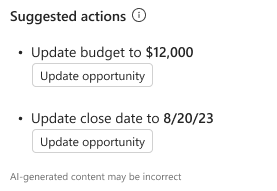
Tired of copying and pasting email details into Dynamics? Copilot for Sales takes that off your plate. As you work through your inbox, it uses AI to surface smart suggestions (like updating estimated revenue or close dates) right inside the Suggested Actions card. One click updates your CRM, and you’re done. No more manual entry, no more missed details.
Opportunity Updates (Preview)
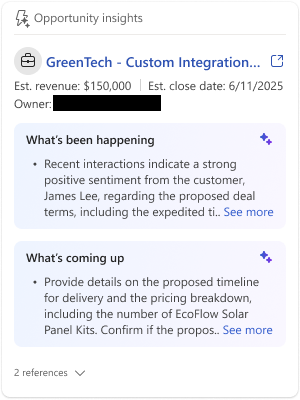
Opportunity Insights is my cheat sheet for every deal (but please note that it is still in preview). Even if I missed the meeting, it shows me actions, risks, and meeting info tied to an opportunity right inside Outlook. Even meetings you didn’t attend show up, as long as Outlook or the meeting content links them to the opportunity.
You’ll see this card only when the email is connected to that opportunity. And if you want more detail, there’s a “See all risks and insights” view. Just make sure meeting insights are turned on, and that your meeting is saved (or tied via content or contacts) to the opportunity.
Insights from Partner Applications (Preview)
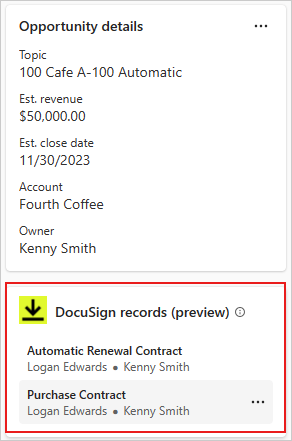
This update is where we can start to get even more information beyond the scope of Microsoft 365 and CRM! You want partner systems (like DocuSign) feeding info straight into your opportunity records, right? Copilot for Sales can now do that (though it is still in preview). It shows you related docs and latest activities from those partner apps inside Outlook & the Copilot pane, so you get even more visibility without bouncing between tools.
Here’s the quick setup so you can see it in action:
- Admins must enable the preview and set up the Power Platform connector.
- Once connected, a card appears in Copilot asking you to sign in to the partner app.
- After that, you’ll see related records (like contracts from DocuSign) tied to an opportunity or account.
- You also get latest activities from the partner app with links or citations so you can drill in.
- The data is displayed as-is from the partner app (copied over via the connector), Copilot doesn’t edit or filter it.
Will this scope include ALL 1,400+ Power Automate connectors eventually? We shall see, and I certainly hope so!
Email and Meeting Prep
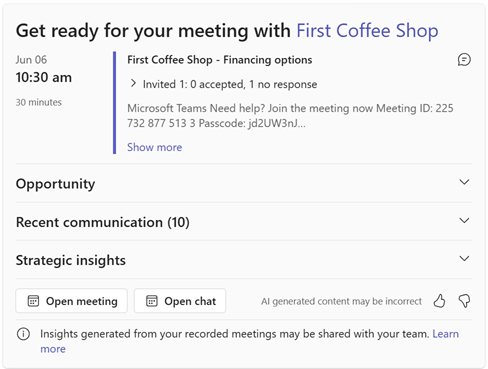
Copilot becomes your meeting wingman. It summarizes emails and meetings, flags action items, and even suggests responses so you show up prepped every time. Before a scheduled meeting, Teams notifies you that you have a meeting coming up, and it will surface all information it can find to help provide context so you can prepare.
Deep Outlook Integration
Right in Outlook, Copilot nudges you with next best actions so you can follow up at the perfect time and keep deals moving.
AI Summaries
No time to read a monster thread? Hit the Copilot summary and instantly get the highlights plus key company and CRM info. Moreover, in the Copilot for Sales side panel, you can see key information about the company, CRM data and more.
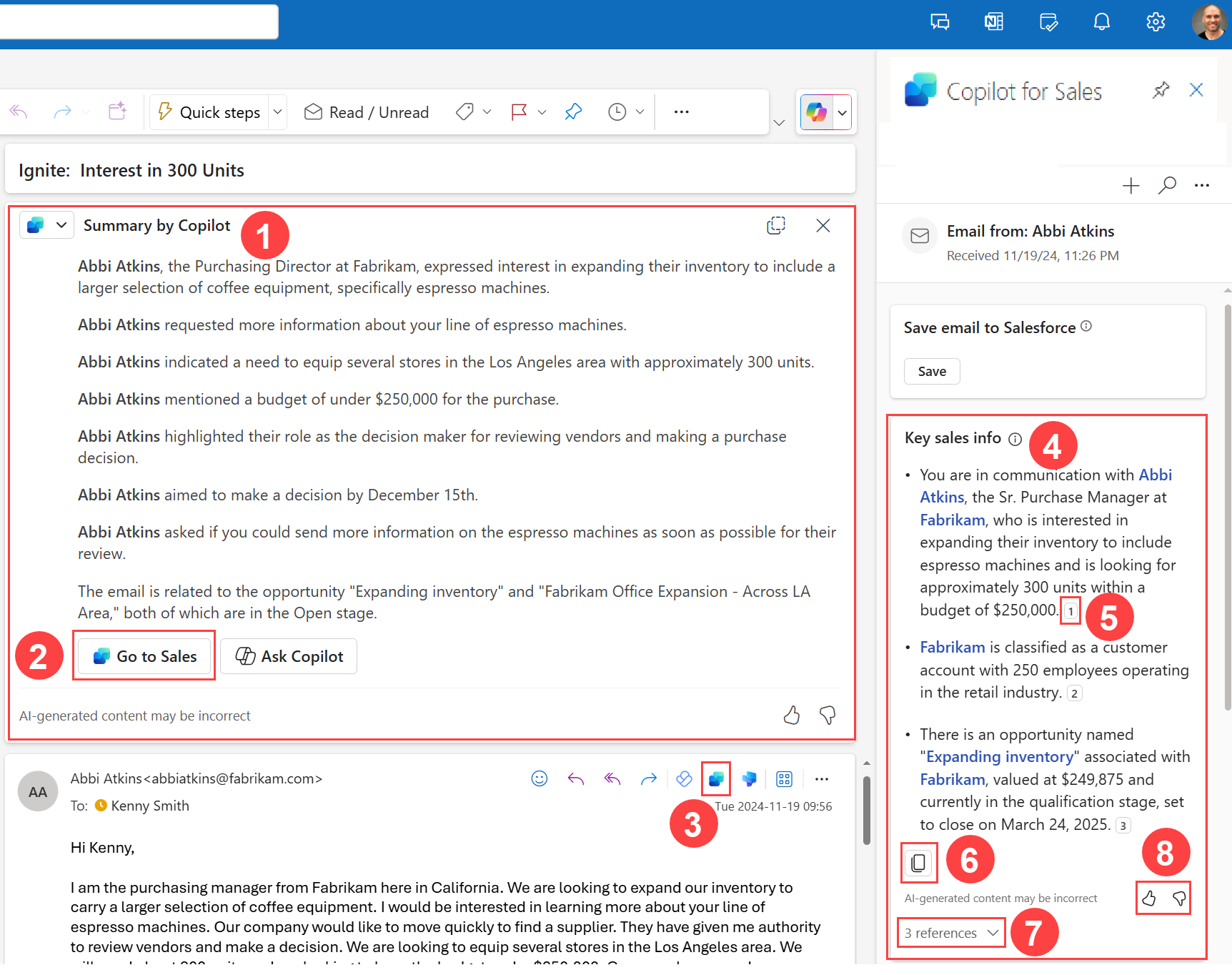
Draft email with Copilot
Need to write an email fast? Copilot drafts it for you using CRM data then you tweak and send. It becomes simple to quickly create and refine emails, proposals, and other customer-facing content.

Deep Teams Integration
Collaborate with your team directly in Microsoft Teams. Copilot provides real-time meeting insights, organizes deal-room channels, and tracks action items so your team stays aligned.
View Meeting Summaries
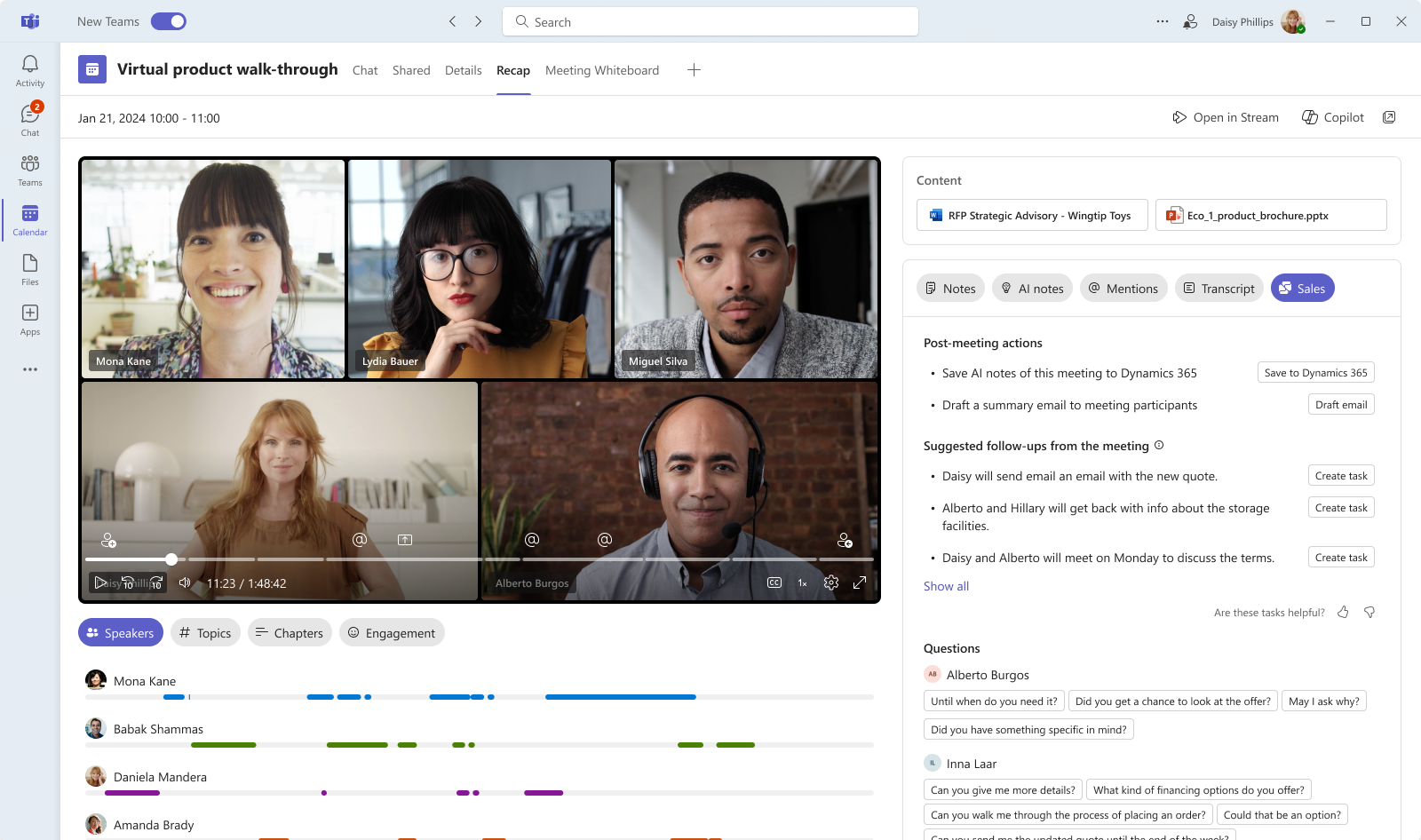
This is my favorite feature in Copilot for Sales, and my most used one. It shows a summary, post-meeting actions, suggested follow-ups, mentions, keywords, a list of questions, sentiment analysis, a full transcript and more. In a word, it is amazing.
Get Started
Copilot for Sales can help your team work smarter, not harder. Give Copilot for Sales a spin and tell me your favorite feature; I’m betting you’ll never go back to manual updates!
