
Back to Basics: Business Process Flows for Dynamics 365 Customer Engagement



Business process flows help teams standardize how records move through a process, such as qualifying leads, managing opportunities, or resolving cases. Love them or hate them, your Dynamics 365 Customer Engagement solution will include several business process flows out of the box.
Business process flows are designed to help guide your users through a process. There are defined stages (for example: Qualify, Develop, Propose, and Close in the Sales App). Inside each stage are a number of steps for users to complete. Users can advance through stages, and required steps can be used to prevent advancement until key data is entered. These stages can create powerful visualizations in dashboards.
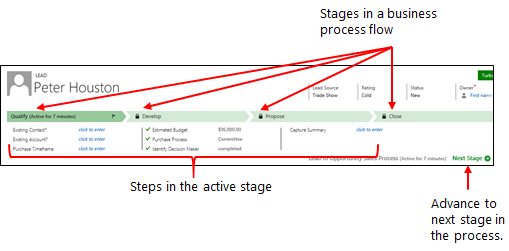
Business Process Flows in Customer Engagement
Here are the processes you will inherit as soon as you spin up your Customer Engagement environment:
- Lead to Opportunity Sales Process
- Opportunity Sales Process
- Phone Call to Case Process
Will any of these processes be production-ready for your organization? NO! But they are a great starting point. You should absolutely configure these stages and steps to match your current processes.
What if I don’t have a defined process?
First of all, you aren’t alone! This is an excellent opportunity for your organization to define a process to help ensure standardization and help with new employee onboarding!
The Rules
There are a few rules around using Business Process Flows. Let’s look at four known limitations:
- A table can have a maximum of 10 active business process flows.
- A process can contain a maximum of 30 stages. (Though, if you have this many stages, we should talk about better ways to automate/organize this!)
- A stage can contain a maximum of 30 steps.
- A business process flow can contain a maximum of five different tables.
New Business Process Flows
After you have created a new business process flow, it is very important to navigate to the security role for your users. By default, only users with the System Administrator or System Customizer security role can access a new business process flow. Be sure to update security roles before rolling it out to users. Make sure to assign appropriate privileges on the business process flow:
- Create: Allows creating an instance of the business process flow, which is done at the same time as creating a new record
- Read: Allows viewing the business process flow on a created record
- Write: Allows updating the business process flow (for example, changing state and navigation)
- Delete: Allows deleting an instance such as when a record is deleted
- Append: Allows cross-table navigation from a table (for example, the Lead table in the Lead to Opportunity Sales Process business process flow)
- Append To: Allows cross-table navigation to a table (for example, the Opportunity table in the Lead to Opportunity Sales Process business process flow)
Best Practices
As you begin using business process flows in your organization, remember that they work best when they reflect how your team actually operates, not how the system is configured out of the box.
Here are five quick takeaways as you begin to consider how to best use business process flows in your organization:
- Keep stages few and meaningful.
- Make only truly necessary steps required.
- Validate the process with actual users.
- Review and refine the flow after users have worked with it in real scenarios.
- Test security roles before rollout.
Business process flows should make work clearer, not heavier. If a flow adds unnecessary clicks, forces users through irrelevant stages, has too many required fields, or does not reflect the real process, users will work around it. Start simple. Validate with the people doing the work and refine the flow as the process matures.
