
Profile Questionnaires: The Secret Behind Successful Marketing



Previously, I have often discussed using Campaigns to set prices and using Segments to provide your sales staff with a more targeted list on which to focus their efforts. The Contacts you select for your target list are based on attributes that you or Business Central (BC) has assigned. But where do these attributes come from?
Business Central users can take advantage of the Profile Questionnaire to define marketing priorities and get more from Contacts in BC.
Profile Questionnaires
The Profile Questionnaire gives you the ability to identify the information you want to collect for each of your contacts, enabling you to pinpoint your marketing efforts.
This is a robust Business Central feature that provides a significant leg up for your sales team! Of course, with any sales or marketing effort, the more selective you are with your target list, the more likely your message will reach those contacts who are interested in hearing your message. And thus, it leads to — you guessed it — more favorable interactions.
Consider this: You are marketing a new fuel additive specifically designed to make vehicles running on unleaded gasoline more fuel-efficient. You sure don’t want to waste time contacting companies that only focus on diesel- or electric-powered vehicles. Your sales staff would be frustrated by the lack of positive responses from their efforts. The companies you needlessly email would be annoyed and may even report your emails as spam.
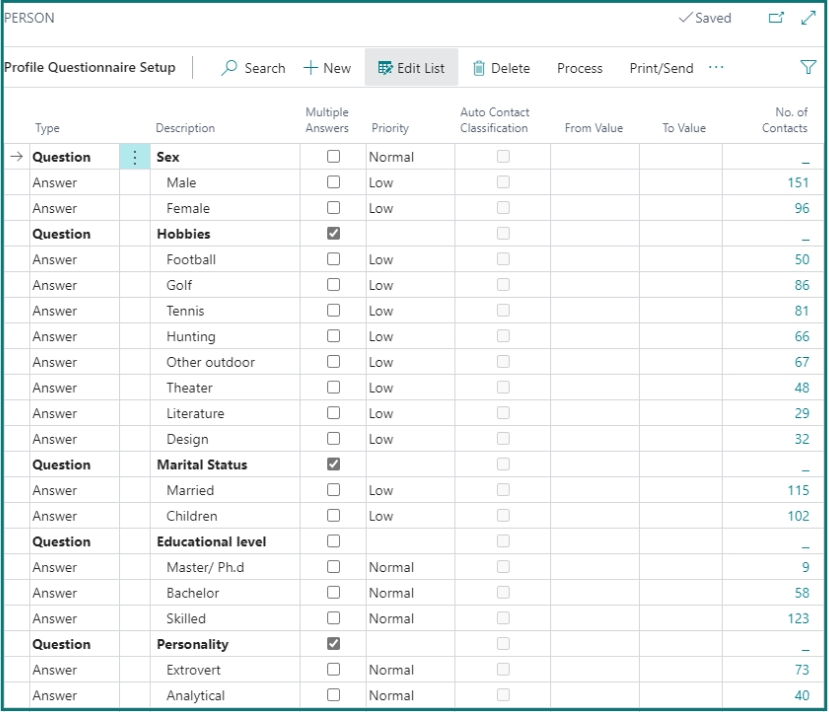
While questionnaires for companies can be simple and maintained by your Sales Reps, Business Central also provides a powerful tool for highlighting strategic insights.
Below, you see systemically generated responses for questions, such as which of your customers comprise the Top 25% of Profit Dollars last year and this year. Because Business Central is our fully functional ERP system, it knows the Contacts associated with our customers, and it knows the profit we make on every sales transaction.
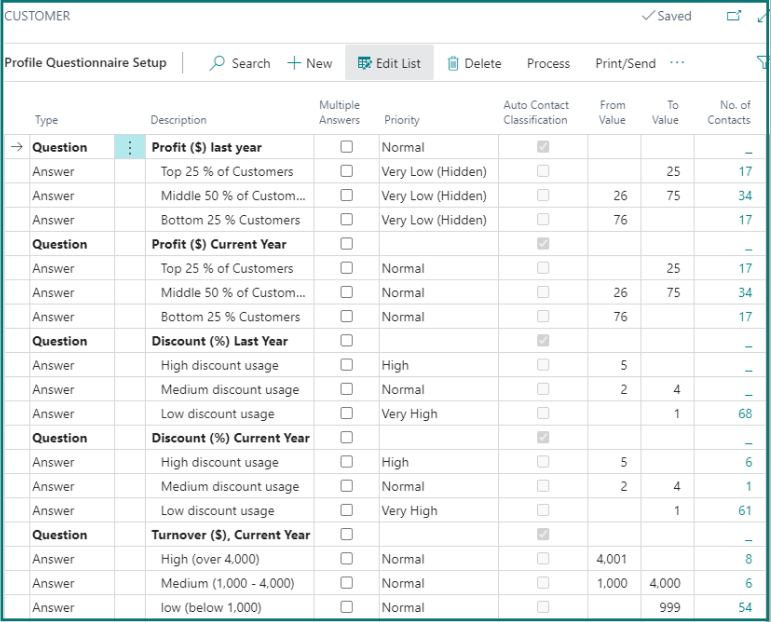
As new transactions are posted, Business Central tracks the related information. The update can be run manually throughout the day, or it can be scheduled to run automatically as frequently as desired.
Developing a Targeted Sales List
An awesome feature of the Questionnaire is the ability to drill into the No. of Contacts field to quickly see which Contacts have “that” answer. As soon as an answer to any question from any Questionnaire is assigned to a Contact, the count in the Questionnaire is automatically updated.
Another powerful feature is the many-to-many relationship between Contacts and Questionnaires. Person and Company Contacts can have answers from multiple Questionnaires. For example, a Person Contact may have answers from a Questionnaire that asks personal information like the one above as well as answers from another Questionnaire that asks business-related information, like length of time with the company or their job responsibilities. A Company Contact with answers from an Auto Contact Classification, as shown above, may have answers to general business information like the type of engineering company, the number of employees, or the annual revenue.
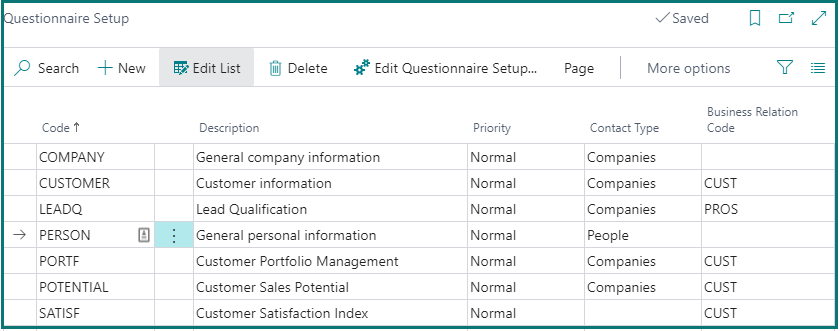
The more you know about the people and the companies they work for, the better you can focus on what you do that meets their needs, so you can drive more business.
When it comes time to develop your target list by building out a Segment, use the Contact Profile Answer filter to tap into the critical information you’ve gathered about your Contacts. Through this, you will build a very specific target list!
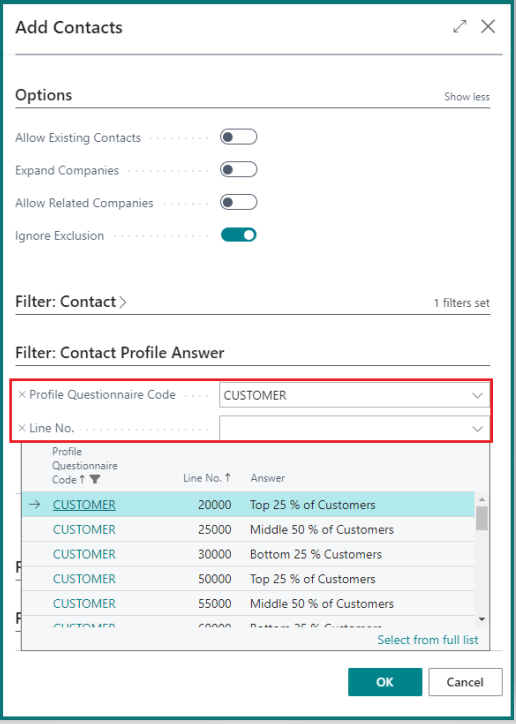
You can run the Add Contacts function multiple times using the Answers from any number of Questionnaires to add or remove the Contacts in the Segment. You can even save the specific contacts in this Segment for use in future Campaigns. Knowing how many Contacts meet the criteria you are using to build your Segment, you also know ahead of time what the total population should be for your targeted market.
A Happy Sales Team
At a high level, you can create Questionnaires to gather information about people and companies. The answers to the questions can be manually or systemically maintained. The answers to the questions can be utilized when you are selecting the Contacts you want in your Segment. The more information you have about your Contacts, the more you can fine-tune the Contacts you target. If you have a well-designed target list, your sales staff will be more efficient, more motivated, and more productive. They win and the company wins!
Need help getting started with Campaigns, Segments, or the Profile Questionnaire? Send me an email. I love to discuss Business Central’s built-in CRM.
