
Copilot for Sales 101: What To Know About AI-Powered Selling



Sales teams aren’t failing; they’re drowning. Too many tools, too many tabs, and not enough selling. This post cuts through the noise to explain what Microsoft Copilot for Sales does, how it differs from Copilot in Sales, and where it truly saves time without risking trust or data. If you want practical, real-world wins (and a few gotchas to avoid), you’re in the right place.
The Problem We’re All Facing
Let’s be blunt: sales today is death by a thousand clicks. Copilot’s promise is simple: reduce the busywork so you can focus on the human parts of selling, like relationships, discovery, and closing.
Wait—Two Copilots?
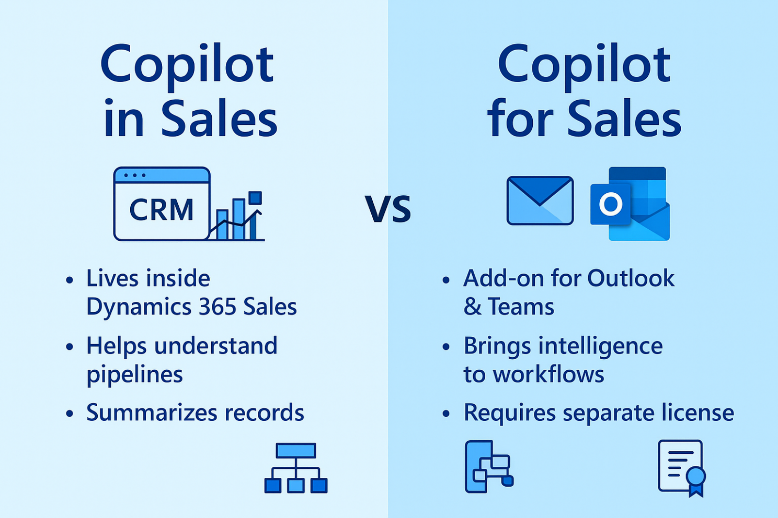
What’s the difference between Copilot in Sales and Copilot for Sales? Simply put:
- Copilot in Sales lives inside Dynamics 365 Sales. It summarizes records, preps you for meetings, and surfaces insights in the CRM. It’s included with D365 Sales Enterprise/Premium.
- Copilot for Sales brings that intelligence to Outlook and Teams where reps actually live. This requires a separate license.
What It Actually Does (Day in the Life)
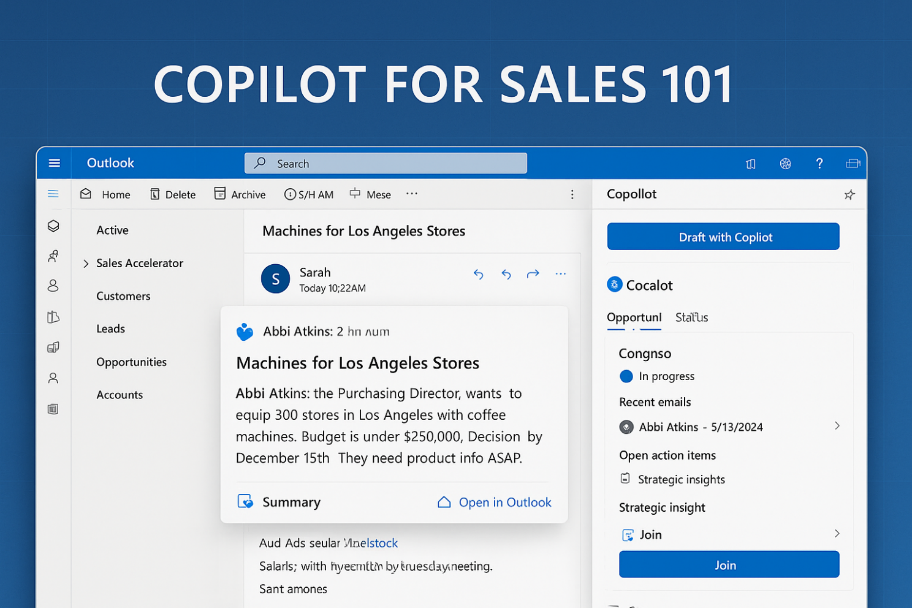
Picture a rep opening Outlook to a seven-email pileup. Copilot summarizes who said what, the decision maker, budget, timeline, and asks. One glance and you’re caught up. Need to reply? “Draft with Copilot” proposes a tailored response that references CRM data and offers next steps or meeting times, and you tweak the tone and send.
Jumping into a Teams call? A pre-call card shows opportunity status, recent comms, action items, and related records. After the meeting (recording/transcription on), Copilot generates a summary with decisions and follow-ups you can drop into a Deal Room channel linked to the opportunity. Activities log back to CRM. You moved deals without playing “update the system” at 7 p.m.
That’s the value: less swivel-chair, more selling.
The Stuff Nobody Tells You
Let’s talk fine print. With Copilot for Sales, keep in mind these considerations:
- Email summary threshold: It kicks in only on longer emails (roughly 1,000+ characters). Short threads may not trigger it.
- Meeting summaries require recording/transcription: Get consent, set a policy, and train reps on when/why to record.
- Licensing can be messy: Your needs depend on existing Microsoft 365/D365/Salesforce licenses. Get a partner to map what you own vs. what you need.
- Garbage in, garbage out: If your CRM data is stale or duplicated, Copilot will confidently reflect that mess. Fix data hygiene first.
The Human Element
Copilot makes suggestions, not decisions. It can miss context or get tone slightly wrong. Treat it like a sharp intern: great at drafting, summarizing, and finding needles in haystacks, but you’re still the closer with judgment and nuance. Review, adjust, send.
Privacy & Security
As it relates to privacy and security, here’s the gist when considering Copilot for Sales:
- Matches emails to the primary email in CRM.
- AI content stays under your control; not used to train a public model.
- Role-based access applies; users only see what they should.
- Summaries/drafts are ephemeral; you choose what’s saved.
- Built for enterprise compliance but have IT/Legal review consent and retention.
Bottom line: it’s designed to be safe, but your governance matters.
Should You Actually Use This?
When evaluating Copliot for Sales, you should use it if:
- CRM adoption is weak because updating it is painful
- Reps burn hours on admin tasks instead of selling
- You’re willing to invest in training and basic data cleanup
However, it’s best not to yet if:
- Your CRM is chaos (duplicates, incomplete records)
- There’s no change management muscle
- Leadership wants “AI” to fix process problems it didn’t cause
Start small, prove value, then expand.
Getting Started
When getting started with Copilot for Sales, follow these guided steps:
- Inventory what you already own. D365 Sales Enterprise/Premium includes Copilot in Sales. Copilot for Sales is an add-on that works with D365 or Salesforce in Outlook/Teams.
- Pick two high-leverage scenarios.
- Enable recording/transcription policy. Publish a short consent script and add it to your meeting template.
- Clean the top 20% of data that drives 80% of revenue. Standardize contacts, accounts, stages.
- Establish a review habit. Reps edit AI drafts; managers spot-check quality and tone.
- Measure wins. Track admin time saved, time-to-first-response, follow-up completion, and opportunity hygiene.
FAQ
- Will Copilot for Sales replace reps? No. It amplifies good reps and exposes bad processes.
- Does Copilot for Sales help managers? Yes. Clearer activity trails, better summaries, faster coachable moments.
- Salesforce compatibility? Copilot for Sales can work with Salesforce; validate your setup.
- Change management? Non-negotiable. Train on when to trust, when to edit, and how to keep data clean.
My Final Take
AI finally feels useful, not gimmicky. Copilot for Sales won’t revolutionize your business overnight, but it will give your team hours back and tighten execution, if you set it up with intention. The teams seeing results did three things well: cleaned core data, trained reps to edit AI drafts, and started narrow to prove value fast.
If you’re AI-curious but allergic to science projects, this is a smart first move. Start with email and meeting workflows, keep humans in the loop, and let results justify the next step. Old-school fundamentals with new-school acceleration. That’s the play.
