
Devon Southall
Forum Replies Created
-

Devon Southall
MemberMay 23, 2025 at 9:52 am in reply to: Extender data in a SmartList or SSRS report::ok – there is a lot here. first – there is some functionality in extender to add fields to smartlists -but I don’t use it because I find it slows it down a LOT.
Extender has the ability to build views with the data from its windows/forms. That is the best way to access the data.
Then you use Smartlist builder or designer to join in the view to see.
Do you have access to the Extender manuals – that should walk you thru how to add the view.
-
Devon Southall
MemberMay 5, 2025 at 8:56 am in reply to: Inquiry – Auditor – Journal Voucher Roadmap::Messe,
Looks like that is part of Rockton Auditor… you can contact them if this PDF manual doesn’t help:
Best,
Devon
-
-
Devon Southall
MemberMarch 6, 2025 at 11:04 am in reply to: Totals not matching in Financial module::Tom,
There is reconcile in Financial (under utilities) to recalculate the summary balances from the details. but you only want to do this if you have SQL backup and everyone is out of GP (and generally in a test company)
There are several ways in GP to delete transactions in the user interface and this utility doesn’t support them all….
Seeing all your posts…. I would reach out to you GP partner and get some assistance.
Best,
Devon
-
-
Devon Southall
MemberFebruary 10, 2025 at 9:11 am in reply to: Manual Payments Cannot Be Applied – Multiple Issues -
-
Devon Southall
MemberJanuary 6, 2025 at 4:07 pm in reply to: AP Batch Entry Control and Actual Transaction selection -
Devon Southall
MemberJanuary 3, 2025 at 10:58 am in reply to: AP Batch Entry Control and Actual Transaction selection::Christine,
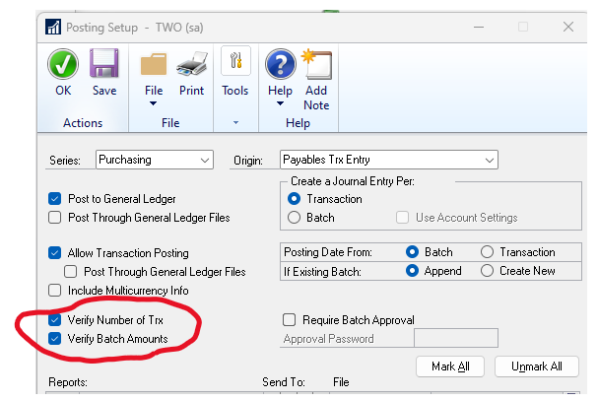
the Batch Trx count and Batch Amount fields are controlled by the Posting Setup for that transaction type (Purchasing > Payables Trx Entry)
Mostly Clients don’t bother using it because you just need to type the totals displayed to the side on the same window.
Any other questions?

-
::
GP wasn’t designed for this…
you can hack it in the background (just remove the field on the customer card table in SQL) but you want to be check if there are payments that were done on this child via the parent… basically, you can’t if that was done unless you are willing to remove that history…
other options is to setup a new customer and use the changer on the ID is desired.
I can get you queries if you are interested.
-
Devon Southall
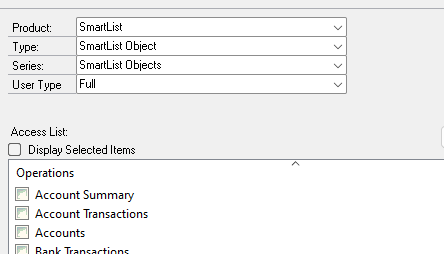
MemberNovember 6, 2024 at 3:28 pm in reply to: Adding New User with access to SmartList Only -
::
Just wanted to chime in on Jo’s comment.. there are still a few GP GL transactions that won’t auto-post with all the fields checked on all of the available posting setup: Intercompany, some Inventory Cost changes (especially cost changes from invoice match when the inventory is sold), and Manufactuing absorption entries. (Others – did I miss anything?) But checking that second box should help a lot if your users are not using batches.
Hope that helps!
-
Devon Southall
MemberSeptember 30, 2024 at 2:03 pm in reply to: Customer Account Maintenance Add Accounts::sorry – that is not a feature in GP. there is only functionality like that in Payables for Vendors.
Most clients – are using sales order processing (and if they are using accounts from the items in that setup), have the sales accounts come from the various “items” they are selling on the document. even if inventory isn’t kept in GP.
-
-
Devon Southall
MemberMarch 11, 2025 at 2:04 pm in reply to: Totals not matching in Financial module