
Forum Replies Created

Page 1 of 2
  • Chris Donnelly

    Member
    January 19, 2026 at 8:11 am in reply to: SmartList error message
    Up
    0
    Down
    ::

    The first place I’d look would be to determine if Extender should have been installed on your machine and wasn’t. Your GP administrator should be able do this. If not, have them contact your Microsoft Partner for help.

    Chris

  • Chris Donnelly

    Member
    December 22, 2025 at 9:59 am in reply to: Job Cost not showing in GL
    Up
    0
    Down
    ::

    Deanne,

    There are a number of methods/options for setting/controlling your posting from the subledgers to the general ledger. Can you identify what module (ie Inventory, Manufacturing, Project, etc.) that your “Signature Cost” is coming from?

    Chris

  • Chris Donnelly

    Member
    December 22, 2025 at 9:55 am in reply to: GP2018 Table ID
    Up
    0
    Down
    ::

    Thomas,

    I bet your description here is just the tip of the iceberg. I’ll offer this advice…

    I’d look at eOne’s products/solutions for integrating and surfacing data from other applications. They are the maker of Smartlist Builder. Take a look at Extender and PopDock.

    Chris

  • Chris Donnelly

    Member
    October 12, 2025 at 7:07 am in reply to: Out of Balance Journal Entry POSTED
    Up
    0
    Down
    ::

    Thomas,

    I’ve never seen an unbalanced entry in GP. I would suspect someone manipulating the SQL tables.

    Chris

  • Chris Donnelly

    Member
    August 18, 2025 at 10:41 am in reply to: Intermittently Slow Financial Series Posting
    Up
    0
    Down
    ::

    Logan,

    I suggest you start logging the time, volume and speed every day. Then start looking for things to correlate the ‘slow processing times’ to. I would start by interrogating/logging other posting activities in GP. Accounts Receivable is a good place to start as it’s common for their volume of postings to impact other processing.

    After you’ve interrogated and eliminated all GP processing, then start looking at any processing that is ‘GP related’. Anything that may be reading or writing to the GP database (i.e. reporting, mass imports, mass exports, etc.).

    Then I’d look for anything putting an unusual load on the network or servers.

    I hope this helps.

    Chris

  • Chris Donnelly

    Member
    July 6, 2025 at 4:29 pm in reply to: Using new features
    Up
    0
    Down
    ::

    Thomas, all GP windows have this great feature: Open the window > click the help button (blue question mark) > select ‘about this window’.

    Enjoy!

  • Chris Donnelly

    Member
    May 19, 2025 at 9:17 am in reply to: GP Upgrade
    Up
    0
    Down
    ::

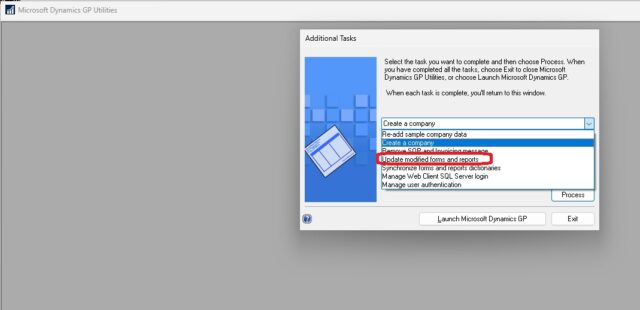
    I recall there being a function for upgrading your reports dictionary(ies). Did you run this?

  • Chris Donnelly

    Member
    March 17, 2025 at 9:39 am in reply to: Extending the life of GP
    Up
    0
    Down
    ::

    Can’t really focus on one app. But I sure love my SmartConnect by eOne. Single, strong, reliable, versatile, centralized tool for all of my custom integrations with GP.

    Chris

  • Chris Donnelly

    Member
    February 23, 2025 at 10:30 am in reply to: Intellego Ship Date Change after posted but not invoiced
    Up
    0
    Down
    ::

    Mike,

    I’m not familiar with Intellego. But I’m sure there are a number of us that are familiar with write-backs from their shipping software (i.e. ship-date, costs, tracking numbers).

    What is your issue?

    Chris

  • Chris Donnelly

    Member
    January 30, 2025 at 12:03 pm in reply to: Need to undo a Receivable Invoice
    Up
    0
    Down
    ::

    Nicole,

    Since you didn’t post the invoice, you can edit it (remove the lines that didn’t ship) before posting. I would enter a new sales order (or backorder if you prefer) with the unshipped lines.

    Chris

  • Chris Donnelly

    Member
    January 27, 2025 at 10:23 am in reply to: Extending the life of GP
    Up
    2
    Down
    ::

    Trevor,

    Here’s the approach I have taken: Stay the course!

    GP remains a mission-critical application for us. And it’s very inexpensive and easy to maintain (as long as you don’t let Microsoft’s announcements erode the attitudes and actions critical to the effectiveness of the application).

    As soon as you and your organization start to neglect it, it will deteriorate and quickly become a burden to maintain.

    Let GP continue to be your trusted and stable ERP. Go ahead and deploy all the hot new technologies ‘around’ GP. There remain a lot of options for integrating with and enhancing GP (while you’re preparing for replacing it). Of course, you’ll want to watch your ROI on any investments as the window of return is shrinking.

    I hope this helps.

    Chris

  • Chris Donnelly

    Member
    October 21, 2024 at 11:46 am in reply to: Adding New User with access to SmartList Only
    Up
    0
    Down
    ::

    Eddie,

    GP security is based on granting users the access they need. They start with nothing. The basic model is explained in these three tiers:

    1 – create the user

    2 – grant the user access to the company(ies)

    3 – for each company, you grant the user the access to a variety of resources within GP

    Sounds like you got through 1 and 2. Now the fun part starts. You’ll need to learn what resources are needed. You can either read the documentation or figure it out by going through the security windows (tools > setup > system > user security) then drill-down through the hierarchy of role setup > task setup. It requires a fair amount of experience with GP.

    Good luck!

    Chris

  • Chris Donnelly

    Member
    October 21, 2024 at 11:36 am in reply to: Management Reporter Data Mart Rebuild
    Up
    0
    Down
    ::

    Hey Kevin,

    It’s unfortunate that nobody has replied with expertise in rebuilding your Data Mart.

    I can offer this advice… I use the legacy connection (of Management Reporter to GP). It’s a direct connection to the SQL database. I do not have to worry about keeping anything synchronized, making it easier to maintain without losing any functionality (financial reporting).

    Others may suffer some loss of functionality if they give up their DataMart. Not us.

    You shouldn’t have any trouble finding documentation on the legacy connection and you should be able to find it easily in the MR Configuration Manager.

    I hope this helps.

    Chris

  • Chris Donnelly

    Member
    April 29, 2024 at 9:46 am in reply to: Management Reporter
    Up
    0
    Down
    ::

    Eddie,

    Did you check the user’s access in Security > dbl-click user > Company Access tab ?

    Chris

  • Chris Donnelly

    Member
    July 6, 2025 at 4:21 pm in reply to: GP Upgrade
    Up
    0
    Down
    ::

    Thomas, it’s an option when you run GP Utilities.

Page 1 of 2

Welcome to our new site!

Here you will find a wealth of information created for peopleĀ  that are on a mission to redefine business models with cloud techinologies, AI, automation, low code / no code applications, data, security & more to compete in the Acceleration Economy!