
Carlos Garcia
Forum Replies Created
-
Carlos Garcia
MemberMarch 6, 2026 at 9:14 am in reply to: Report Layout available when running a report::Thanks Louis
I get it your approach but unfortunately releasing the Report ID Filter and choosing another layout from other report ID won’t work. Did you try?
It comes back to your report Request page with one of the available only.
Remember there will be a risk of errors if the dataset of another layout does not match the one you are running
-
Carlos Garcia
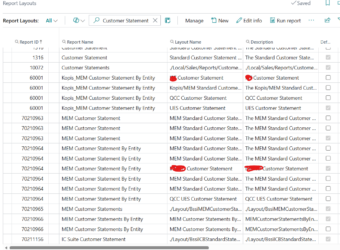
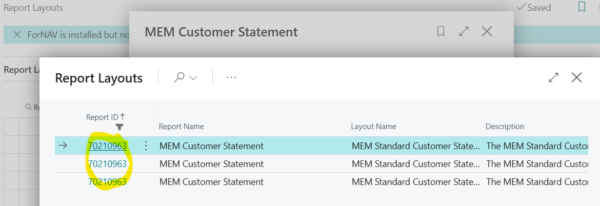
MemberMarch 5, 2026 at 7:12 pm in reply to: Report Layout available when running a report::We have few Customer statement reports from Add on, plus the standard report and one customized, brand-new ID. The client wants to run one specific report and when clicking on the report request form on the layout by going to 3 little assist buttons, to see other report layout.
For example I run report 70210963 then the only available are the 3 with this number
-
::
Enmanuella
I found this article and may help you.
Set up email in Business Central – Business Central | Microsoft Learn
Use SMTP
If you want to use SMTP protocol to send emails from Business Central, you can use the SMTP Connector extension. When you set up an account that uses SMTP, the Sender Type field is important. If you choose Specific User, emails are sent using the name and other information from the account you’re setting up. However, if you choose Current User, emails are sent from the email account specified for each user’s account. Current User is similar to the Send As feature
-
Carlos Garcia
MemberJanuary 15, 2026 at 8:05 am in reply to: Extending AL object, Global Vars Vs Protected Var::Hello Again
And the definition as per Microsoft is clearer and behavior as per design, however the naming convention is not user friendly. The concern in here is, why I cannot extend the other Global Vars? In some cases, we need them and extending is not an option, instead we need to create a copy of the object to developed a new report or object. And the worst part is when the object we want to extend is from another partner or add on.
Microsoft link says:
The protected keyword can be used to make variables accessible between tables and table extensions, pages and page extensions and reports and report extensions. It also makes variables accessible between extensions if they belong to apps, which depend on each other. If you want to only expose some variables as protected, you must create two sections of var declarations.
-
Carlos Garcia
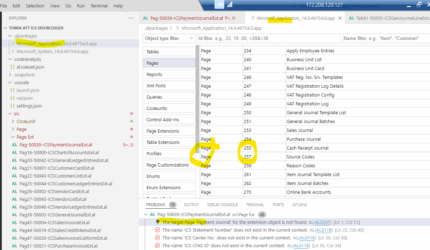
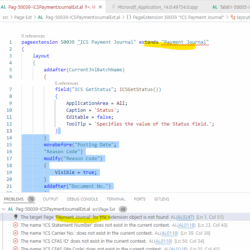
MemberJanuary 15, 2026 at 7:40 am in reply to: VS Code and Microsoft Application APP Package losing some standard objects in BC::Thank you for all your replies. I have checked all setups, and everything is correct including fields enabled on the instance. To add a detail, I am working form a server always, this is our Company test server and not a VS Code local installation connecting to a cloud or on-premise installation. I did not want to use my latest / local VS Code app. It turns that everything was solved using an old VS code installation for another local user I have on the server. I connected with that user and without any modifications to code was able to publish and install with no issue (using PowerShell commands)
Unfortunately, Microsoft won’t help, I submitted a ticket, and they do not support BC 14 anymore. Here there is their reply:
I understand that the concern is specifically around how VS Code retrieves the base Application symbols, and I agree that the behavior you’re seeing (symbols downloading inconsistently or partially) does point more toward a development‑environment or tooling issue rather than something caused by the BC version alone.
That said, because the environment is running on an older, unsupported version of Business Central, the development tools and symbol‑generation components are no longer maintained by Microsoft. This means the inconsistencies you’re experiencing fall outside the areas I’m able to troubleshoot or escalate effectively, as the underlying platform is not supported by Microsoft’s current development team.
For that reason, the most reliable long‑term solution is to upgrade to a supported version of Business Central, where symbol generation, tooling compatibility, and development workflows are fully maintained and aligned with VS Code.
I completely understand this may not be the ideal answer, but I want to be transparent so you can plan with clarity.
XYZ name
Support Engineer
Dynamics 365 Business Central -
Carlos Garcia
MemberDecember 22, 2025 at 7:09 pm in reply to: VS Code and Microsoft Application APP Package losing some standard objects in BC::Hello
Thank you for your reply, sad to say this is ongoing issue. It was fixed by itself. It was fine for more than one month and today started the issue again. All symbols were download. The errors when publishing the app via PowerShell are not listed in the Problem section. Of course, some errors are “fake” because standard objects “should exist”. Last time I invite one of my coworkers and explaining the situation started to work. It must be a version of the VS Code and or the version of the extension package. I have only two extensions: AZ AL Dev Tool/Code Outline and AL Language extension for Microsoft Dynamics 365 BC (BTW this last I have to downgrade to version 16.2 because compile errors)
-
Carlos Garcia
MemberNovember 12, 2025 at 10:00 am in reply to: VS Code and Microsoft Application APP Package losing some standard objects in BC -
Carlos Garcia
MemberJanuary 9, 2025 at 10:18 am in reply to: Business Central and BA12 Bank Statement format.::Hello all
I found a good article form a partner. Attaching in here
-
Carlos Garcia
MemberJune 27, 2024 at 8:55 am in reply to: FirstPartySync error in Updating to Version 24::Hello Kim
I have some instructions to fix this issue, you need to temporary download an extension.
Step-by-step guide:
Guide:- Download
the Per Tenant Extension on Per Tenant Extension (PTE). - It
will be a zip file, please extract the file on a folder. - Go
to your BC environment and search “Extension management.” - Click
on “Manage” option. - Click
on “Upload” Extension. - Select
the .app file on the folder you extracted. - Turn
on the switch so you can deploy the extension. - Once
it is installed, search for “Data Editor” on BC. - Select
the 1400 table on every
company you have on the environment. - Delete
all the files on the table. - Update
the apps on the environment. - Update
the environment.
URL to download:
GitHub – Drakonian/data-editor-for-bc: Data Editor extension that allows you to change and delete information from any table in Business Central
Per-Tenant Extension (PTE) - Download
-
-
Carlos Garcia
MemberSeptember 21, 2023 at 7:39 am in reply to: Hide Power Automate Group on Sales or Purchase Document, using VS code-Not Perso::I meant with VS Code-No Personalization on the Title of the discussion.
However is not possible neither with Personalization.
I found a good article that helps.
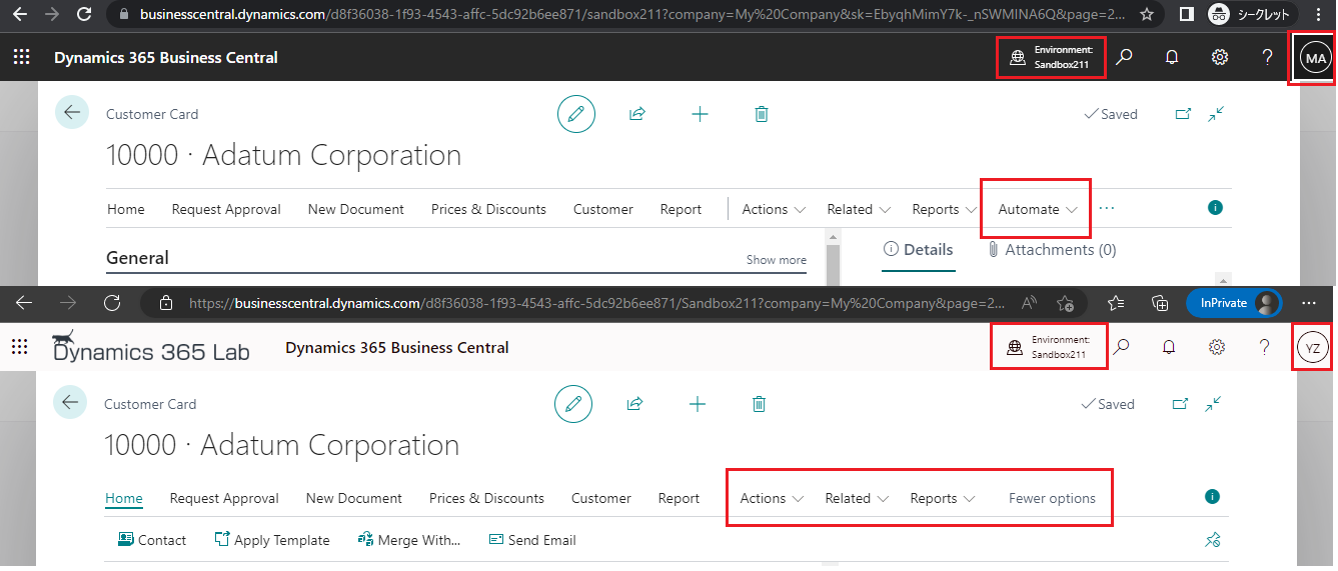
yzhums.com
Hi, Readers.Today I would like to talk about how to hide Power Automate action group for some users by permission set.Po
-
Carlos Garcia
MemberAugust 8, 2023 at 1:15 pm in reply to: Payment Journal EFT File and Removing lines with digits 9-
Carlos Garcia
MemberAugust 8, 2023 at 1:56 pm in reply to: Payment Journal EFT File and Removing lines with digits 9::I found a documentation from Truist Bank, NACHA-CD Standard Entry Class Code.
We used Data Exchange Definition to accommodate it.
-
-
Carlos Garcia
MemberJuly 11, 2023 at 1:36 pm in reply to: Indirect Permission to Insert into a table is not working. -
Carlos Garcia
MemberJuly 11, 2023 at 1:33 pm in reply to: Indirect Permission to Insert into a table is not working.::Hello
I got a replied from Microsoft and I am not happy at all what they told me. Not sure why Essential License does not have permission to indirect access/ restrict the Bin Content, this is part of Warehouse Management and Not Manufacturing that belong to Premium License
———
Hi Carlos,
I trust this mail find you well.
I appreciate your prompt response.
Yes, the screenshot you sent was helpful as it has assisted me to narrow down the root cause of the reported issue.
I notice that the user has an essential license, which is why the permission sets to Bin content are not working in your BC NAV environment.
I recommend that you upgrade to premium license, and you should not experience the issue anymore.