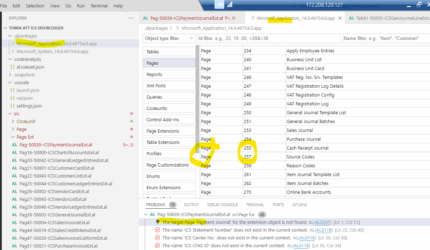
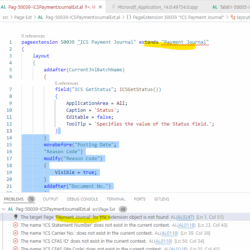
VS Code and Microsoft Application APP Package losing some standard objects in BC

Tagged: 

  • VS Code and Microsoft Application APP Package losing some standard objects in BC

    Posted by Carlos Garcia on November 12, 2025 at 9:57 am

    VS Code and Microsoft Application APP Package losing some standard objects in BC version 14.

    When downloading symbols some of the standard’s objects disappear from the Package and extended objects are erroring out because the object does not exist. This did not happen for 2-3 years and only recently started to appear when publishing the Custom app using PowerShell commands. Teh VS Code and the error in PowerShell differs sometimes.

    Carlos Garcia replied 3 months, 3 weeks ago 4 Members · 6 Replies
  • 6 Replies
  • Carlos Garcia

    Member
    November 12, 2025 at 10:00 am
  • Ian Ray

    Member
    November 13, 2025 at 4:52 pm
    Up
    0
    Down
    ::

    Have you checked to see if all objects and symbols are good on the server?

  • Silviu Virlan

    Member
    December 16, 2025 at 8:13 am
    Up
    0
    Down
    ::

    Ive seen missing type errors in more recent versions. Considering that the app files are not corrupt on the server, I would re-download symbols and I would reload VS Code. Sometimes VS Code gets crazy. Lastly, if you have a service agreement with Microsoft I would create a ticket with their support team for version 14.

  • Carlos Garcia

    Member
    December 22, 2025 at 7:09 pm
    Up
    0
    Down
    ::

    Hello

    Thank you for your reply, sad to say this is ongoing issue. It was fixed by itself. It was fine for more than one month and today started the issue again. All symbols were download. The errors when publishing the app via PowerShell are not listed in the Problem section. Of course, some errors are “fake” because standard objects “should exist”. Last time I invite one of my coworkers and explaining the situation started to work. It must be a version of the VS Code and or the version of the extension package. I have only two extensions: AZ AL Dev Tool/Code Outline and AL Language extension for Microsoft Dynamics 365 BC (BTW this last I have to downgrade to version 16.2 because compile errors)

  • Saurav Dhyani (MVP)

    Member
    January 9, 2026 at 4:39 pm
    Up
    0
    Down
    ::

    Hi,

    You need to make sure that DeveloperServiceEnabled in Service Tier.

    To Make sure all symbols are downloaded always going forward please refer to below video.

    https://youtu.be/ETED7LDYdqo?si=mtUaq_ab_dmEyZzg

  • Carlos Garcia

    Member
    January 15, 2026 at 7:40 am
    Up
    0
    Down
    ::

    Thank you for all your replies. I have checked all setups, and everything is correct including fields enabled on the instance. To add a detail, I am working form a server always, this is our Company test server and not a VS Code local installation connecting to a cloud or on-premise installation. I did not want to use my latest / local VS Code app. It turns that everything was solved using an old VS code installation for another local user I have on the server. I connected with that user and without any modifications to code was able to publish and install with no issue (using PowerShell commands)

    Unfortunately, Microsoft won’t help, I submitted a ticket, and they do not support BC 14 anymore. Here there is their reply:

    I understand that the concern is specifically around how VS Code retrieves the base Application symbols, and I agree that the behavior you’re seeing (symbols downloading inconsistently or partially) does point more toward a development‑environment or tooling issue rather than something caused by the BC version alone.

    That said, because the environment is running on an older, unsupported version of Business Central, the development tools and symbol‑generation components are no longer maintained by Microsoft. This means the inconsistencies you’re experiencing fall outside the areas I’m able to troubleshoot or escalate effectively, as the underlying platform is not supported by Microsoft’s current development team.

    For that reason, the most reliable long‑term solution is to upgrade to a supported version of Business Central, where symbol generation, tooling compatibility, and development workflows are fully maintained and aligned with VS Code.

    I completely understand this may not be the ideal answer, but I want to be transparent so you can plan with clarity.

    XYZ name

    Support Engineer
    Dynamics 365 Business Central

Log in to reply.

Welcome to our new site!

Here you will find a wealth of information created for peopleĀ  that are on a mission to redefine business models with cloud techinologies, AI, automation, low code / no code applications, data, security & more to compete in the Acceleration Economy!