Report Layout available when running a report

  • Report Layout available when running a report

    Posted by Carlos Garcia on March 5, 2026 at 5:09 pm

    I know what layouts are available when running a report: only the ones associated to the report number you are executing.

    One of my coworkers want other layout from a “similar name report” to be available from another.

    I don’t see any solution unless you recreate others report layout and bring to one unique number, but that is a lot of work and risky.

    Can anybody confirm my statement and or provide a link?

    Thank you

    Louis Chebetar replied 1 month, 3 weeks ago 2 Members · 5 Replies
  • 5 Replies
  • Louis Chebetar

    Member
    March 5, 2026 at 5:29 pm
    Up
    0
    Down
    ::

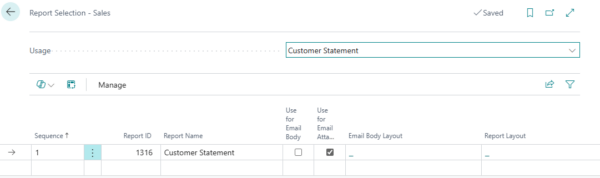
    Carlos – what’s your specific use case? It depends as some instances you can leverage related reports that don’t share the same layout ID. You can set them by default by searching the “Report Selection – {Insert Area i.e. Sales} and updating which document the reports show on to default the preferred document. Keep in mind this updates it for all users.

  • Carlos Garcia

    Member
    March 5, 2026 at 7:12 pm
    Up
    0
    Down
    ::

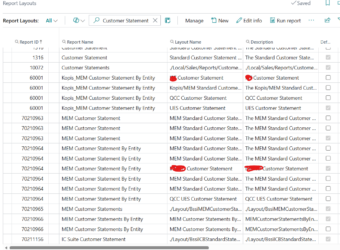
    We have few Customer statement reports from Add on, plus the standard report and one customized, brand-new ID. The client wants to run one specific report and when clicking on the report request form on the layout by going to 3 little assist buttons, to see other report layout.

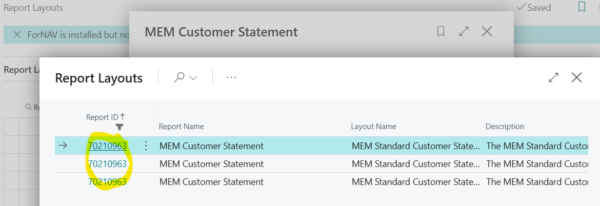
    For example I run report 70210963 then the only available are the 3 with this number

  • Louis Chebetar

    Member
    March 5, 2026 at 7:26 pm
    Up
    0
    Down
    ::

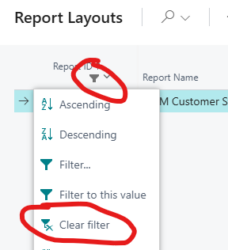
    If constantly switching between layouts – have the customer click the funnel and clear the filter. Then the other options appear to be selected.

    If just using one of the forms which is not the main ID selectable, choose it in Report Selection – Sales

  • Carlos Garcia

    Member
    March 6, 2026 at 9:14 am
    Up
    0
    Down
    ::

    Thanks Louis

    I get it your approach but unfortunately releasing the Report ID Filter and choosing another layout from other report ID won’t work. Did you try?

    It comes back to your report Request page with one of the available only.

    Remember there will be a risk of errors if the dataset of another layout does not match the one you are running

    • Louis Chebetar

      Member
      March 6, 2026 at 10:57 am
      Up
      0
      Down Accepted answer
      ::

      Aligned that it needs to be able to connect with the source information. This does work and I just did it with the example MEM Customer Statements 70210965 is defaulted out of the box with Binary Stream installed and I changed to MEM Customer Statements By Entity 7021966 and was able to see the output without issue.

Log in to reply.

Welcome to our new site!

Here you will find a wealth of information created for peopleĀ  that are on a mission to redefine business models with cloud techinologies, AI, automation, low code / no code applications, data, security & more to compete in the Acceleration Economy!