
Benjamin Baxter
Forum Replies Created
-

Benjamin Baxter
MemberFebruary 13, 2026 at 8:34 am in reply to: Manufacturing Use Cases in Business Central Traceability Planning & Performance::Business Central works great as a platform for the areas you’ve mentioned. As a partner who specializes in Manufacturing deployments, I can tell you we address these needs in almost all deployments. The only exception is not every deployment requires Lot/Serial tracking.
Lot/Serial tracking is very well supported for end-to-end traceability. The data entry process is where you want to be careful. Garbage In/Garbage Out. If you don’t set your Item Tracking setup with the specific touch points you need, it won’t provide the solution you need. You can also streamline the data input by utilizing handheld scanning solutions (ISV) and barcoded inventory.
Demand Planning/MRP is fantastic out-of-the-box. Again, proper setup is key to getting the system to make the same suggestions your planner would make. Once you understand the settings and dial it in, it can be a huge efficiency and accuracy gain for the business.
Production Scheduling out-of-the-box is very list driven. Utilizing a planning tool (ISV) for machine optimization and drag-and-drop scheduling on a visual scheduling board provides a better user experience.
Reporting and Analytics are covered through base reports and the ability to write your own reports. You can also introduce data warehouse/reporting products to speed up the processing of reports.
Manufacturing at its core does not put a lot of strain on the system. Don’t complicate the process by adding a bunch of ISV solutions until you have determined a true gap, not a perceived gap. Out-of-the-box Manufacturing is very flexible and reliable.
I think above all having a partner who understands Manufacturing is key. Just because you’re a Business Central partner, does NOT mean you know how to deploy a manufacturing environment. You really want to find a resource that can ensure you get industry feedback on your questions, not just someone who looks up YouTube videos on how it works.
Best Regards,
Ben Baxter – Accent Software
-
Benjamin Baxter
MemberDecember 9, 2025 at 8:18 am in reply to: Upgrading Dynamics NAV to Dynamics 365 Business Central::There are too many factors to consider to give a complete answer that isn’t a novel. If you’re moving from object-based Dynamics NAV to Business Central, you have the challenge of converting/re-writing your customizations to AL Extensions. 10-out-of-10 times I would suggest a cloud migration in this scenario. Treat it like a restart on Business Central, and only write Extensions you actually need.
If you are Extension based upgrading, on-premise or cloud doesn’t really change anything. I would still recommend moving to the cloud, but some industries still have some limitations on compliance.
When you view your “upgrade” as a “restart”, you change your perspective on how to approach the project. As a restart, you can make decisions based on the business today, not just bring forward the decisions of the past. Don’t try to recreate the old system, plan out what is optimal for today and the future. This isn’t without challenge, especially if your changing costing methods or utilizing warehousing that you didn’t it the past. It may mean a longer testing phase to get comfortable with the changes.
The project will be what you make it, but make sure you have the bandwidth to thoroughly test scenarios, your Users are excited (throw them a kick-off party?), and remember it is going to have its ups and downs so be ready to work through challenges to get to the finish line.
-
::
Ideally you indicate the Tax Area Code on your Vendor record, which will default it to your PO Header.
If you need to change the Tax Area Code you can move the field from the Invoice section to the General section so you don’t have to scroll to fill it in.
Best Regards, Ben Baxter – Accent Software
-
Benjamin Baxter
MemberSeptember 22, 2025 at 8:40 am in reply to: Subassemblies within Assemble to Order::Out-of-the-box, a nested ATO component will not have an Assembly Order created. It would be better in that case to set the Item as ATS with a Reordering Policy of Order, which will allow Planning to trigger the creation of the Assembly Order. In this case the ATS order would need to be complete and output into Inventory before the Sales Order is shipped.
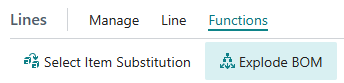
However, you could also use the standard “Explode BOM” capability (Lines > Functions > Explode BOM) to bring the 2nd level ATO components up to the top Assembly Order, which would trigger their consumption upon shipment of the Sales Order.
Finally, you could write an Extension to either Explode BOM OR create the ATS Sub Assembly Order upon creation of the ATO parent. This would reduce your clicks.

-
::
Sorry to hear you had a bad experience. As a partner, I encourage you to look for a partner whose industry experience matches yours. Once you identify a few partners for your industry, schedule some calls and find out who matches well with you. We often start with a small project (either training or dev) to make sure it is a good fit on both sides before committing to the change.
If you are going to Summit, it can be a great place to actually see partners demonstrating their knowledge of the product. The expo is okay, but research partners before going so you can see if any you’re interested in are presenting at the conference.
-
Benjamin Baxter
MemberAugust 8, 2025 at 8:10 am in reply to: Which is the best Dynamics 365 company who offer services at affordable cost? -
Benjamin Baxter
MemberFebruary 20, 2025 at 8:36 am in reply to: Create picks for Routing Link codes::Unfortunately, there is no option to filter by Operation or Routing Link Code when creating the Pick. We have had similar requests on the planning stage, and you can’t plan by Operation or RLC there either.
This will require an extension (customization) to accomplish.
Best Regards,
Ben Baxter
Accent Software Inc
-
Benjamin Baxter
MemberJanuary 29, 2025 at 8:45 am in reply to: Report to pull “Maximum Inventory” planning field by part number? -
Benjamin Baxter
MemberJanuary 28, 2025 at 10:20 am in reply to: New v25 1099 Feature – How-To Handout (READ IT) -
Benjamin Baxter
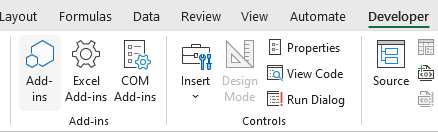
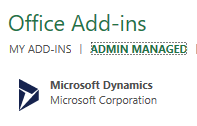
MemberMay 9, 2024 at 8:22 am in reply to: How to get Edit in Excel pane back after closing::First, add the Developer tab to your Action Ribbon in Excel, and look for the Add-Ins icon. In the Office Add-Ins section, select Admin Managed > Microsoft Dynamics, then at the bottom select Add. This will bring back the Connection Pane and resync the connection.
Best Regards,
Ben Baxter
Accent Software Inc
-
Benjamin Baxter
MemberMay 3, 2024 at 8:18 am in reply to: Sales Line Suggestions with Copilot in Business Central 2024 Release Wave 1. -
::
I don’t know how your Picks are created, but during the Create Pick process is a toggle “Do not Fill Qty. to Handle”. If your Pick Creation is run on a Job Queue, is it possible someone accidentally flipped the toggle off? This would cause new Picks to be created with the Qty. to Handle filled in.
Especially in an on-premise environment, where it is less likely an update to the software occurred.
Just a thought.
Best Regards,
Ben Baxter
Accent Software Inc
-
::
There is no standard field to display the remaining time on a Production Order. You would want to write an Extension to add a calculated field that is the difference between the total “Expected Capacity Need” (Prod. Order Routing Lines) for the Production Order less the Posted Time (Capacity Ledger Entries) for the Production Order.
If your Production Orders have multiple lines, you may want to add it on the Production Order Lines as well, filtered to the specific line. This way you could see the remaining time on the sub-assemblies from the Finished Good.
Best Regards,
Ben Baxter
Accent Software Inc
-
Benjamin Baxter
MemberDecember 20, 2023 at 9:26 am in reply to: Service and Field Service Add ons for BC::Obviously, they should start with the base Business Central Service Module. If they are looking to expand on the base capabilities, they should look into ExpandIT’s Field Service Management Extension.
Field Service Management Software – ExpandIT Inc.
Best Regards,
Ben Baxter
Accent Software Inc
expandit.com
Field Service Management Software - ExpandIT Inc.
Field Service Management Software - ExpandIT Inc.
-
Benjamin Baxter
MemberApril 30, 2024 at 8:02 am in reply to: Business Central Licensing – determine number and type needed::Both Purchase Quotes and Sales Quotes are available to Team Members. They cannot “Make Order” and they cannot enter Orders.
The Reclassification Journal Post would not be an option, but entering lines in the journal would be allowed.
A Team Member can run any number of reports in Business Central. They can also View any table in Business Central (with the appropriate security permissions). We like to think of Team Members as mostly view-only Users, and they work great for Project Managers who need to see data but not enter it.
Lastly, Team Members can enter and update their employee information and time sheets.
P.S. You may also want to look into the Business Central access via Microsoft 365 licenses. Here is the info link: Business Central Access with Microsoft 365 licenses – Business Central | Microsoft LearnBest Regards
Ben Baxter
Accent Software Inc