
The Incident Type Trap: How to Build a True Work Order Playbook in D365 Field Service



If you ask ten different organizations how they use Incident Types in Dynamics 365 Field Service, nine of them will give you the same answer: “It’s the drop-down field where dispatchers select why the customer called.” That approach treats one of the platform’s most powerful tools like a glorified tag.
When an Incident Type is treated as a plain text label, a way to categorize “HVAC Repair” or “Generator Inspection,” you miss out on the core automation engine of D365 Field Service. Worse, you leave every technician to invent their own procedure on site, leading to erratic first-time fix rates, inaccurate inventory tracking, and complete blind spots in your operational reporting.
A properly configured Incident Type isn’t a label; it’s a standardized, repeatable playbook. Here is how to transform your Incident Types into the backbone of your field operations.
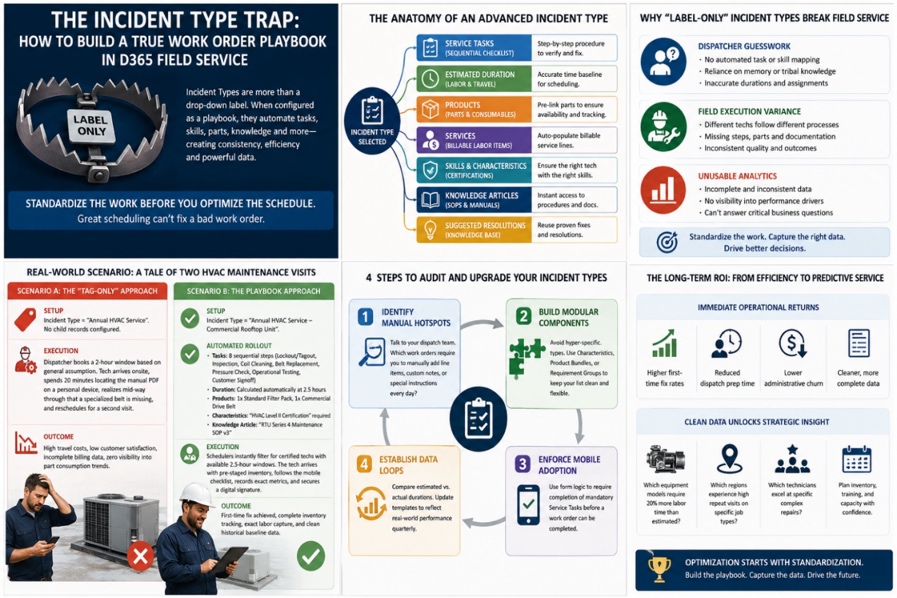
Why “Label-Only” Incident Types Break Field Service
When work orders lack structured playbooks, field operations suffer across three distinct areas:
- Dispatcher Guesswork: Without automated task and skill mapping, schedulers must rely on personal memory or tribal knowledge to determine how long a job should take and which technician has the necessary qualifications.
- Field Execution Variance: Tech A completes a 12-point checklist, records every used part, and logs accurate labor hours. Tech B fixes the immediate issue, leaves off the preventative checks, and forgets to account for a $200 replacement valve.
- Unusable Analytics: If actual work isn’t captured against a standardized template, executives can’t answer basic performance questions:
- Are our estimates accurate?
- Which parts fail most often?
- Why are repeat visits spiking in a specific region?
To fix this, you must shift your perspective: Standardize the work before you attempt to optimize the schedule. Even the best automated scheduling engine cannot compensate for an incomplete or poorly defined work order.
The Anatomy of an Advanced Incident Type
When a dispatcher selects a primary Incident Type on a Work Order, D365 should automatically build out the entire execution framework.
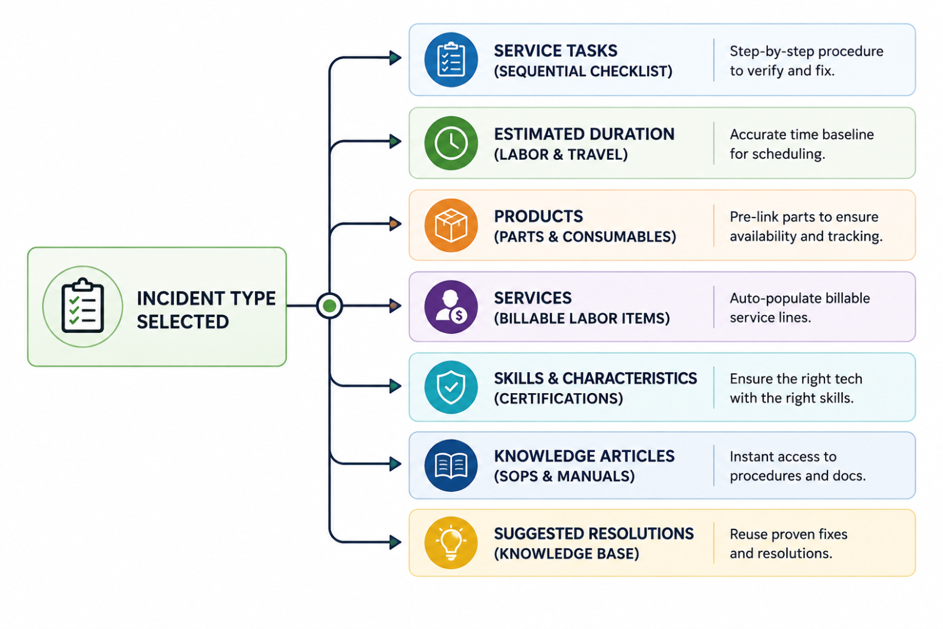
Here is how each layer contributes to a bulletproof work order.
- Service Tasks (The Sequence): Instead of telling a technician what is wrong, Service Tasks tell them how to verify and fix it step-by-step. Order matters. Structuring tasks in logical sequence prevents technicians from skipping safety checks or rushing straight to the repair without completing diagnostic steps.
- Estimated Durations: Incident Types aggregate the estimated duration of all child Service Tasks to establish an accurate baseline for the entire work order. This gives Resource Scheduling Optimization (RSO) or manual dispatchers precise time blocks rather than arbitrary rule-of-thumb estimates.
- Products & Services: Pre-linking required parts (e.g., specific filters, oil, gaskets) and billable service items ensures inventory is earmarked in advance, and billing lines are auto-populated, preventing unbilled labor and missing inventory reconciliation.
- Characteristics (Skills & Certifications): Matching the right work to the right person requires data. Linking required skills (e.g., EPA Universal Certification, High-Voltage Safety) directly to the Incident Type ensures schedule board filters automatically prevent under-qualified assignment.
- Knowledge Articles & Resolutions: Directly attaching SOPs, wiring diagrams, and safety guidelines to the Incident Type gives technicians instant access to technical docs within the mobile app, even while working offline.
Real-World Scenario: A Tale of Two HVAC Maintenance Visits
Scenario A: The “Tag-Only” Approach
Setup
Incident Type = “Annual HVAC Service”
No child records configured.
Execution
Dispatcher books a 2-hour window based on general assumption.
Tech arrives onsite, spends 20 minutes locating the manual PDF on a personal device, realizes mid-way through that a specialized belt is missing, and reschedules for a second visit.
Outcome
- High travel costs
- Low customer satisfaction
- Incomplete billing data
- Zero visibility into part consumption trends
Scenario B: The Playbook Approach
Setup
Incident Type = “Annual HVAC Service – Commercial Rooftop Unit”
Automated Rollout
Tasks
8 sequential steps:
- Lockout/Tagout
- Inspection
- Coil Cleaning
- Belt Replacement
- Pressure Check
- Operational Testing
- Customer Signoff
Duration
Calculated automatically at 2.5 hours.
Products
- 1x Standard Filter Pack
- 1x Commercial Drive Belt
Characteristics
HVAC Level II Certification required.
Knowledge Article
RTU Series 4 Maintenance SOP v3.
Execution
Schedulers instantly filter for certified techs with available 2.5-hour windows. The tech arrives with pre-staged inventory on their truck, follows the mobile inspection checklist, records exact metrics, and secures a digital signature.
Outcome
- First-time fix achieved
- Complete inventory tracking
- Exact labor capture
- Clean historical baseline data
Four Steps to Audit and Upgrade Your Incident Types
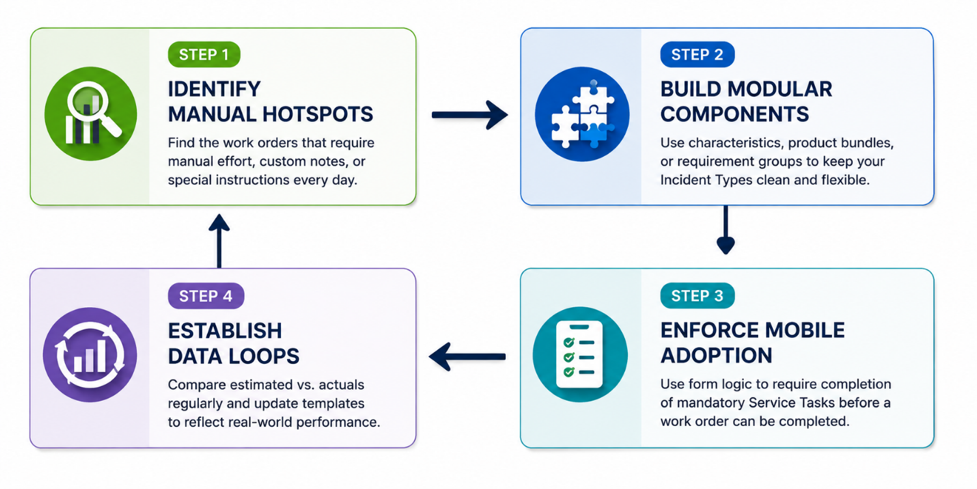
Step 1: Identify Manual Hotspots
Talk to your dispatch team. Ask them, “Which work orders require you to manually add line items, custom notes, or special instructions every day?” High manual intervention points highlight prime candidates for Incident Type optimization.
Step 2: Build Modular, Non-Redundant Types
Avoid creating hundreds of hyper-specific Incident Types for every micro-variation. Use Incident Type Characteristics, Product Bundles, or Requirement Groups to keep your top-level list clean and manageable while remaining flexible.
Step 3: Enforce Mobile Adoption via Form Logic
Ensure your mobile form requires completion of mandatory Service Tasks before a work order can transition to “Completed.” This protects data integrity and guarantees field compliance without micromanagement.
Step 4: Establish Estimated vs. Actual Feedback Loops
Review your operational reporting quarterly. Compare estimated task durations against actual time logged by field technicians. If a 30-minute task consistently takes 60 minutes in the field, update the master Incident Type template to reflect reality.
The Long-Term ROI: From Field Efficiency to Predictive Service
Upgrading Incident Types from simple categories to comprehensive playbooks produces immediate operational returns: higher first-time fix rates, reduced dispatch prep time, and lower administrative churn. More importantly, standardized work execution creates clean historical data.
Once you have consistent baseline data across thousands of work orders, you can begin identifying macro trends:
- Which equipment models require 20% more labor time than estimated?
- Which regions experience high repeat visits on specific job types?
- Which technicians excel at specific complex repairs?
Optimization starts with standardization. Before investing heavily in advanced AI routing or predictive maintenance models, ensure your work orders carry the playbook necessary for field success.
