
Putting AI to Work on Dynamics GP While Keeping the Data On-Premises


Every GP shop is sitting on the same untapped capability: years of general ledger, payables, and receivables detail in SQL Server that could answer real business questions in seconds — if anyone could query it in plain language. The blocker was never the data. It is the question that follows every “let’s use AI on this”: what leaves our environment, and can we defend that answer to an auditor? The Model Context Protocol (MCP) is the piece that makes the answer defensible.
What MCP Is — and What It Is Not
MCP is an open standard that defines how an AI model discovers and calls external tools. The practical consequence matters more than the spec: the model never receives a copy of your database and never holds a connection to SQL Server. Instead, you run an MCP server — a lightweight service on your own infrastructure — that exposes a fixed set of operations the model is permitted to call, such as “look up a vendor” or “total the GL for a date range.” The model works from a menu you define, not from raw table access. It cannot invent an operation that is not on the menu, and it cannot reach past the menu to the tables underneath.
This is the difference between handing over the vault and installing a teller window. GP is just SQL tables — the account master in GL00100, open-year GL activity in GL20000, vendors in PM00200, customers in RM00101. MCP lets an AI request against those tables through a gateway you own, rather than being handed the keys.
The Residency Boundary
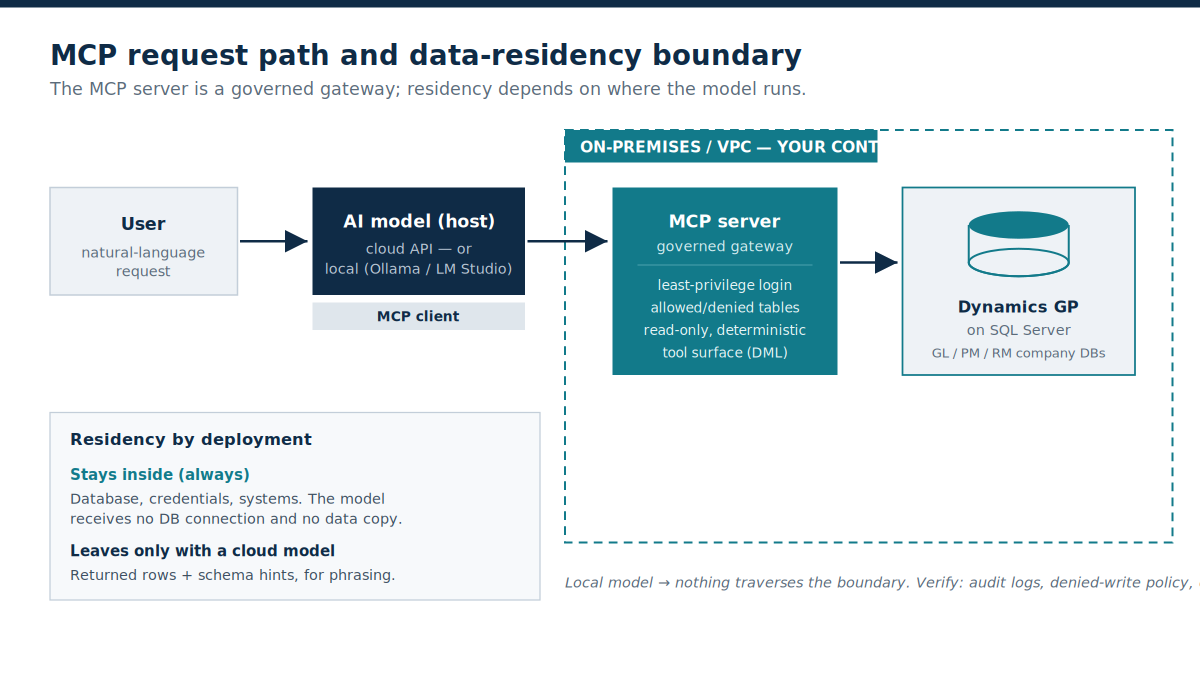
The architecture is worth seeing before the controls make sense. A user asks in natural language; the model decides which tool to call; the MCP server executes the request on your hardware and returns only the result. Three things never cross the boundary under any configuration: the database, the credentials, and the systems themselves.
The Controls That Make It Auditable
Because the MCP server is the only component that touches the database, it is also the only place you have to govern — and the controls are ones your IT team already understands:
- Least-privilege, read-only login: Point the server at SQL Server with a dedicated account that can read and nothing else. The worst case of a badly phrased question is a wrong-looking list, never a changed balance — there is no write path into the GL.
- Scoped tool and table surface: Production MCP servers expose allow/deny lists for both tools and schemas, so the AI sees only the tables you nominate. Sensitive tables simply are not on the menu.
- Deterministic query generation: Microsoft’s SQL MCP Server, built on Data API builder, generates well-formed T-SQL deterministically — the same request produces the same query every time — which makes the behaviour testable and repeatable rather than a black box.
Every one of these is a configuration discipline, not a default. The governance is only as strong as the login you create and the allow-list you maintain — which is exactly the kind of control an auditor knows how to inspect.
Where Residency Actually Breaks — and How to Close It
Here is the caveat that most write-ups skip, and the one your compliance team will ask about first. The database, credentials, and systems stay inside. But the model — the component that reads your English and phrases the answer — has to run somewhere, and its location is the whole residency question.
If the model is a cloud service, then to compose an answer it must see the rows a query returned, plus schema hints such as table names. Only those returned rows leave, and only for the moment it takes to write the reply — not the database, not the login. For many organisations that is acceptable. For regulated data it may not be, and it is worth noting that even the metadata carries information: knowing a table of vendor payments exists is itself a fact about the business.
The close is straightforward. Microsoft’s SQL MCP Server works with local models served through tools such as Ollama, and community stacks (Ollama, LM Studio) run capable models entirely on-premises, including in air-gapped environments. Wire a local model to the same MCP server and nothing traverses the boundary — the question, the data, and the answer all stay on machines you own. The trade-off is honest: a local model needs adequate hardware and the largest cloud models remain somewhat stronger, but for reading and summarising GP data the on-premises models are more than sufficient.
The Business Case
- Close acceleration. Analysts get answers to ad-hoc questions during the close without another export-and-pivot cycle, compressing the time between “what does this look like?” and a defensible number.
- Control, not new exposure. A read-only surface adds no write path to the ledger, and every tool call can be logged — arguably tighter than the spreadsheet exports it replaces.
- Low build cost. The approach reuses the SQL Server you already run, and official plus community MCP servers mean you are configuring a gateway, not building one from scratch.
The Caveats Worth Naming
Two risks stay on the table. First, an AI can produce a confident query that is subtly wrong — a mis-set date boundary, a join that quietly drops rows. Human validation of AI-generated figures remains a control, not an optional courtesy; treat the output like a capable analyst’s first pass. Second, with a cloud model the returned rows and metadata do leave, so match model placement to your data classification: local for the sensitive workloads, cloud where the exposure is genuinely harmless.
Start narrow. Stand up an MCP server against a copy of one company database, read-only, one or two tables, and put three questions to it whose answers you already know. Watch what moves across the boundary and what does not, then decide where the model belongs.
Final Thought
MCP does not decide your data residency — your deployment does. The database, credentials, and systems never leave. Whether returned rows leave depends solely on whether the model runs in the cloud or on hardware you own. Match model placement to your compliance posture, keep the MCP login read-only and least-privilege, scope the table surface, and log every call.
