
The Role of Sales Literature in Dynamics 365 Sales



While helping someone with their Dynamics 365 Sales implementation, they asked me about the role of sales literature in the overall app. Here’s the thing: I have never once implemented it for an organization. Were the requirements just not there? Was I just not well-versed in the capabilities? Read on to find out why! That makes this a good opportunity to highlight a lesser-used feature of the Sales apps.
What Is Sales Literature?
Sales Literature can serve as the central repository of the organization’s sales information and collateral. This often includes brochures, product specification sheets, pricing one-pagers and more.
With proper permissions, users can create, view, edit and/or delete a sales literature item. Users can search Sales Literature by keyword and upload attachments directly to a Sales Literature record.
For a full list of the tables and functionality (SalesLiterature and SalesLiteratureItem) that comprise Sales Literature inside of Dynamics 365, see this article in Microsoft Learn.
Security Considerations
Only specific out-of-the-box security roles can create Sales Literature records: System Administrator, System Customizer, Sales Manager, Vice President of Sales, Vice President of Marketing, and CEO–Business Manager. Alternatively, admins can grant access to the SalesLiterature and SalesLiteratureItem tables in custom security roles so other users can create and manage Sales Literature records.
What Can I Do With Sales Literature?
The core of sales literature is to provide an organization with easy access to collateral. For marketers, it enforces consistent, on-brand messaging. For salespeople, it helps to quickly find and share documents within their opportunities.
Sales Literature is useful beyond the Dynamics web client. If sales reps are heavy Outlook users, they can add sales literature to an email from the Dynamics 365 App for Outlook. (I didn’t know about this before researching this article, and it’s genuinely useful.) Sellers can have organization-approved sales literature at their fingertips through the Dynamics 365 App for Outlook. How? It’s simple!
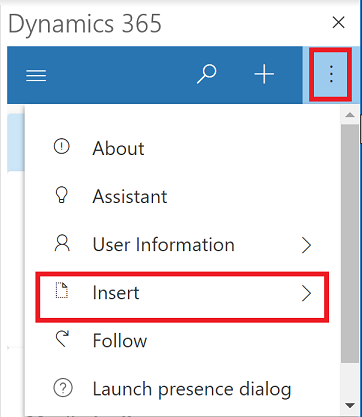
Once Sales Literature and the Dynamics 365 App for Outlook are configured, sellers can open an email, open the Dynamics 365 App for Outlook, select the ellipsis (…), and choose Insert > Add Sales Literature.
This adds the approved document to the email and ensures the activity and attachment are tracked back to Dynamics 365.
Why Haven’t I Implemented This?
There’s one simple reason: Dataverse storage. Storing potentially a significant amount of files as Sales Literature can create a lot of data, which requires storage on the Dynamics 365 environment. Dataverse storage is expensive. If data size is a concern, there are other alternatives available like SharePoint.
When to Use vs. When Not to Use
When to use Sales Literature:
- There is a curated set of key sales documents that should be easy to insert into emails and tracked in Dynamics 365
- You want simple governance and don’t need complex document management or deep folder structures
When not to use Sales Literature:
- You have many large files or rich folder structures
- Marketing already manages collateral elsewhere (like SharePoint or Teams) and you just need links in Dynamics 365
