
Explaining SLAs in Dynamics 365 to End Users


Our last two posts (Understanding the SLA Dataverse Tables and Using SLA KPI Instance Table to Build KPIs) have been jargon-heavy when discussing SLAs. This is required for system admins and anyone tasked with building them out, but it can be overwhelming for end users. Let’s back up and explain SLAs in plain language so our end users can better understand them.
What Is an SLA?
An SLA (Service Level Agreement) is simply a promise about time. It sets the expectation for how quickly a case should be handled. For example:
- “We will respond to this case within 2 hours.”
- “We will resolve this issue within 3 business days.”
Dynamics 365 tracks these promises automatically so no one has to watch the clock manually.
How SLAs Show Up in Dynamics 365
When you open a case, the SLA shows up in two main ways:
- Countdown timers: These tell you how much time is left before the promise is due.
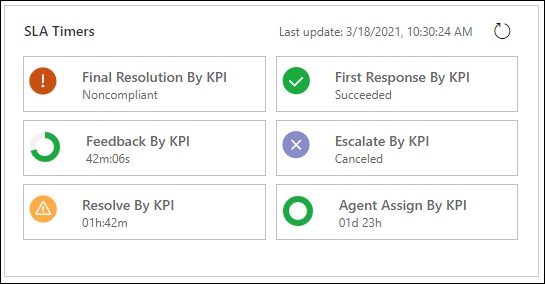
- Status indicators: Green means you’re on track, yellow means time is running short, and red means the deadline has passed.
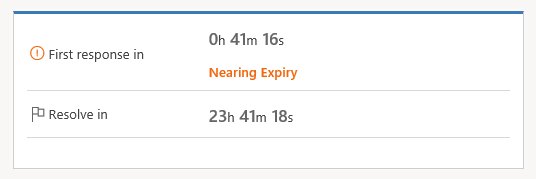
This gives you a clear picture of what needs your attention first.
What SLAs Mean for You
You don’t set up SLAs; that’s handled by your admins, but you interact with them every day. Here’s what matters:
- Know your priorities: The timer helps you see which cases are most urgent. Imagine you’re handling three cases at once and you’re not sure which is most important. SLAs can help you understand where to spend your time.
- Pause when waiting on customers: If a case is paused while waiting for customer input, the SLA clock pauses too, so you aren’t penalized.
- Stay consistent: Everyone on the team is measured by the same rules, which keeps service delivery fair and predictable.
Why SLAs Make Your Job Easier
SLAs aren’t just about accountability. They’re also about clarity:
- No guessing which case should come first.
- Better visibility for managers, which helps them support you.
- Happier customers who get responses and resolutions on time.
Wrapping Up
You don’t need to know the technical setup to benefit from SLAs. Just remember SLAs are the promises the system helps you keep. Next time you open a case, glance at the SLA timer to see how it can help guide your day.
