
Tiffany Collums
Forum Replies Created
-

Tiffany Collums
MemberMarch 26, 2025 at 11:45 am in reply to: Business Central, Purchase Order: Where is the Purchase Receipt Posting Date?::With that button toggled on it just links the Document Date to the same date as the Posting Date when you receive or invoice the document and then the two dates match.
Order Date which is the date the document was created.
Document Date which will change based on any posting date when that toggle is turned on in the setups.
Posting Date should be updated and populated with the date the PO is being received or invoiced. You can back date this date to the date the PO was physically received as long as it is within the General Ledger setup posting date range or User Setup posting date range.
Updating document dates with posting dates – Business Central | Microsoft Learn
-
Tiffany Collums
MemberMarch 24, 2025 at 12:41 pm in reply to: Business Central, Purchase Order: Where is the Purchase Receipt Posting Date?::If the received date is entered in Posting Date field either:
1) If Basic Warehouse, populate the receipt date as the Posting Date on the purchase order header.
or
2) If Advanced Warehouse, populate the receipt date as the Posting Date is entered in the purchase warehouse receipt header.
Also, I would review the Purchase & Payables setup page:
1) Look at your Default Posting field selection
Specifies which date must be used as the default posting date on purchase documents. If you select Work Date, the Posting Date field will be populated with the work date at the time of creating a new purchase document. If you select No Date, the Posting Date field will be empty by default and you must manually enter a posting date before posting.
2) There is also a Link Doc. Date to Posting toggle. If enabled, the document date changes when the posting date is modified.
-
-
::
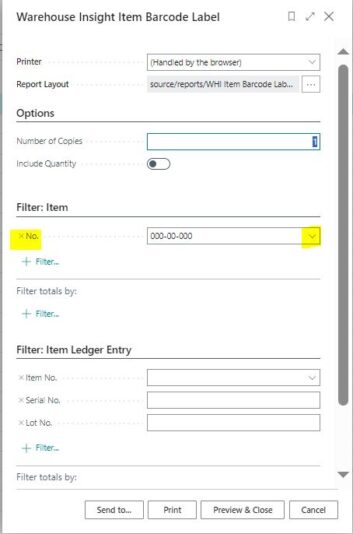
If I print the label from the open Item Card, then I get the same GTIN label as yourself. However, if I am in the item list and then select Process, Print Item Label the popup for the Warehouse Insight Item Barcode Label appears and from here I can select my Item No.
Also, you can global search for Warehouse Insight Item Barcode Label and you can select your item no. from here too.

-
::
Can you provide your steps when printing from the item card?
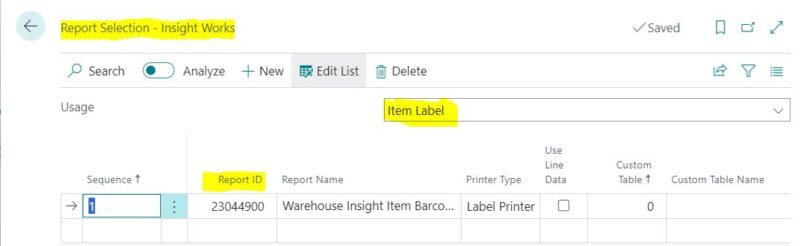
We use Insight Works too and when I go to the item list and select Process –>Print Item Label, I get this pop-up that shows that it is the Warehouse Insight Item Barcode Label. I included how we have this report selection setup in Insight Works Report Selection. (We use a different report number).
I am not sure if this is what you were asking about or if this helped.
-
::
The only way I have ever been able to achieve this on additional by-product being produced (ie. cutting a piece of bar stock or stamping tags out a flat piece of sheet metal where you have already factored in potential scrap for the raw material), is to increase the production order line qty (not the production order header qty) and then completing the output and then changing the production order line qty back to what the original planned output qty was so that it doesn’t affect the required amount of material needed for the production order qty. However, you can also leave the increased qty on the line, along with the increased component demand, and just click that OK when you change the status to FINISHED. “Production Order xxxxxxxx has not been finished. Some consumption is still missing. Do you still want to finish the order?”
However, without more specifics into the product being manufactured/produced and your costing method, it is difficult to say where you could see the variances of making more out of the same amount of material consumed. I hope that helps.
-
Tiffany Collums
MemberMay 7, 2024 at 8:54 am in reply to: Items with no transactions since a given date::I agree with Lewis on using the Item Ledger Entries and Item tables.
I go to Item Ledger Entries and sort Posting Date by descending order then export to Excel, then I delete duplicates by Item No. Then to get a comprehensive list of items with no activity or latest transaction date, I also take an export of all Items and do a vlookup against Item No and bring in the Posting Date from the Item Ledger Entries export. I can then filter by whatever date period I am looking for and it also will show me items with no transaction history too.
-
Tiffany Collums
MemberOctober 25, 2023 at 10:21 pm in reply to: Add parts and labor to a finished goods part::First, can I ask what is your costing method and how do you capture labor on a standard production order?
You can create a production order manually to call out the parent as a child, but you cannot create a BOM like that or you will get low level code issues. If you are standard cost, the variances incurred by adding additional parts and labor should go to your variance accounts defined in your posting setups once the production order status is changed to Finished and Adjust Cost-Item Entries is run. If you are specific, then you will not see any of the variances and it will report the actual cost by each item produced. However, if you are using any other costing method, it will really skew your unit cost and the history by doing this.
-
::
Some available exchange rate subscriptions can be found at:
– Pricing Plans | Free Trial Available | Exchange Rates API | OANDA
– Currency Exchange Rates – Float Rates
– Currency Data API packages, pricing and payment – Xe Help Centre
Another good article can be found here too.
How to Automate Currency Exchange Rate Updates in Business Central/NAV (innovia.com)
-
Tiffany Collums
MemberAugust 17, 2023 at 3:58 pm in reply to: Sales & Receivables Setup – Copy Customer Names To Entries::This also applies to Purchase & Payables setup for Vendor names and Inventory Setup for Item Description to be copied to entries. From what I can see, these were new fields between NAV and BC in these setup pages and can get overlooked during upgrades if you aren’t aware of them on these pages.