
What Your Team Is Actually Buying When It Buys a Large Language Model (LLM)



Everyone nods, and nobody asks. Someone requests Copilot licences. Someone else mentions that ChatGPT wrote their variance commentary. A third person wonders aloud whether “the AI” could handle the intercompany reconciliation. Heads nod around the table, the request goes to approval, and not one person in the room could explain what was just approved. That is not a failure of intelligence — nobody has explained it to you honestly, without either selling you something or showing off. So here it is, in plain terms: what these tools actually are, what they are genuinely good at, where they will embarrass you, and the handful of things to settle before your organization commits.
It Finishes Your Sentences — That’s the Whole Trick
Read this and let your brain finish it: “The invoice was sent to the ______.” You filled that in without deciding to. Probably “vendor” or “customer.” Definitely not “refrigerator.” Nobody taught you a rule for that. You have read and written enough business English that some words simply feel far more likely than others.
That is what these tools do. Every one of them — ChatGPT, Claude, Copilot, Gemini — is a program that got extremely good at one job: guess the next word, then the next, then the next. A three-paragraph answer is that guess repeated a few thousand times, each new word chosen in light of everything written before it.
The formal name is a large language model, usually shortened to LLM. “Large” describes its size, “language” describes what it works with, and “model” is the honest word in the phrase — it is a statistical picture of how text behaves. It is not a mind, and it is not a database. Hold on to that second point, because everything that follows depends on it.
How It Learns
Nobody sat down and wrote rules like “after ‘invoice was sent to the’, prefer ‘vendor’.” There would be more rules than there are stars. Instead the program teaches itself, and the method is almost disappointingly plain:
- Feed it a mountain of text. Websites, books, manuals, software code — trillions of words.
- Hide the next word and let it guess. Then show it the real one.
- Nudge it. Adjust its internal settings a hair in the direction that would have produced the right word.
- Do that a few billion more times. Each nudge is tiny. Together they add up to something remarkable.
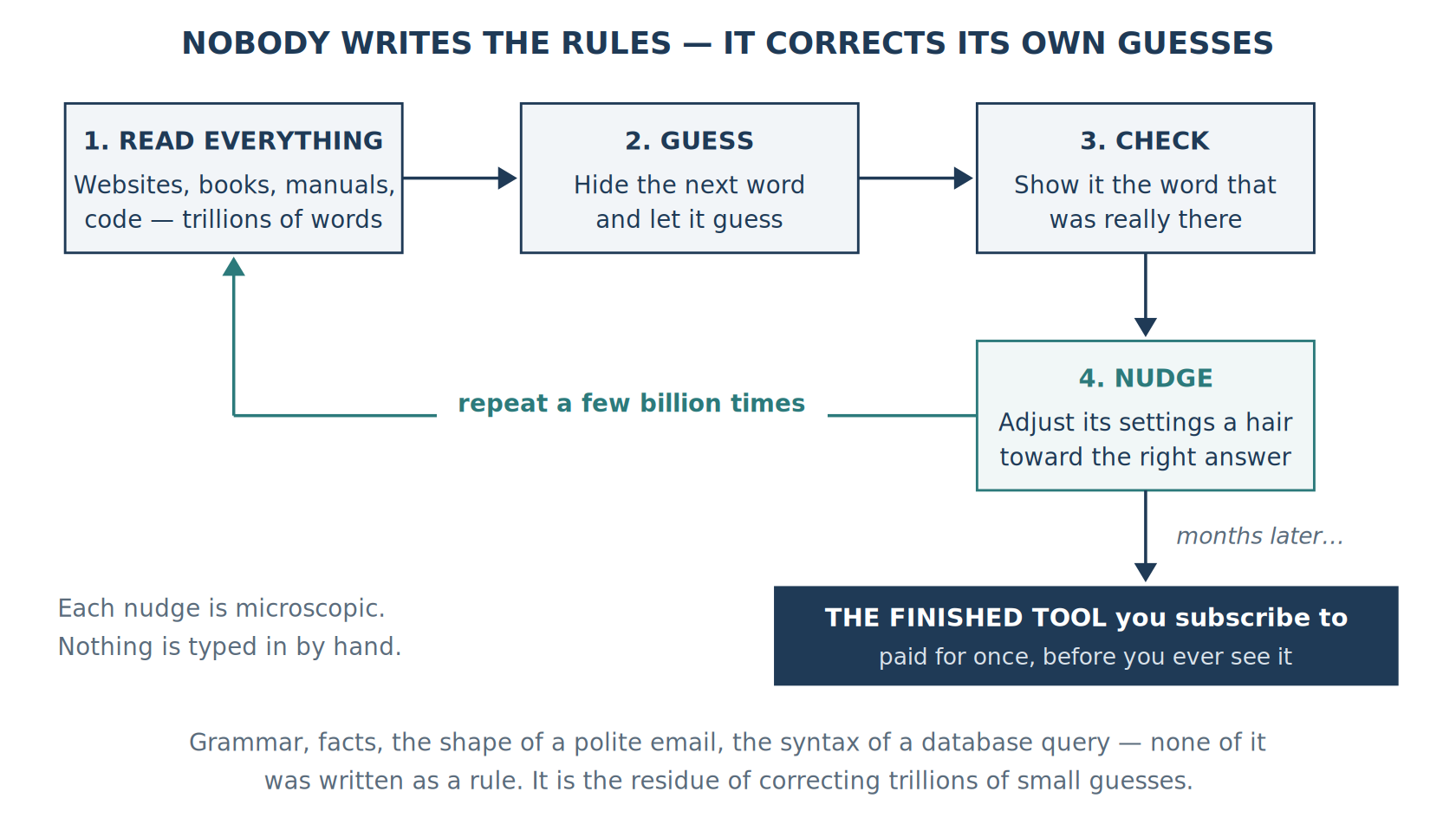
After enough of those corrections, the program has soaked up grammar, facts that show up consistently in writing, the shape of a polite email, the structure of an argument, and the syntax of a database query. Nobody typed any of that in. It is the residue of correcting trillions of small guesses. This is the expensive part — it runs for months on tens of thousands of specialized computers, which is why only a handful of very well-funded companies build these things. But it happens once, before you ever touch the product. Think of a highway: enormously expensive to build, cheap for any one car to drive on.
Three leftovers from that process show up on invoices and in vendor meetings. They are the three words most likely to be used on you by someone who assumes you will not ask, so they are worth having ready.
- Parameters — the size number. These are the internal settings that got nudged during all that guessing, and vendors quote the count the way car dealers quote horsepower. It describes capacity, not quality. A well-built smaller model routinely beats a carelessly built larger one, so a bigger number is not by itself a reason to pay more.
- Tokens — the billing unit. A token is a chunk of text the tool reads or writes, roughly three-quarters of a word. You are charged by the token, which means anything involving a lot of documents costs more than anything involving a little. Work that number out on real volumes before you commit — a trial run on twenty documents tells you almost nothing about what two thousand a month will cost.
- The cutoff date — when its reading stopped. It knows nothing that happened afterward: not a tax change, not a Dynamics GP release, not your last quarter. Ask any vendor where their cutoff falls and whether the product searches the web live to fill the gap, because the better ones now do rather than relying on memory.
One thing it does not do is learn from you. Its settings are locked when the product ships. Inside a single conversation it seems to remember what you said, but only because the whole conversation is resent with every message. Close the window and it is gone. Whether the company keeps a copy of what you typed, and whether they might use it to train a future version, is a completely separate question — that one lives in the contract, not the technology, and it is the question your agreement needs to answer in writing.
Why It Sounds So Certain When It’s Wrong
This is the section that saves you from an embarrassing meeting, and the comparison that makes it click is sitting in your own system.
When you look up a vendor in Dynamics GP, it reads the record that is actually stored. If the vendor is there, you get the balance. If the vendor is not there, you get nothing — an empty result. That “nothing” is doing real work: it is the system telling you the truth about what it does not have. GP will never invent a vendor to be helpful.
An AI assistant has no equivalent. It is not looking anything up. Ask it about a vendor and it does what it always does — writes the most likely-sounding answer. Most of the time that lands correctly, because true statements dominate the text it learned from. But when it is on thin ice, it does not stop and admit it. It cannot. It carries on producing plausible words, and the result reads exactly as confident as a correct answer, because it came out of exactly the same machinery.
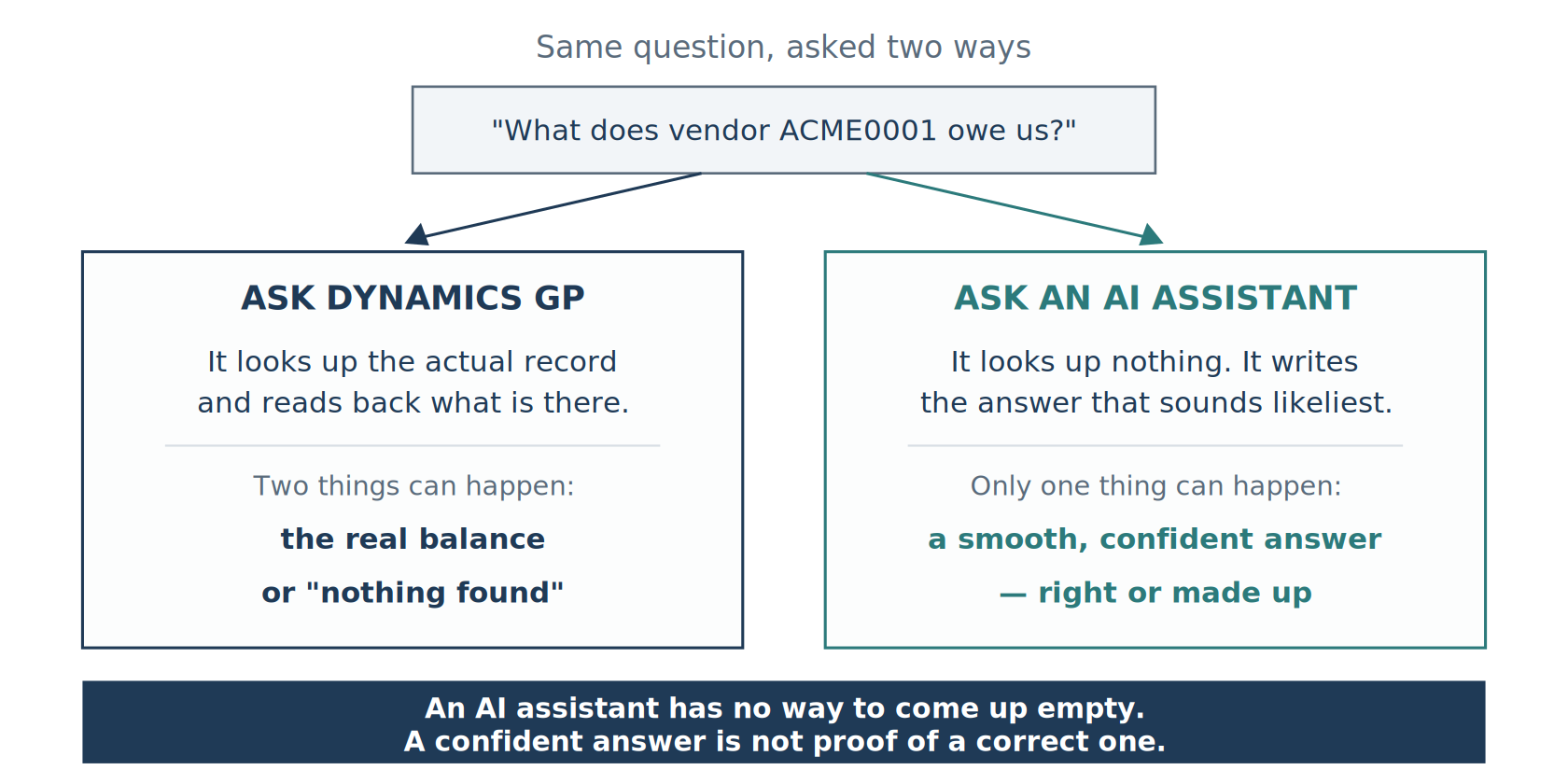
The industry calls this a hallucination, which is a far too whimsical word for what it is: an invented figure, a made-up citation, an account code that does not exist in your chart, delivered in the same calm tone as everything else. It is not a bug awaiting a patch. A tool that writes plausible text instead of looking up verified facts will sometimes write something plausible that is not true — that is simply what it does. So plan for it: assume some answers will be wrong, and build the checking in rather than hoping for a version that never slips.
5 Names You Will Actually Hear
The brand names sort out quickly once you know the trick: they are all the same kind of thing. The differences are which company built it, how that company shaped its manners, and — the one that matters most — whether it can run on equipment you own.
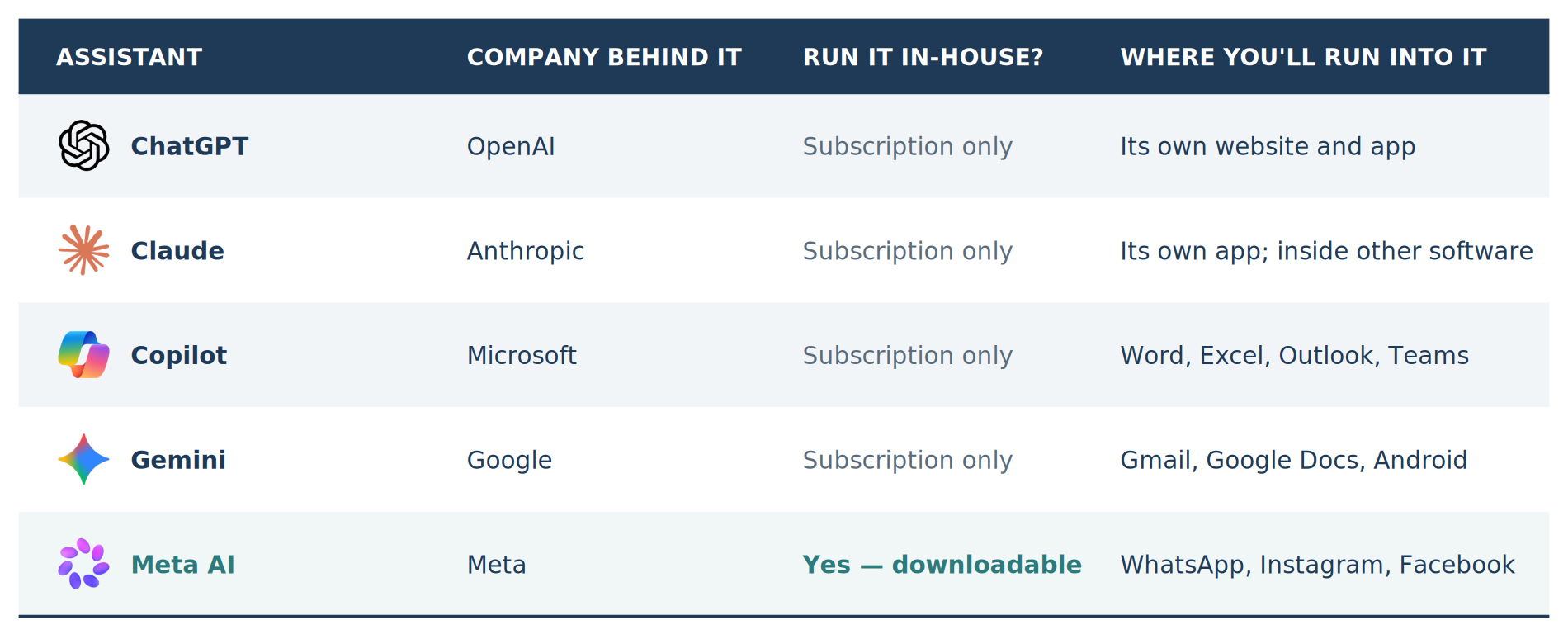
Since the table above is a picture and cannot be searched or copied, here it is again in words. ChatGPT is made by OpenAI, subscription only, met through its own website and app — the product that made “AI” a household word. Claude is made by Anthropic, subscription only, met through its own app and increasingly built inside other companies’ software. Copilot is made by Microsoft, subscription only, and arrives inside Word, Excel, Outlook, and Teams. Gemini is made by Google, subscription only, and shows up in Gmail, Google Docs, and Android phones. Meta AI is made by Meta, appears in WhatsApp, Instagram, and Facebook, and is the exception — Meta lets anyone download it and run it on their own equipment, free.
Two clarifications will save you real confusion. First, the company, the technology, and the app are three different things, and people use the names interchangeably. OpenAI is the company; GPT is the technology it builds; ChatGPT is the app you open. So when a colleague says “we’re using OpenAI,” the useful question is which of the three they mean — because the answer determines whose contract covers your data. Second, “Copilot” is several different products sharing one name. Copilot inside Word and Excel, Copilot for software developers, and Copilot on the Windows desktop have different prices, different rules about your data, and different administrative settings. “We’re getting Copilot” is not an answer; it is the start of a question.
There is a credible second tier underneath these — Grok, Perplexity, Mistral, and DeepSeek come up regularly — but the five above are the ones that will land on your desk through a Microsoft, Google, or Meta product you already pay for, often switched on by default.
Where Your Typing Actually Goes
This is the part that matters most for anyone responsible for controls, and it has nothing to do with which brand scores best on a benchmark this quarter. It is simply: whose computer does the work?
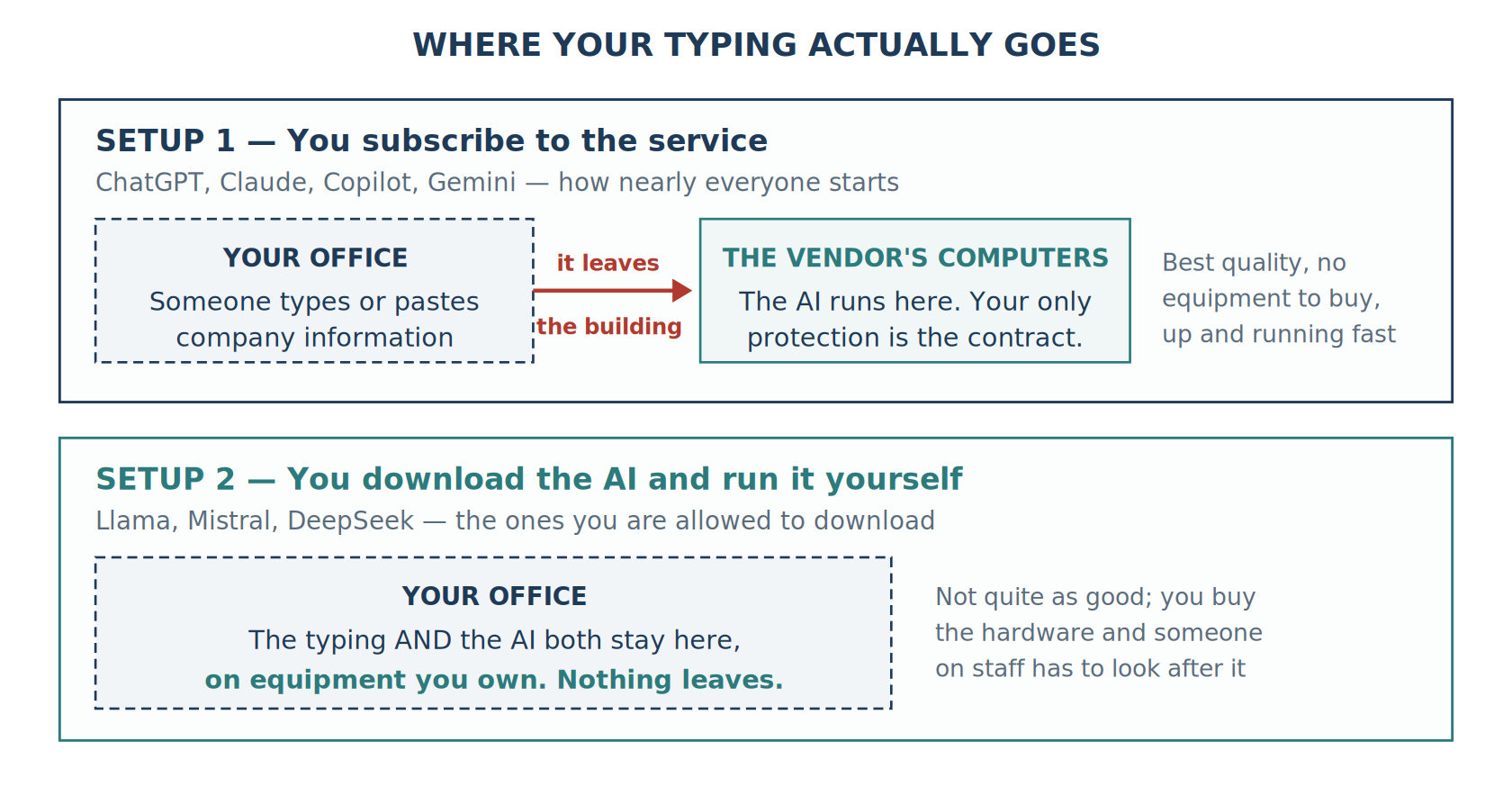
With a subscription, whatever someone types or pastes travels out of your building to the vendor’s computers, where the work is done and the answer is sent back. That is not automatically unacceptable; it is how most business software now works, and the major vendors sell business-tier plans with written commitments about how long they keep your text, whether they use it to train future versions, and which country it is processed in. But notice what the protection actually is: a promise in a contract, not a wall around your network. That means somebody with a legal eye needs to read the terms — and needs to know that the free consumer version and the paid business version of the same product frequently make very different promises.
The alternative exists because Meta gives its AI away as a download, as do Mistral and DeepSeek. You put it on hardware you own, and nothing leaves the building at all. The trade-offs are real and deserve saying out loud: a downloadable model is not quite as capable as the best subscription ones, you also have to buy the hardware to run it on, and somebody on staff has to keep that hardware working. For an organization whose AI ambitions touch payroll, patient information, or client financials, that cost is often easy to justify. For summarizing meeting notes, it is not.
One vendor claim deserves particular scrutiny, because it sounds like a security guarantee and often is not. “Your data never leaves your servers” is true of a downloaded model running on your own equipment. It is not true of a setup where a piece of software on your network reaches out to a subscription AI — in that arrangement the connecting piece is local, but your information still makes the trip. The distinction is worth insisting on in a demonstration, because those two setups sit in completely different places on a risk register.
What This Means For Your Dynamics GP Environment
An AI assistant is not connected to your ERP. It cannot see your accounts in GL00100, this year’s activity in GL20000, your vendors in PM00200, your customers in RM00101, or your company list in SY01500. Ask a chat window for a vendor balance or a trial balance total and whatever number comes back was written, not retrieved. It may look entirely reasonable. It is fiction. This sounds obvious once stated, and it is still the single most common misunderstanding in early AI conversations inside GP shops.
Where these tools genuinely earn their keep is the layer above your data, not the data itself. They are strong at writing a first draft of a database query when you show them the structure, explaining an inherited stored procedure nobody documented, turning a technical constraint into language a controller will accept, condensing a long support thread into three paragraphs, and drafting the runbook nobody has had time to write. In every one of those, the tool is working with words and structure rather than asserting facts about your ledger — and in every one, what comes out is a draft entering your normal review process, not a figure entering your books.
Connecting an AI to live GP data is achievable, and increasingly well supported, but it is a proper project rather than a setting someone switches on. It needs a piece of software in between that runs the real query and hands the verified answer to the AI, read-only credentials limited to specific tables, and someone who understands that in GP the company code and the database name are the same thing — the INTERID — and that the company list lives in the DYNAMICS system database. “Just point it at the company database” is a question, not an instruction, and it needs answering before anyone issues a credential.
5 Things Worth Settling Before the Rollout
None of this requires new software, and all of it is far easier to establish now than after informal use has spread.
- Name an approved tool and say so out loud. When there is no sanctioned option, people use free personal accounts on their own phones and you lose sight of it entirely. One approved tool with a business agreement beats a ban nobody enforces.
- Write the data rule in words people can follow. “No customer personal information, no unreleased financials, no passwords” is a rule someone can actually apply. “Use appropriate judgment” is not a rule.
- Require a human to check anything with a number in it. If output supports a journal entry, a reconciliation, a filing, or something a client will see, a competent person reviews it first. Make sure reviewers understand that a confident tone tells them nothing about accuracy.
- Read the contract terms on training, specifically. Whether the vendor may use what you typed to improve their product is a contract question with a contract answer — and it very often differs between the free version and the paid version of the same product.
- Write down the decision and who made it. Which tool, subscription or in-house, what information is permitted, and who approved it. When an auditor asks how AI is governed here, that document is the answer.
Start Smaller Than You Think
The temptation with something this broadly capable is to hunt for the transformative use case. The better move is much smaller. Pick one recurring, wordy, low-stakes job your team already does — drafting the month-end variance narrative, condensing vendor support threads, documenting that stored procedure — and run it through your approved tool for one full cycle, leaving your existing review step exactly where it is. You will learn more about accuracy, cost, and where checking really needs to happen than any vendor demonstration will show you, and you will learn it on work where a poor draft costs nothing.
And name the drawbacks alongside the benefits, because that is what makes the case credible to the people who have to sign. These tools produce confident errors by design. Their built-in knowledge is dated. Subscription versions send your text to somebody else’s computers. Costs climb with volume in a way that surprises teams who tried it on only a handful of documents. None of that is an argument against using them. It is an argument for using them with the same care you would apply to any other system that touches the ledger.
Key Takeaways
An AI assistant writes the answer that sounds most likely — it does not look anything up, and it cannot tell you it does not know. Every one of these products — ChatGPT, Claude, Copilot, Gemini, Meta AI — is that same technology, differing mainly in manners and in whose computers do the work. Before the next licence is approved, get three things in writing: which tool is behind the feature, where the typing goes, and who checks the output before it reaches the books. Then try it on one small recurring task and let the results set the pace.
Community Summit NA is the largest independent Microsoft AI & Business Applications User Conference on the planet. Register today for four days of big ideas, education, training, networking, and more to define your relevance in the AI era.
