
Managing Warranties in D365FO: Challenges and Effective Strategies



Effectively handling product warranties in Dynamics 365 Finance & Operations (D365FO) is important for organizations aiming to ensure customer satisfaction and operational accuracy. While the system’s native capabilities provide a solid foundation, they lack specific tools for automated warranty management, requiring businesses to creatively adapt existing functionalities and implement disciplined processes. This article explores strategies for overcoming these challenges, enhancing traceability, and minimizing risks associated with warranty claims.
By understanding the available features and their limitations, businesses can better manage the product lifecycle, prevent revenue loss, and deliver reliable customer service. Whether you’re new to D365FO or looking to refine your warranty processes, these insights will equip you to tackle warranty management effectively.
1. Setting Up Warranty Information
Though D365FO doesn’t have a dedicated warranty management module, its existing tools can capture warranty data with some manual effort. Two primary strategies include leveraging product master attributes and enabling serial tracking.
Warranty Attributes
Configuring product master fields allows you to record essential warranty details, such as the warranty period and type. However, these serve as informational fields only, offering no automated workflows or logic.
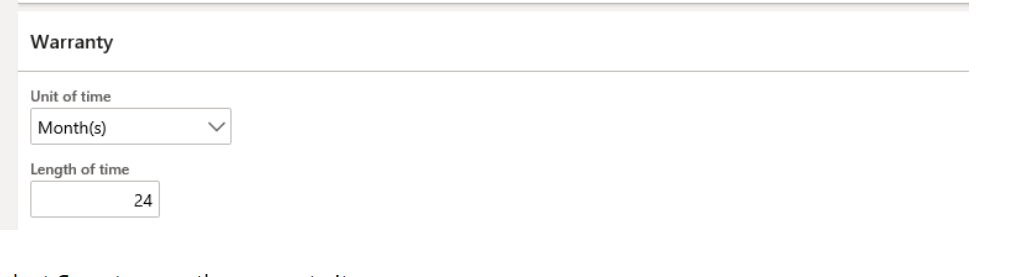
Tip: Use standardized naming conventions and strict data entry protocols to ensure accuracy and consistency across records.
Serialized Tracking
Activating serial number tracking is essential for warranty-eligible products. This feature ties sales, returns, and warranty data to specific items, improving traceability and simplifying warranty verification processes.
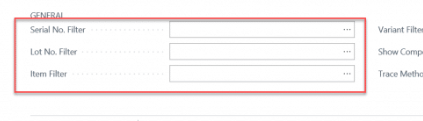
Best Practice: Always enable serial or batch tracking for warranty-eligible items. This ensures robust traceability and facilitates seamless warranty validation during inspections or returns.
2. Selling Warranty-Eligible Products
The sales order process in D365FO plays a vital role in capturing warranty-related data. While warranties can be added as service lines to document duration and type, manual calculations based on the sales date are often required to define warranty periods.
Traceability Strengths and Gaps
While D365FO enables detailed tracking for serialized products, non-serialized items often lack direct linkage to warranty data. This gap can lead to disputes over eligibility and missed claims.
Key Insight: To ensure efficient warranty management, prioritize serial tracking for all warranty-eligible products.
3. Returns and Warranty Claims
Managing returns and claims in D365FO demands precise manual validation. Although the system enables return orders linked to sales data and serial numbers, there is no automated validation for warranty status.
Return Orders
Customer returns are processed using return orders, which can be tied back to the original sales order and serial numbers. Return reason codes like “warranty return” can help categorize and sort claims efficiently.
Inspection & Validation
Returned items can undergo inspection through quarantine management, using disposition codes to determine next steps such as replacement, repair, or rejection.
Critical Limitation: Warranty status validation remains manual, creating risks of errors in high-volume operations.
4. Addressing Gaps Without Customization
Though D365FO provides basic tools for warranty management, manual interventions are often unavoidable. Implementing strict procedures and supplementary tools can fill these gaps and reduce risks.
Key Native Solutions
- Serialized Item Control: Always use serial tracking for warranty-eligible products to ensure comprehensive traceability.
- Return Order Linking: Tie all returns to their original sales orders and serial numbers to reduce processing errors.
- Warranty Documentation: Record warranty terms at the point of sale as product attributes or attached documents to assist manual validations.
Best Practices
- Require serial numbers for sales and returns of warranty-eligible items
- Clear document warranty terms during sales transactions for transparency
- Train teams to manually validate warranty eligibility using transaction logs and product attributes
By adopting these practices, organizations can minimize traceability risks, avoid missed claims, and enhance customer satisfaction.
Key Takeaways
Managing warranties in D365FO is a nuanced process that requires creativity, diligence, and supplemental strategies to address the platform’s limitations. While its native capabilities offer a strong foundation, automation and structured frameworks for warranty contract management are notably absent.
Recommendations for Businesses
- Enable serialization for every warranty-eligible product to establish reliable traceability
- Document warranty terms and durations at the point of sale to support manual validation
- Link returns to original sales orders with serial or batch numbers to reduce processing errors
For scaling businesses, exploring automated solutions or integrating third-party tools can deliver greater efficiency and scalability. Effective planning and disciplined execution are vital for building a robust, future-proof warranty management system.
