
Jonathan Delfraisse
Forum Replies Created
-
 ::
::Hey Lewis,
If you don’t need the historical records to be preserved, then it might be okay to delete them. I recommend using https://stati-cal.com/PrismForCAL to see what object/code use the posted shipment lines and if they are important.
-
Jonathan Delfraisse
MemberApril 10, 2025 at 10:33 am in reply to: Tariffs – Refresh Open Sales Order Prices::As a developer, I would recommend creating a Codeunit to iterate through all the sales order lines, retrieve the correct sales price for each, and update accordingly. This function could be reused for any future mass price updates affecting current sales orders in the future. Lewis has the non-developer idea, once in excel you could use a vlookup for the new price then update all of the sales line at once.
-
Jonathan Delfraisse
MemberOctober 30, 2024 at 1:29 pm in reply to: Change Exchange Rate – Payment Journal -
::
Hello. Thank you for your reply!! The problem I am having is the result of the FlowField.
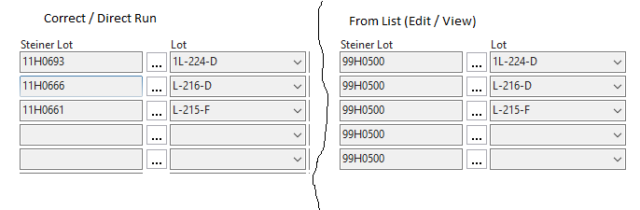
I have taken a screenshot of an example. They are from the same page, but the one on the left was “ran” from the Development Environment and the other was from a “List page” (Edit / View). Usally when you click the 3 dots next to a FlowField, it will use the same fields as filters in the list page of the lookup. But it only shows the second filter. The FlowFilter works when I run the table from the Dev Env. as well (only showing a value if the one field is not blank).
I had an idea as I was typing the above. I switched the order of the two filters. I put the filter <> ” first then the field = Other. Now it seems to be working. <crazy!!!!>

-
Jonathan Delfraisse
MemberNovember 7, 2023 at 10:12 am in reply to: Cleo Integration Cloud (CIC) – Is anyone using this?::At my old company we used Cleo (local install) for SFTP and EDI file transfers. At my new company, instead of paying for Cleo monthly, I made a .NET windows service that runs on the on prem application server to upload files from a folder just like Cleo did. If you are SAAS, you could use Azure Functions that would connect to NAV via web services and then connect to the other web service or generate a file for sftp upload.
-
Jonathan Delfraisse
MemberMay 7, 2024 at 1:16 pm in reply to: Multiple selectable Word Templates for one report -
Jonathan Delfraisse
MemberApril 25, 2024 at 9:39 am in reply to: Multiple selectable Word Templates for one report -
Jonathan Delfraisse
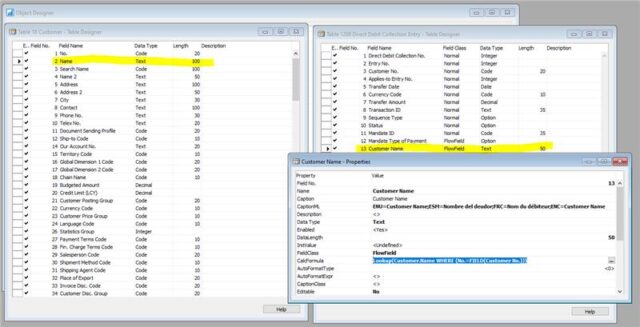
MemberNovember 7, 2023 at 10:27 am in reply to: FlowField text size in relation to reference field::Thank you. That page/table would be awesome if the table and field from the CalcFormula was shown there as fields at least for FlowFields. Other wise it is still each reference one by one checking the size, which Prism will show, just have to click on each of the assignment references and see what the variable or table field length is. It looks like Microsoft might have missed a couple of tables when making the customer name bigger. (At least in version 19 first release).
-
Jonathan Delfraisse
MemberNovember 3, 2023 at 5:36 pm in reply to: FlowField text size in relation to reference field::I am using this: https://stati-cal.com/PrismForCAL
But it only gets me so far. With the software, you are able to find the usage of a field and go to each one of those usage. But it does not show the field size of the variables using the field in question unless you click on each one. I was hoping for another way to find things like in the picture. This screen shot is from the demo database and it shows the Customer Name in a flow field not having the correct length for the text. So if we were to use this table, it would error out if the customer name is bigger than 50. Any ideas how to find these? It might have to be outside of the Development Environment. Or I might just have to do it manually one by one.
stati-cal.com
Our analysis tool and code browser for Microsoft Dynamics NAV featuring detailed find usages