
Jeff Woodard
Forum Replies Created
-

Jeff Woodard
MemberJanuary 13, 2026 at 10:41 am in reply to: 1099 Vendor Overview Page Not Functional::As of 1/13/26, this report is now working in all of our environments, although it is a tad slow. On the initial open it took around 5 minutes for 705 vendors, but subsequent runs were around 2 minutes.
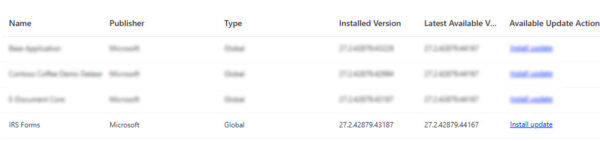
It looks like the update came across the IRS Forms app (version 27.2.42879.44167) as opposed to any full system version. I did have to manually update this in environments that had already been updated to 27.2.
-
Jeff Woodard
MemberDecember 23, 2025 at 11:39 am in reply to: 1099 Vendor Overview Page Not Functional::FWIW, I updated a sandbox instance to 27.2, but neither the production 27.1 nor 27.2 instances displayed any data. “No data found for the selected reporting period”. I created a few 1099 Form Documents and tried in both open and released status, but neither appeared in the report. I did confirm vendor general ledger entries with 1099 amounts were listed in the 2025 reporting year, and the date ranges are correct for the period.
-
Jeff Woodard
MemberNovember 4, 2025 at 2:01 pm in reply to: Allocation Accounts – distribution vs breakdown::Hi Valerie,
We moved from GP to BC about 10 months ago. I’m more on the technical side of things, and I’m sometimes told my credits don’t always match my debits, but we had several discussions around this.
In our scenario, we have several companies and locations, so our GP G/L accounts were similar to yours: <natural>-<company>-<location>.
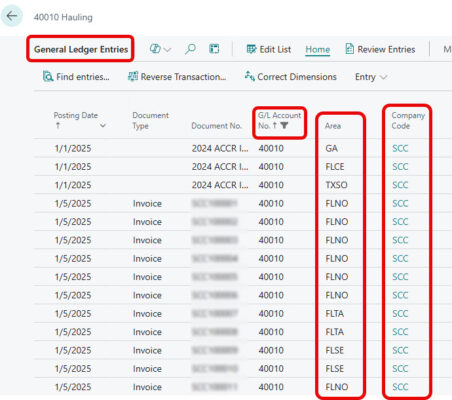
A couple of concepts that we struggled with was that the concept of distributions from GP really goes away in BC and is more or less replaced with dimensions. In BC, our chart of accounts was greatly simplified as we now only have the natural account. Each transaction line gets assigned a company dimension and an area dimension. Hopefully your partner has some experience with GP – ours did not, so explaining a few things we did in GP was sometimes challenging.
We also took the opportunity to rebuild the chart of accounts, which was really worth it to simplify and standardize accounts that had evolved over the last 20 years of changes in business practices.
To illustrate what the GL entries look like in BC, here a quick look at how they look for us with the dimensions replacing the 2 segments of the GP GL account numbers:

-
::
Hi Devora,
That is really sad to hear. I would suggest a good way would be to go to Summit in Orlando on Oct 19-23. If you’ve never been, it’s a great educational opportunity with lots of sessions, and many partners have booths in the exhibit hall where you can meet the folks and talk to them in detail. You could think of it as speed dating for a new partner. It’s a great way to find out if their industry experience / culture / tech expertise is a match. Here’s a link to the event: Home – Community Summit North America
-
Jeff Woodard
MemberMay 15, 2025 at 6:09 pm in reply to: Data Exchange Definition problem with decimals -
Jeff Woodard
MemberMay 13, 2025 at 10:53 am in reply to: Data Exchange Definition problem with decimals::Looks like the same issue we encountered when we went live in January. Here’s what i documented at the time.
The problem was that any amount numbers were not formatting correctly in the file – numbers with trailing zeros had the zeroes truncated, and numbers with non-zero trailing numbers were not using the correct number of spaces in the file.
i.e.
BC Value Expected File Value Actual File value
$750.00 xxxxx75000 xxxxxxx750
$694.36 xxxxx69436 xxxx69436
I found these articles:
EFT/ACH – Payment Amount shows 0 issue, Data Exchange Definition needs correction
Solved: Data Exchange Definition – Dropping Zeros in Footer Total
The solution seems to be to change the ‘Multiplier’ field on the field mapping table from 1 to 100 (despite the article above indicating to change from 100 to 1.
-
Jeff Woodard
MemberApril 21, 2025 at 6:07 pm in reply to: SECURITY- File Storage and Business Central::Sorry to hear your upgrade experience has not been that great. It sounds like 14-23 is a pretty big jump, so I’d guess you have a ton of customized features that may take a while to re-build. I can’t speak for the NAV on-prem environment, but we just moved from another on-prem ERP to BC-online, and also struggled with the best way to attach documents.
The SharePoint route is great if you need to share documents outside of BC as part of a library, but I agree with you that it’s less than ideal keeping in sync with the ERP security, and if you’re syncing SharePoint folders with users PC’s you’re storing the files in multiple places. I know that BC online still supports attachments stored inside the database, so I’m a little mystified why that wouldn’t be supported on-prem, unless you have a medium-term goal of moving online. I would look to the reasoning that’s requiring SharePoint online – there are many other ways that attachments can be stored. You could even store it in SharePoint on-prem, but now it’s getting more expensive.I would hazard a guess that you may have multiple levels of attachments, i.e. vendor invoices and customer agreements may be well suited to a semi-shared SharePoint environment, but if you have more sensitive IP, you may want to treat that differently, but still support the ‘basic’ accounting users. If it were me, and I had to store sensitive IP as attachments that had to be in a cloud environment, I’d look at buying or building a solution that would store the documents in Azure blob storage. You can secure blob storage pretty tightly with file encryption, certificates and limited user access. It’s easily backed up and/or replicated in a myriad of different ways. Then BC is your one-and-only source of truth for end-user security access. You might take a look at Microsoft App source, I did a quick search and found this option: https://appsource.microsoft.com/en-us/product/dynamics-365-business-central/PUBID.winspiresolutions-sg|AID.abs_attachments|PAPPID.2ae43052-0f98-4eeb-b456-589c0bfbca4e?tab=Overview. A free third party solution with SharePoint that doesn’t require syncing SharePoint folders to the PC is DocXtender. It works well for our purposes, but still have a separate SharePoint site and it’s security model to maintain.
If you absolutely have to use SharePoint online, I’d recommend looking at Barracuda cloud backup. While still a cloud service and not truly air gapped, they very affordably back up our entire cloud tenant, and as I understand it, have several layers of storage that would ensure it can be restored if the primary source is corrupted. We have used their backup appliances and firewalls for years with great success.
-
Jeff Woodard
MemberApril 16, 2025 at 5:09 pm in reply to: Crippling Slow Data Sources with Power BI::I can’t tell from your post if you’re on-prem, or online, but here are a couple of pennies for you ;). If you’re on-prem, I’d look in to writing some SQL views that you can do a lot of pre-filtering with. If you’re online, I think you will have to go the extension route by writing a custom API. It sounds like your data sets are pretty huge, so it would make sense to build a custom API library that can do a lot of your pre-filtering and joining using the cloud horsepower rather than transmitting gobs of data that may not be used. Custom APIs in BC are really not all that difficult once you get started. You can get Visual Studio Code for free with its AL tools, and there are lots of MS learning modules out there you can get started with. If you don’t want to get that technical, you can take a look at Erik Hougaard’s Simple Object Designer that has some cost associated with it but will let you take a less code-oriented approach. He has an extensive YouTube channel that is a wealth of BC information from building your own API, to using his tool you can see here: Create your own data Queries for APIs and on-screen reports in Business Central.
-
::
What kind of things are you looking to do with a CRM? BC actually supports a lot of the basic functions of CRM systems. I would look to see what you can leverage with OOB BC first, especially if your team is ‘Old School’. A lot of CRM deployments fail due to user adoption of the ‘new’ system, and better to find out before you spend a lot of time and money if the team will take to it. We use a highly customized Dynamics 365 CRM/Dataverse for our sales and operations teams, and have built a lot of our own integrations. We’re new to BC and are just exploring some of the CRM functionality for the accounting / finance / collections teams, but it seems to have all the objects you need like contacts, leads, opportunities, campaigns, etc. Here’s a quick link I found to some of the BC features: https://learn.microsoft.com/en-us/dynamics365/business-central/marketing-relationship-management
-
::
This table is in the BC Sustainability extension (https://learn.microsoft.com/en-us/dynamics365/business-central/finance-manage-sustainability). If your business doesn’t monitor and record it’s environmental impact, you can also uninstall the extension. In our case, that was simpler than adding and maintaining the security settings. Be aware, however, if you make extensive use of configuration packages that it will remove some columns in key tables that may require you to rebuild some configuration packages. As always test in a sandbox environment first.
-
::
Hi Michelle,
Community Summit is an annual event, usually held in October. There are many other companion events though – this year, they started the ‘Summit Road Show’, which is a series of 1 day educational and networking events held monthly in various locations throughout the US. I had the opportunity to go to the first one in Tampa a few months ago and highly recommend it. There are also local user group meetings, some areas are more active than others. Depending on what communities you are involved in, there are some more focused events, i.e. I know the Power Objects community also has an annual conference. There is also the Dynamics Con event held in May, but I have not been to that one, and I’m not sure it is organized by the Dynamics Communities organization.
-
::
Try https://ebizcharge.com/. We’ve used them in the US on Dynamics GP for several years and are in the process of migrating to BC online and have their BC extension installed for testing now. I can’t speak to their international support, but a quick google search showed me they have GDPR referenced in their privacy policy, and I saw Australia mentioned in several product reviews.
-
Jeff Woodard
MemberJune 12, 2024 at 12:43 pm in reply to: Word and Excel Template capabilities / limitations::Hi Mike,
Good luck on your upcoming cloud journey. Here are a couple of tips to help with your document quandry.
1) You CAN continue to use SSRS reports, but you’ll need to convert any embedded SQL to to FetchXML. There are some very useful conversion utilities in the XRM toolbox (https://www.xrmtoolbox.com/) where you can paste in the SQL and get back the FetchXML.
2) If you’re used to writing SQL queries, you can use SSMS (Sql Server Management Studio) to connect to your online instance just as easily as your on-prem instance. In the login prompt for the database, use your CRM-Online URL i.e.<companyname>.crm.dynamics.com, select Microsoft Entra MFA for the Authentication (hopefully your org is using multi factor authentication, otherwise use the appropriate option), and your full e-mail address as the username. The database is read-only, but you can run standard SQL queries this way online.
3) Depending on the types of documents you’re looking to convert, you may want to look at a third party product called DocumentsCorePack for Microsoft Dynamics 365 (mscrm-addons.com). It has a custom MS Word add-on that lets you easily insert placeholders for the Dataverse data. IMO, the real power of this product is the one-click actions where you select all the steps in the document handling. We have a single button that creates a customer quote from a custom entity. With one button click, it creates a pdf, attaches it to a pre-defined dynamic e-mail template, and saves a copy of the document in SharePoint. The user opens the .eml file in outlook, makes any final changes and hits send.
-
::
Hi @kristywilhelm ,
This can be done with synchronization filters, here’s a reference to get you started: Choose the records to synchronize between Dynamics 365 apps and Outlook or Exchange | Microsoft Learn.
The users can create these rules themselves, however, I’ve found it easier to administer on the admin side where you can push out the filters to users that are not as technical. The XrmToolBox has a great tool called the Sync Filter Manager that you can use to push out a D365 view as an outlook filter.
-
Jeff Woodard
MemberApril 10, 2024 at 10:52 am in reply to: GP 18.6.1695 (2023) Inventory Item Update Tool?::Hi Clay,
It sounds like you’re spending an awful lot of time and effort working around the e-mail setup. I’m not sure what your specific issues are, but it should be fairly easy to get going, and sounds like it will save your folks a ton of time in shuffling documents. Here’s a good guide to setting up basic e-mail in GP: https://community.dynamics.com/blogs/post/?postid=8002aee5-4db1-4d5f-9934-5ce842502d6c
The only trick is If you’re using GP 18.3+, there is an azure application registration that you need to set up. The link above has this step-by-step guide: https://learn.microsoft.com/en-us/dynamics-gp/whats-new/multi-factor-authentication. The link wasn’t obvious when we updated to the latest GP, so I think it bears mentioning.