


Power Platform
Public Group
Active 3 hours ago
Power Platform
Organizer:
- JOSE Organized by
-
-

Values abnormal at 12:00 AM
-
Values abnormal at 12:00 AM
Posted by DSC Communities on May 17, 2021 at 3:03 am-

Asif Dakhway
MemberMay 17, 2021 at 3:03 AM
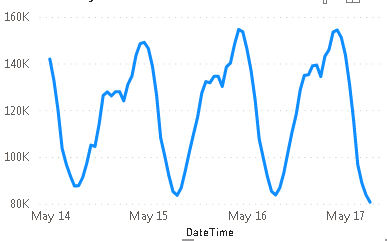
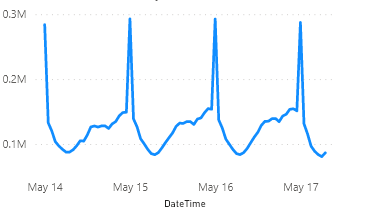
I’m trying to make report with hourly data pulling from MS SQL database, If I prepare it in Powerbi Desktop it shows correct value but if I publish same report to Powerbi it shows abnormal value. Can anyone help meSnapshot from Power bi Desktop application
Snapshot from Power bi website
——————————
Asif Dakhway
—————————— -
Asif Dakhway
MemberMay 17, 2021 at 3:45 AM
My DateTime fields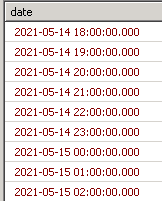
——————————
Asif Dakhway
——————————
——————————————- -
Ben Howard
MemberMay 17, 2021 at 6:16 AM
Are you able to share your .pbix file?——————————
Ben Howard, UK.Please mark any answer as recommended if it helps you.
——————————
——————————————- -
Is it possible you are looking at another report from the same dataset? Check the lineage of the dataset.
——————————
Bill Kellam
——————————
——————————————- -
Asif Dakhway
MemberMay 27, 2021 at 2:54 PM
I cannot share the data. lineage is OK——————————
Asif Dakhway
——————————
——————————————- -
Vishesh Jain
MemberJune 7, 2021 at 4:36 AM
Hi ,Can you please check that the dates are being read correctly on PBI Service as I have faced a similar problem and my numbers go haywire.
Instead of a graph try putting the measures on a table with the date and time, this way you can investigate what is actually going on with? the numbers.
I say this because if you look at the Y-axis the numbers are nearly double of what you have on the desktop.Thank you,
——————————
Vishesh Jain
MCSA Power BI and Excel
Emerald Award Dynamic Communities 2019
Owner
VR Construction
——————————
——————————————- -
Asif Dakhway
MemberJune 8, 2021 at 4:07 AM
Thanks Vishesh,I’ll check this and one thing I want to add is I’m using incremental refresh
——————————
Asif Dakhway
——————————
——————————————- -
Vishesh Jain
MemberJune 8, 2021 at 8:21 AM
Hi ?,Incremental refresh should not affect this, as it is only related to data refreshes.
My assumption is, that the dates are being read wrong, which is why the numbers are changing and in effect the Y-axis scale too.
Investigate the actual numbers first as this will show if and when, what is wrong where.
Thank you,
——————————
Vishesh Jain
MCSA Power BI and Excel
Emerald Award Dynamic Communities 2019
Owner
VR Construction
——————————
——————————————- -
Asif Dakhway
MemberJune 10, 2021 at 4:27 AM
I found something strange, I tried report by disabling Incremental refresh, then after publishing to PBI service and refresh from PBI service it shows fine no abnormality
then I enabled the Incremental refresh and after publishing to PBI service and refresh from PBI service it shows again abnormality.My table is getting updated every hour below is the snap of my incremental refresh
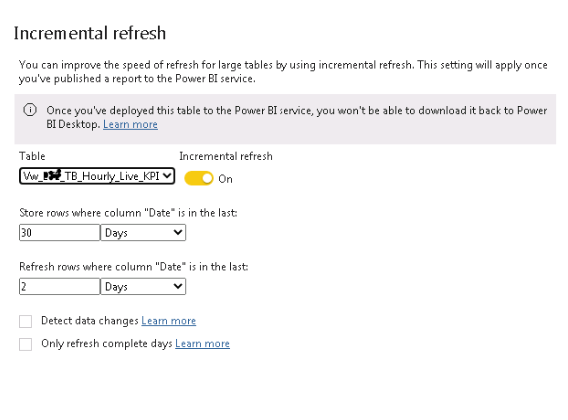 I tried with enabling Detect data changes and Only refresh complete days also but same result
——————————
Asif Dakhway
——————————
——————————————- -
Asif Dakhway
MemberJune 10, 2021 at 4:37 AM
One more thing
In both the scenario after publishing report on PBI service it shows normal
It is getting abnormal only when I refresh from PBI service ( After enabling incremental refresh)——————————
Asif Dakhway
——————————
——————————————- -
Asif Dakhway
MemberJune 13, 2021 at 7:41 AM
I found the problem
Actually while filtering the dattime column instead of selecting “is before” I was selecting “is before or equal to” for RangeEnd option
after correcting, it works fine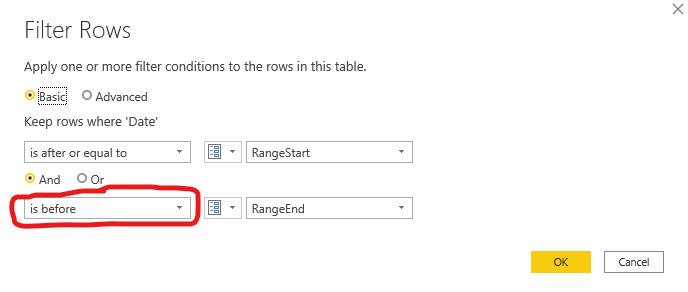 Thanks for everybody
——————————
Asif Dakhway
——————————
——————————————-
DSC Communities replied 4 years, 7 months ago 1 Member · 0 Replies -
-
0 Replies
Sorry, there were no replies found.
The discussion ‘Values abnormal at 12:00 AM’ is closed to new replies.
