UNION and duplicates

  • UNION and duplicates

    Posted by DSC Communities on March 31, 2021 at 8:17 am
    • GĆ©rard Ducouret

      Member

      March 31, 2021 at 8:17 AM

      Hi,
      I was reading that:

      UNION performs the union of two tables. It is mainly used in calculated columns.

      In this example the opposite table contains all the countries from both the “Customer” and the “Store” tables.

      UNION does not remove duplicates before returning a result.

      So I tried this little code:

      AllCountryRegions =Ā  Ā  Ā  Ā  Ā  Ā  Ā — New Table

      UNION (

      Ā  Ā  Ā  ALL ( Customer[CountryRegion] ),

      Ā  Ā  Ā  ALL ( Store[CountryRegion] )

      )

      and I noticed that all the duplicates are removed!
      So, where is the truth ?

      Thanks for your help

      Ā 

      ——————————
      GƩrard Ducouret
      ——————————

    • Ben Howard

      Member

      April 1, 2021 at 8:15 AM

      Hi Gerard, I have certainly written DAX where I have used UNION in conjunction with DISTINCT to remove duplicates, so I would check your code and input.

      ——————————
      Ben Howard, UK.

      Please mark any answer as recommended if it helps you.
      ——————————
      ——————————————-

    • GĆ©rard Ducouret

      Member

      April 1, 2021 at 9:00 AM

      Hi Ben, If you want, you can check, in the attached file, the “AllCountryRegion” calculated table, tab “Page 1”

      Thanks

      ——————————
      GƩrard Ducouret
      ——————————
      ——————————————-

    • Ben Howard

      Member

      April 5, 2021 at 4:35 AM

      Hi Gerard,

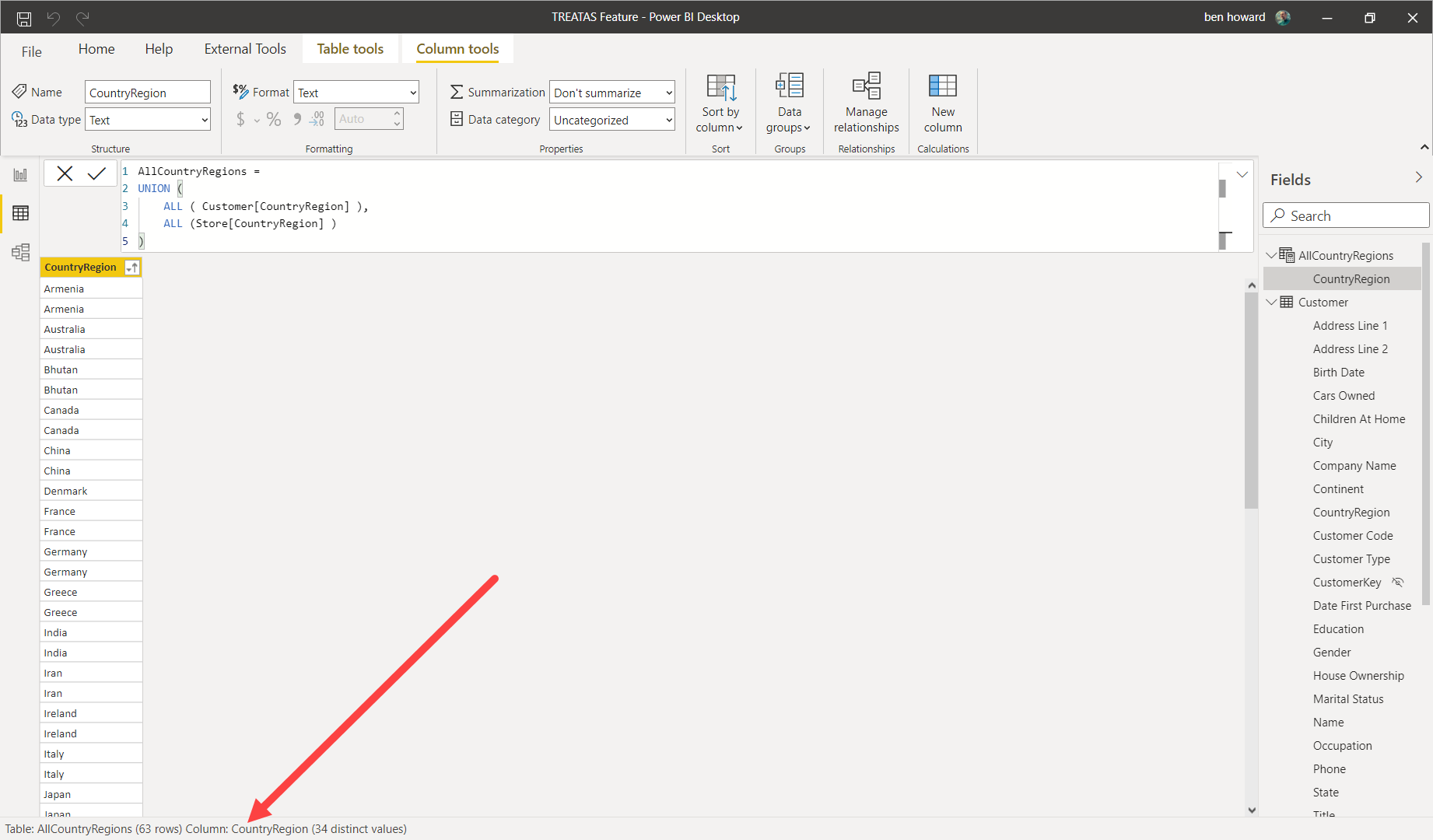
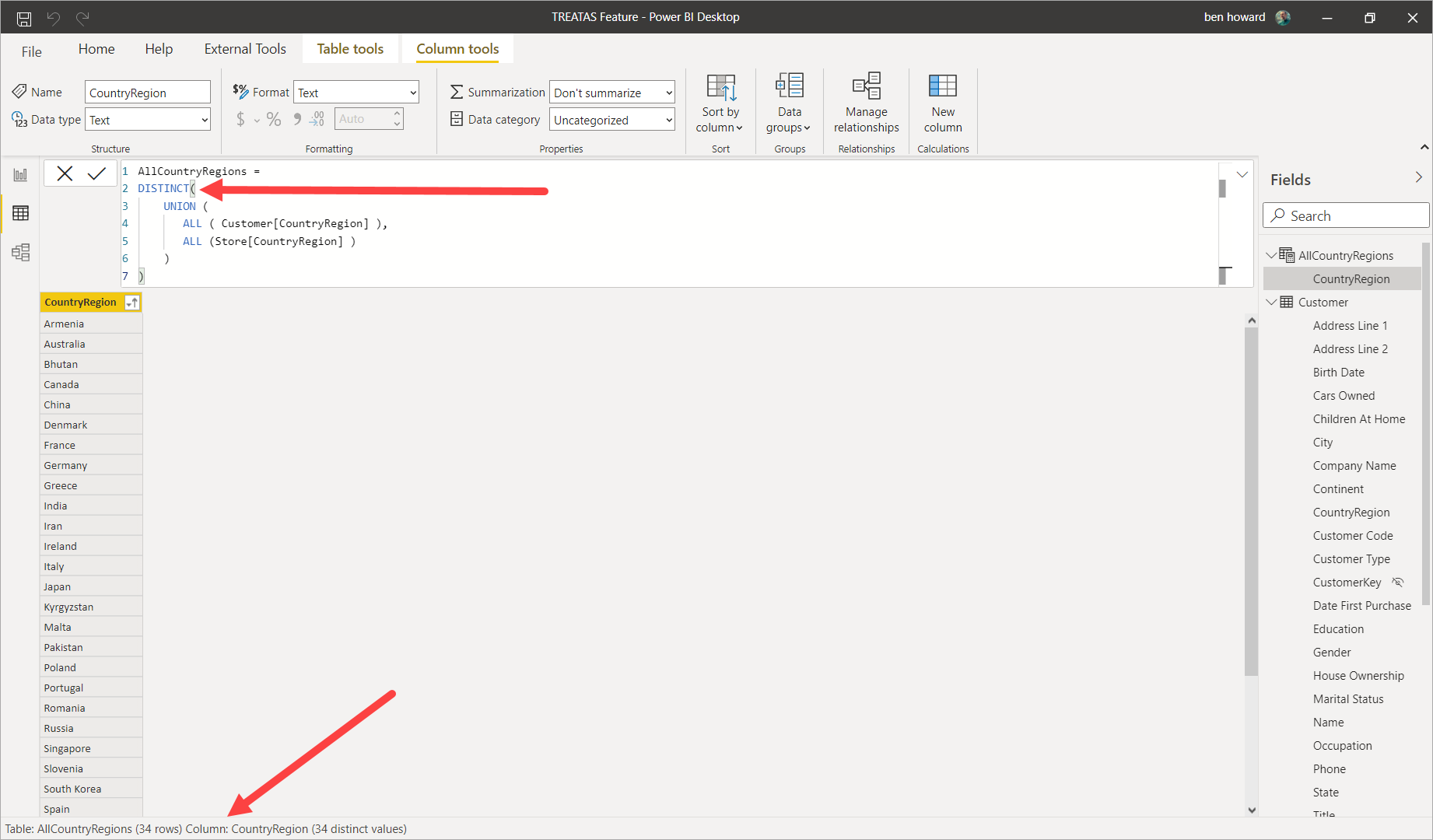
      If you look at the data tab, you’ll see you have 63 rows, but 34 distinct values.Ā  Try sorting the column ascending and you’ll see the duplicates.

      If you then wrap a distinct around it, you’ll only return 34 values.

      ——————————
      Ben Howard, UK.

      Please mark any answer as recommended if it helps you.
      ——————————
      ——————————————-

    • GĆ©rard Ducouret

      Member

      April 5, 2021 at 4:54 AM

      Hi Ben,

      Thanks a lot for these detailed explanations!

      ——————————
      GƩrard Ducouret
      ——————————
      ——————————————-

    • William Skelley

      Member

      April 5, 2021 at 9:17 AM

      Hi Gerard:

      If you use the function DISTINCT before UNIONĀ  Ā  DISTINCT(

      UNION( …

      This action will remove duplicates.

      I hope this helps you.

      Bill

      ——————————
      William Skelley
      01106
      Longmeadow MA
      8602807221
      ——————————
      ——————————————-

    • GĆ©rard Ducouret

      Member

      April 5, 2021 at 9:36 AM

      Hi Bill,
      Great ! Very interesting !
      Thanks a lot

      ——————————
      GƩrard Ducouret
      ——————————
      ——————————————-

    • William Skelley

      Member

      April 5, 2021 at 9:57 AM

      Your welcome!

      I didn’t notice Ben had taken a through approach towards the solution too!

      Best regards,

      Bill

      ——————————
      William Skelley
      01106
      Longmeadow MA
      8602807221
      ——————————
      ——————————————-

    DSC Communities replied 5 years ago 1 Member · 0 Replies
  • 0 Replies

Sorry, there were no replies found.

The discussion ‘UNION and duplicates’ is closed to new replies.

Start of Discussion
0 of 0 replies June 2018
Now

Welcome to our new site!

Here you will find a wealth of information created for peopleĀ  that are on a mission to redefine business models with cloud techinologies, AI, automation, low code / no code applications, data, security & more to compete in the Acceleration Economy!