


Power Platform
Public Group
Active 2 hours ago
Power Platform
Organizer:
- JOSE Organized by
-
-

Power BI refresh error –
-
Power BI refresh error –
Posted by Unknown Member on May 20, 2020 at 7:50 am-
Hi Experts,
I build a report in Power BI desktop where source is JIRA Cloud. I am able to refresh in Power Bi desktop but when I trigger a manual refresh, it gives me an error message given below –
Data source error Unable to refresh the model (id=11272710) because it references an unsupported data source.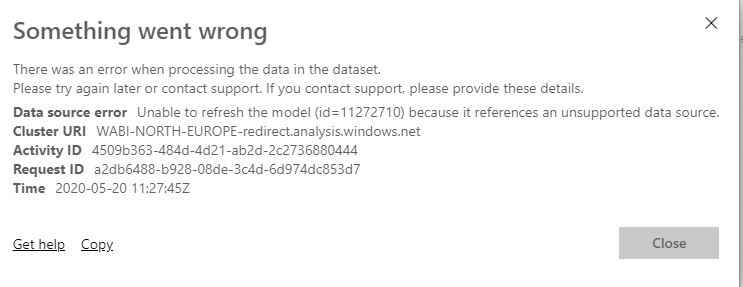
JIRA Cloud by default push only 50 rows per page and if you define MaxResults, it gives 1000 rows. This is I believe JIRA defaut behaviour.
So, I was using other recommended way to use functions Fetch Pages/page and get all records. Code is given below.Generate by Page Code:
//Query Name: GenerateByPage
(getNextPage as function, optional tableType as type) as table =>
    let
        listOfPages = List.Generate(
            () => getNextPage(null),
            (lastPage) => lastPage <> null,
            (lastPage) => getNextPage(lastPage)
            ),
        tableOfPages = Table.FromList(listOfPages, Splitter.SplitByNothing(), {"Column1"}),
        firstRow = tableOfPages{0}?,
        keys = if tableType = null then Table.ColumnNames(firstRow[Column1])
               else Record.FieldNames(Type.RecordFields(Type.TableRow(tableType))),
        appliedType = if tableType = null then Value.Type(firstRow[Column1]) else tableType
    in
        if tableType = null and firstRow = null then
            Table.FromRows({})
        else
        Value.ReplaceType(Table.ExpandTableColumn(tableOfPages, "Column1", keys), appliedType)?
Fetch Page Code:
//Query Name: FetchPage
let
    FetchPage = (server as text, url as text, pageSize as number, skipRows as number) as table =>
    let
        //Here is where you run the code that will return a single page
        contents = Web.Contents(server,[RelativePath=url, Query = [maxResults= Text.From(pageSize), startAt = Text.From(skipRows)]]),
        json = Json.Document(contents),
        Value = json[issues],
        table = Table.FromList(Value, Splitter.SplitByNothing(), null, null, ExtraValues.Error)
    in
        table meta [skipRows = skipRows + pageSize, total = 500]
in
    FetchPage?
Fetch Pages:
//Query Name: FetchPages
let
    FetchPages = (server as text, url as text, pageSize as number) =>
let
    Source = GenerateByPage(
    (previous) =>
    let
        skipRows = if previous = null then 0 else Value.Metadata(previous)[skipRows],
        totalItems = if previous = null then 0 else Value.Metadata(previous)[total],
        table = if previous = null or Table.RowCount(previous) = pageSize then
                    FetchPage(server, url, pageSize, skipRows)
		else null
    in table,

    type table [Column1])
in
    Source
in
    FetchPages?
Here is the code to import JIRA rows:
let
    Source = FetchPages("https://jiradc2.int.net.nokia.com", "/rest/api/2/search?jql=project%20in%20(NE1,NE2,NE3,NE4,NE5,NE6,NE7)%20AND%20issuetype%20in%20(Epic,SAFe_Solution_Epic,SAFe_Capability,Improvement,Story,%22New%20Feature%22)%20AND%20created>%3D2020-04-04&fields=customfield_41593&fields=customfield_12157&fields=updated&fields=resolutiondate&fields=lastViewed&fields=duedate&fields=created&fields=versions&fields=summary&fields=priority&fields=components&fields=comment&fields=assignee&fields=subtasks&fields=status&fields=resolution&fields=reporter&fields=project&fields=issuetype&fields=fixVersions&fields=creator&fields=labels&expand=changelog", 500)

in
    Source?
With this I am successfully loading 45K+ rows in Power BI desktop but when I published this is giving me an error mentioned above.
Option 2-
Understanding from blogs that may be some query is not recognized by Power Bi service, I tries below with Relative Path as well –let Source = Json.Document(Web.Contents("https://jiradc2.int.net.nokia.com", [RelativePath="/rest/api/2/search?jql=project%20in%20(NEO1,NEO2, NEO3,NEO4,NEO5,NEO6)%20AND%20issuetype%20in%20(Epic,SAFe_Solution_Epic,SAFe_Capability,Improvement,Story,%22New%20Feature%22)%20AND%20created>%3D2017-01-01&fields=customfield_41593&fields=customfield_12157&fields=updated&fields=resolutiondate&fields=lastViewed&fields=duedate&fields=created&fields=versions&fields=summary&fields=priority&fields=components&fields=comment&fields=assignee&fields=subtasks&fields=status&fields=resolution&fields=reporter&fields=project&fields=issuetype&fields=fixVersions&fields=creator&fields=labels&expand=changelog"])), issues = Source[issues], #"Converted to Table" = Table.FromList(issues, Splitter.SplitByNothing(), null, null, ExtraValues.Error) in #"Converted to Table"?
With this query I managed to refresh on Power Bi service but now I am getting only 50 rows instead of ~45K. Even if define maxResults to 10000, it gives in return only 1000 rows as it is a defaul behaviour of JIRA.
If the either of the options code can be modified in a way that it gives all rows and also refresh on Power Bi service, it will be a great hep for us.
Because of this issue many Power Bi reports are stuck in our department.Thanks again !
——————————
Gaurav
——————————
Unknown Member replied 5 years, 6 months ago 1 Member · 0 Replies -
-
0 Replies

Sorry, there were no replies found.
The discussion ‘Power BI refresh error –’ is closed to new replies.
