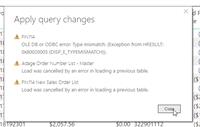
I’m having trouble performing a calculation using M language in power query. It successfully calculates in the query editor, but when I “Close & Apply” it says there is some error.Ā When the Freight Key is Delivered and the Accrued Freight is 0, then I want to calculate and replace the Accrued Freight like this: Pounds Billed * .04. If this if/then doesn’t apply, then the freight remains unchanged.
This is the formula: = Table.ReplaceValue(#”Month”, 0, each if [Freight Key] = “Delivered” and [Accrued Freight] = 0 then (each [Pounds Billed]*.04) else [Accrued Freight], Replacer.ReplaceValue,{“Accrued Freight”})
This is the error power BI gives me while it’s attempting to refresh.
I don’t get it. If it works in the query editor, why doesn’t it work when applying it?
—————————— F.L. Oakwood, GA ——————————
Gopa Kumar Sivadasan
Member
July 16, 2020 at 2:21 AM
Hi
There must be a value in your referenced column source which is not of the data type for that column. In query editor, by default, only 1000 rows are loaded. Hence, if the error is in a row not within this 1000 rows, then no error is shown in query editor. But when you close & apply, the whole data is transformed, and it will throw an error.
Please check in the source data for any data type mismatches.
Please note:
This action will also remove this member from your connections and send a report to the site admin.
Please allow a few minutes for this process to complete.
Report
You have already reported this .
Welcome to our new site!
Here you will find a wealth of information created for peopleĀ that are on a mission to redefine business models with cloud techinologies, AI, automation, low code / no code applications, data, security & more to compete in the Acceleration Economy!