


Power Platform
Public Group
Active 9 hours ago
Power Platform
Organizer:
- JOSE Organized by
-
-

Navigate between screens based on checkbox value on power apps
-
Navigate between screens based on checkbox value on power apps
Posted by DSC Communities on June 21, 2022 at 10:26 am-

Ahmed Njimou
MemberJune 21, 2022 at 10:26 AM
Hello everyone,
I want to navigate between screen in my application power app, the first screen is this :

And based on the checkbox selected, i want to navigate to it. And also navigate between the for screens if more than checkbox is selcted. For example, if i check the first and the last one, i want to go to the screen of the first one, then the screen of the last one. I want to do all the possibility, i tried this code but it’s not working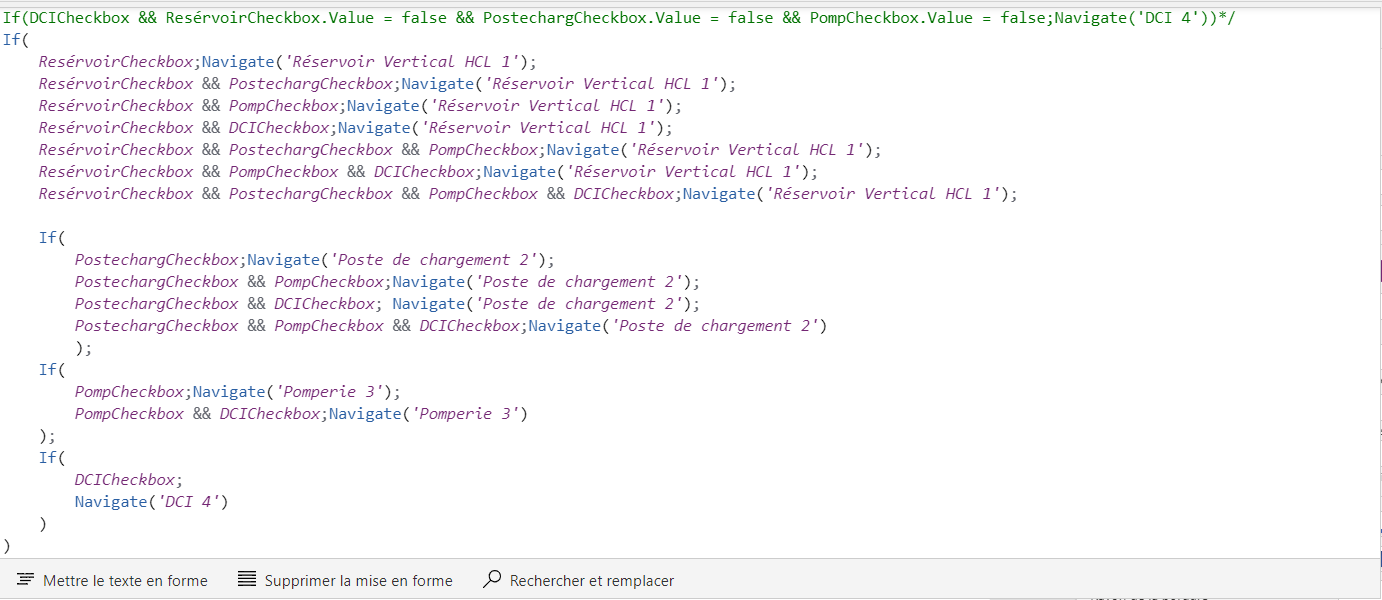
Can someone help with this please, thank you in advance !
——————————
Ahmed Njimou
Database administrator
Neuville-sur-Oise
—————————— -
Enrique Sánchez
MemberJune 22, 2022 at 6:13 AM
Hello Ahmed,
I suppose that if you select several checkboxes, you want to navigate to the first one and then in this screen you will place a button to navigate to the second one.
If so, I recommend you to collect your checkboxes in a Collection. After that you could navigate to the appropiate screen in order.Hope this helps.
——————————
Enrique Sánchez
——————————
——————————————- -
Ahmed Njimou
MemberJune 22, 2022 at 9:45 AM
Hello Enrique,
I tried to work with collections, but without success.
in the next button, i put this code :
Collect(ColNav;{NumeroEcran: CountRows(ColNav)+1;Ecran:’DCI 4′});;
Set(VNavig;{Actuel:1;Total:CountRows(ColNav)});;
Navigate(LookUp(ColNav;NumeroEcran=VNavig.Actuel;Ecran))In every checkbox oncheck i puted :
Collect(ColNav;{NumeroEcran:CountRows(ColNav)+1;Ecran:’ScreenName’})on the Unoncheck :
RemoveIf(ColNav;Ecran=’ScreenName’)and then in evrey screen i creat a button with this code to navigate :
Set(VNavig;{Actuel:VNavig.Actuel+1;Total:CountRows(ColNav)});;If(VNavig.Actuel>VNavig.Total;Navigate(‘Acceuil_1 apres creation prjt’));;
Navigate(LookUp(ColNav;NumeroEcran=VNavig.Actuel;Ecran))But it’s not working proprely, can you tell me more about your way of doing this, thank you in advance !
——————————
Ahmed Njimou
Database administrator
Neuville-sur-Oise
——————————
——————————————- -
Tracy Madison
MemberJune 22, 2022 at 8:13 AM
I create a table that has the screens as a column value and then I navigate based on the users selection and bind that to a gallery for a menu.On button click in the gallery:
If(!IsBlank(ThisItem.screenname),Navigate(ThisItem.screenname),
//Perform Refresh
)Gallery Items:
ClearCollect(tblMenu,Table(
{id: 1,desc: “Home”,screenname: scrHome},{id: 2,desc: “Request”,screenname: scrRequest},{id: 3,desc: “Calendar”,screenname: scrCalendar},{id: 5,desc: “Actuals”,screenname: scrActuals},{id: 6,desc: “Refresh” //Performs a refresh on all data sources.})
)——————————
Tracy Madison
Sr. Application Developer
Fort Worth TX
——————————
——————————————- -
Ahmed Njimou
MemberJune 22, 2022 at 9:47 AM
Hello Tracy, and thank you for your response. i did not really understand your solution, so i have to create a table in place of checkboxs ?——————————
Ahmed Njimou
Database administrator
Neuville-sur-Oise
——————————
——————————————- -
Tracy Madison
MemberJune 29, 2022 at 6:57 AM
Hello – I would say that you would build the table, bind it to a gallery and then have your check boxes in the card. Then OnSelect if the checkbox is value is true, you navigate to that screen.——————————
Tracy Madison
Sr. Application Developer
Fort Worth TX
——————————
——————————————- -
In the oncheck property of the checkboxes, you can navigate to another screen. But that may not work if indeed a uer could check several of them before navigating away. In that case, you can add a button or a seperate checkbox to start the navigatiom and include logic that goes to the first screen you want based on what is checked. When finished on one of those screens, provide logic that determines if another screen should be next based on the check boxes or simply return back to the home screen. Might also require keeping up with what screen(s) were selected and also visitied.
It is a lbit challenging to provide a crisp answer since it might be possibe to have a large number of screen selection criteria or to know the priority of visiting them.
——————————
Larry Heimendinger
larry@techevents.com
EverettWA
——————————
——————————————-
DSC Communities replied 3 years, 9 months ago 1 Member · 0 Replies -
-
0 Replies
Sorry, there were no replies found.
The discussion ‘Navigate between screens based on checkbox value on power apps’ is closed to new replies.
