Monthly Change in a Rolling Average

  • Monthly Change in a Rolling Average

    Posted by Unknown Member on April 24, 2018 at 6:40 pm
    • Martin Wing

      Member

      April 24, 2018 at 6:40 PM

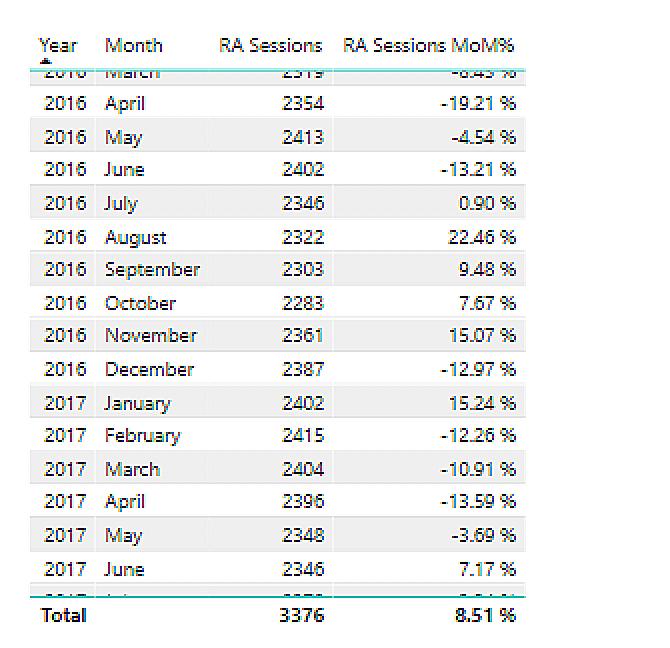
      I am trying to show the monthly percentage difference in a 12-month rolling average. I created the rolling average using a quick measure and tried creating another quick measure for month-over-month % change, but it is not calculating correctly.Ā 

      Does anyone have an idea of what is happening?Ā 

      ——————————
      Martin
      ——————————

    • Brian Connelly

      Member

      April 25, 2018 at 7:30 AM

      ?Can you share the calculations that you are using?Ā  It is hard to make an assessment without any indications of what you did.

      ——————————
      Brian Connelly
      ——————————
      ——————————————-

    • Kristi Cantor

      Member

      April 25, 2018 at 7:53 AM

      Did you try creating a measure for Last Month 12 Month rolling average and then using it in the % change?
      I usually create a current total, a last month total and then do my % change by something like : DIVIDE([ThisMonth]-[LastMonth]),[LastMonth]

      ——————————
      Kristi Cantor
      KaTom Restaurant Supply
      Kodak TN
      4235865758
      ——————————
      ——————————————-

    • Martin Wing

      Member

      April 25, 2018 at 12:35 PM

      Sorry – below are the calculations from the “Quick Measures”

      RA Sessions =
      IF(
      ISFILTERED(‘Date'[Date]),
      ERROR(“Time intelligence quick measures can only be grouped or filtered by the Power BI-provided date hierarchy or primary date column.”),
      VAR __LAST_DATE = ENDOFMONTH(‘Date'[Date].[Date])
      VAR __DATE_PERIOD =
      DATESBETWEEN(
      ‘Date'[Date].[Date],
      STARTOFMONTH(DATEADD(__LAST_DATE, -11, MONTH)),
      __LAST_DATE
      )
      RETURN
      AVERAGEX(
      CALCULATETABLE(
      SUMMARIZE(
      VALUES(‘Date’),
      ‘Date'[Date].[Year],
      ‘Date'[Date].[QuarterNo],
      ‘Date'[Date].[Quarter],
      ‘Date'[Date].[MonthNo],
      ‘Date'[Date].[Month]
      ),
      __DATE_PERIOD
      ),
      CALCULATE(SUM(‘Overview'[Sessions]), ALL(‘Date'[Date].[Day]))
      )
      )

      RA Sessions MoM% =
      IF(
      ISFILTERED(‘Date'[Date]),
      ERROR(“Time intelligence quick measures can only be grouped or filtered by the Power BI-provided date hierarchy or primary date column.”),
      VAR __PREV_MONTH = CALCULATE([RA Sessions], DATEADD(‘Date'[Date].[Date], -1, MONTH))
      RETURN
      DIVIDE([RA Sessions] – __PREV_MONTH, __PREV_MONTH)
      )

      As you can see the MoM change is not calculating correctly.

      ——————————
      Martin Wing
      Vice President
      PCM
      Yorba Linda CA
      9512850487
      ——————————
      ——————————————-

    • William Skelley

      Member

      December 20, 2019 at 6:24 PM

      Hi Martin:

      I think this measure could help you and has flexibility to change your months/timeframes. It is set at 3 now. I hope this helps you. It’s a 3-month moving average formula.

      Best regards,

      Bill Skelley

      ——————————
      William Skelley
      01106
      Longmeadow MA
      8602807221
      ——————————
      ——————————————-

    Unknown Member replied 7 years, 11 months ago 1 Member · 0 Replies
  • 0 Replies

Sorry, there were no replies found.

The discussion ‘Monthly Change in a Rolling Average’ is closed to new replies.

Start of Discussion
0 of 0 replies June 2018
Now

Welcome to our new site!

Here you will find a wealth of information created for peopleĀ  that are on a mission to redefine business models with cloud techinologies, AI, automation, low code / no code applications, data, security & more to compete in the Acceleration Economy!