


Matrix visual filtering another table with multiple selections

  • Matrix visual filtering another table with multiple selections
    Posted by DSC Communities on April 10, 2020 at 10:48 am
    • Ondrej Bartak

      Member

      April 10, 2020 at 10:48 AM

      Hi,
      I have report with 2 visuals:
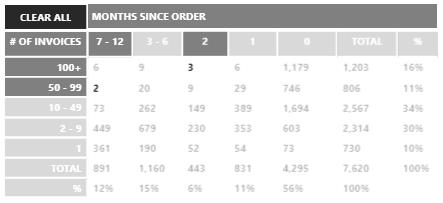
      1. Matrix that shows number of customers split by number of invoices (rows) and months (columns).
      2. Table with customer detail, filterable by clicking in matrix above.

      It works well – if I click (highlight) one cell in matrix, it filters second table accordingly, only showing relevant customers.
      However, when I highlight two cells (holding down Ctrl), it does not show detail for these two cells, but for all cells with highlighted columns and rows in matrix.

      Is there a way around it, so table detail only shows two highlighted cells?

      In other words: I want second table to show 5 customers per selection, but instead it shows 20 (intersection of all highlighted columns and rows)

      ——————————
      Ondrej Bartak
      ——————————

    DSC Communities replied 5 years, 12 months ago 1 Member · 0 Replies
  • 0 Replies

Sorry, there were no replies found.

The discussion ‘Matrix visual filtering another table with multiple selections’ is closed to new replies.

Start of Discussion
0 of 0 replies June 2018
Now

Welcome to our new site!

Here you will find a wealth of information created for peopleĀ  that are on a mission to redefine business models with cloud techinologies, AI, automation, low code / no code applications, data, security & more to compete in the Acceleration Economy!
