


Power Platform
Public Group
Active 22 hours ago
Power Platform
Organizer:
- JOSE Organized by
-
-

Look for previous date – DAX help
-
Look for previous date – DAX help
Posted by DSC Communities on September 11, 2019 at 12:59 pm-

Augusto Berg
MemberSeptember 11, 2019 at 12:59 PM
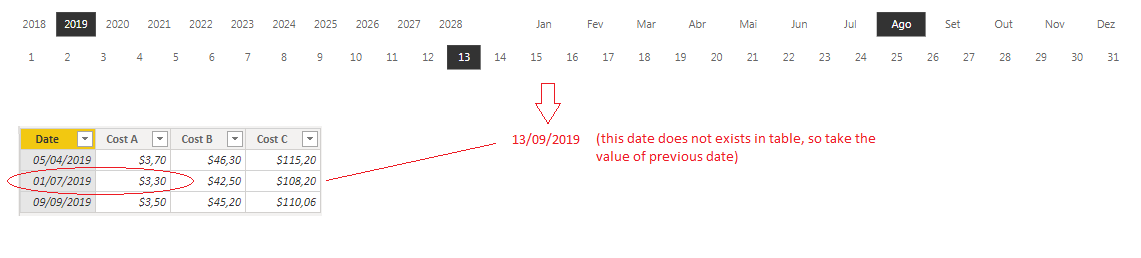
Hi.I have a PBI application with three slicers: day, month and year. I need to look for a value in the column “Cost A” of a table according the date selected in the slicers but if the date selected does not exist in the table, I need the value from the previous date that was the selected.
For example, in the following picture the date selected is 13/08/2019 (dd/mm/yyyy) but this date does not exist in the table, so I need to return the value from column “Cost A” from the previous date, i.e. the value of the date 01/07/2019 which is $ 3.30.
Could anyone help me in DAX, please ?
Thank you for your attention.
Cheers,
Berg——————————
Augusto Berg
Electrical Engineer
—————————— -
Audrey Abbey
MemberSeptember 11, 2019 at 4:31 PM
Hi Berg,
Your file didn’t have the worksheet data in it, so I recreated based on what you showed me here by using the Enter Data feature.
See attached.
Here is what I had to do:
Remove the relationship between the Calendar table and the fCosts table.
Why? Because we don’t want the selected calendar date to be able to filter the fCosts.
If we allow that, then when you filter to 8/13, there are no records available in fCosts!Next:
Create a Selected Date measure.
This captures your slicer date.
SelectDate = SELECTEDVALUE(dCalendar[_Data])Create a Max Selected Date measure
This uses the SelectDate value as a variable so that we can filter the fCosts table independent of a relationship.
Max Selected Date = var selectdate = [SelectDate] return CALCULATE([Max Cost Date], FILTER(fCosts2, fCosts2[Date] <= selectdate))
Create a Selected Value measure
This uses the Max Selected date measure as the variable.
Selected Value = var maxselectdate = [Max Selected Date] return CALCULATE(Max(fCosts2[Value]), FILTER(fCosts2, fCosts2[Date] = maxselectdate))Finally, you use the Max Selected Date and Selected Value measures in the matrix, instead of the underlying columns:
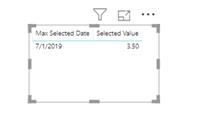
——————————
Audrey Abbey
SR. BI Developer/Analyst
New Seasons Market
Portland OR
——————————
——————————————- -
Simon Lamb
MemberSeptember 12, 2019 at 6:57 AM
Hi ,Audrey’s solution ?clearly works though I’d imagine you probably want to keep your dCalendar table connected to fCosts. If so then the following measure should work for you:
Cost A on nearest date =
VAR myFilterDate =
    LASTDATE( dCalendar[_Data] )
VAR myDate =
    LASTDATE(
        FILTER(
            ALL(fCosts[Date] ),
            fCosts[Date] <= myFilterDate
        )
    )
VAR mySumA =
    CALCULATE(
        SUM(fCosts[Cost A]),
        FILTER(
            ALL(fCosts),
            fCosts[Date] = myDate
        )
    )
RETURN mySumA?
The logic is exactly the same though I’m not using SELECTEDVALUE and have opted for SUM rather than MAX. Which is most appropriate depends on what your real data looks like, how you’re filtering and what result you’re after.
Hope that helps,
——————————
Simon Lamb
IT Consultant, Method Excel Ltd.
——————————
——————————————- -
Augusto Berg
MemberSeptember 12, 2019 at 7:38 AM
Hi !Thanks for the feedback and the great contribution in the solution and yes, I really need to keep the tables connected.
Very interesting the exchange of experiences, one problem and several solutions …Thank’s for your time !
Cheers,
Berg——————————
Augusto Berg
Electrical Engineer
——————————
——————————————- -
Augusto Berg
MemberSeptember 12, 2019 at 7:33 AM
Hi !First sorry for my mistake about the forgotten table. Your solution worked well and I really appreciate your help !
Thank you for helping !
——————————
Augusto Berg
Electrical Engineer
——————————
——————————————- -
Audrey Abbey
MemberSeptember 12, 2019 at 9:45 AM
Cool thing about Power BI is that there are many ways to skin a cat.
Simon definitely has the better solution if your requirement is to keep your date table connected.
Filter/All is extremely powerful.I will go ahead and mention ALLEXCEPT – that allows to choose which filters to override if you have more than one.
Depending on the rest of your model, that might come in handy.——————————
Audrey Abbey
SR. BI Developer/Analyst
New Seasons Market
Portland OR
——————————
——————————————-
DSC Communities replied 6 years, 6 months ago 1 Member · 0 Replies -
-
0 Replies
Sorry, there were no replies found.
The discussion ‘Look for previous date – DAX help’ is closed to new replies.
