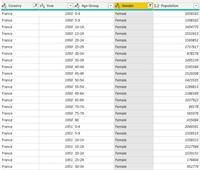
Hello, i have a table with population By Country, by Gender, by Age group, by Year. I don’t care of Age group. I just want the total for each Gender for each Year. (AndĀ By Country) How can I do that? Thanks and regards
I can’t actually complete the action.. it looks like there are some files on your desktop or in a folder on your computer that you are linked to… but since I don’t have them.. I can’t do it. Look at the other comment that said to use GrouBy in PowerQuery. Look up an example on Youtube and it should be pretty simple.
—————————— Beau Arlt Business Analyst Holland MI 989-400-7812 —————————— ——————————————-
Audrey Abbey
Member
November 25, 2019 at 12:17 PM
Gerard,
There are several ways you can do this.
If you just need a visual that shows this, then you can: Create a measure that sums the population. Then put Year, Gender, and/or Country on an axis.
If you want to transform your table and remove the age attribute altogether: Go into the Query Editor (Edit Queries or Transform Data icon, depending on which version).
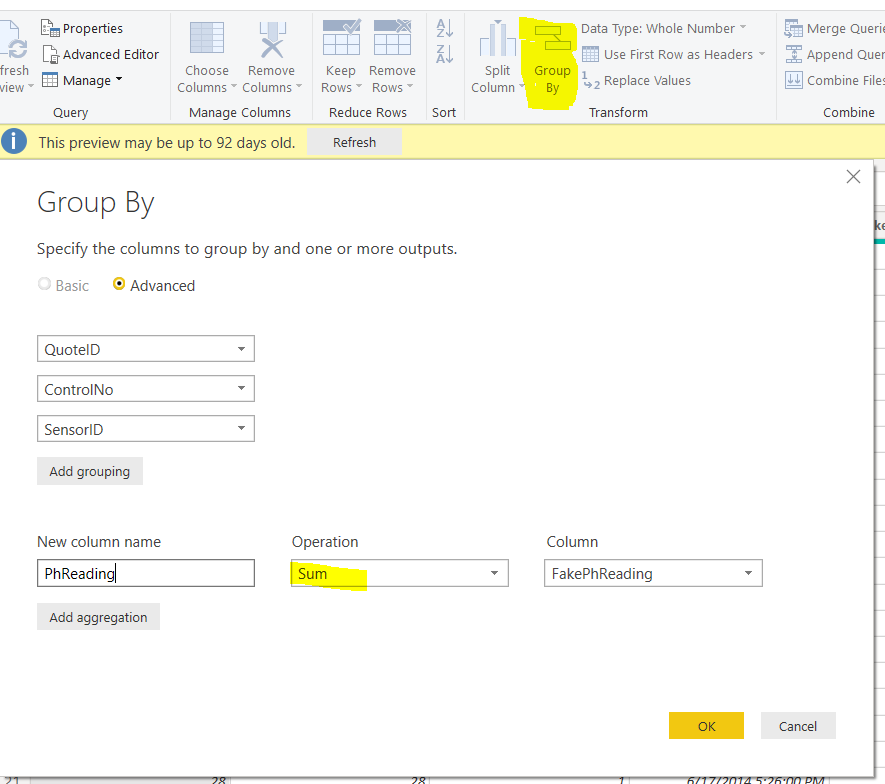
In the query editor: Select Group By Transform. Click Advanced. Add a grouping for Year, Gender, and Country in the top section. Add an aggregation for Population using SUM in the bottom section. (Make sure your population column is set to decimal data type).
This is what the Group By configuration window looks like with some example data I have.
—————————— Audrey Abbey SR. BI Developer/Analyst LeapFrogBI Portland OR —————————— ——————————————-
Please note:
This action will also remove this member from your connections and send a report to the site admin.
Please allow a few minutes for this process to complete.
Report
You have already reported this .
Welcome to our new site!
Here you will find a wealth of information created for peopleĀ that are on a mission to redefine business models with cloud techinologies, AI, automation, low code / no code applications, data, security & more to compete in the Acceleration Economy!