How to reference within a calculated column?

  • How to reference within a calculated column?
    Posted by DSC Communities on June 29, 2022 at 12:00 am
    • Tom Paulson

      Member

      June 29, 2022 at 12:00 AM

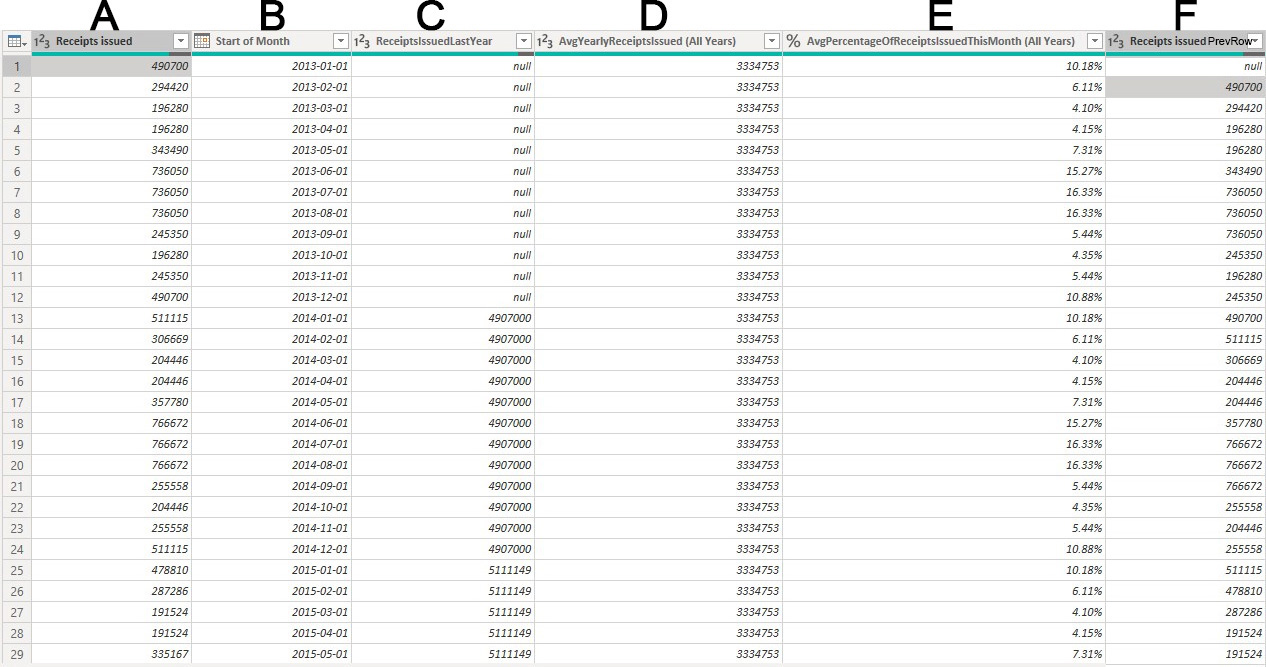
      I have the following Data:

      The idea is to identify and forecast demand for receipts every month of each year. This would be column G. Obviously, we don’t know what demand will be for month (row) 1. However, we do know what the number of average yearly receipts issued is and the avergae receipts issued for each month is so we can use those figures as a starting point by taking take the AvgYearlyReceiptsIssued (All Years) and multiply it by the AvgPercentageOfReceiptsIssuedThisMonth (All Years).

      For each month that follows, demand is to be determined by subtracting the expected demand of the previous month and subtracting the number of receipts issued in that previous month and adding the result to our average monthly issued receipts baseline. This process repeats for every month until the end of the table.

      The below is a breakdown of the expected results for column G:

      RowĀ  Ā  Ā  CalculationĀ  Ā  Ā  Ā  Ā  Ā  Ā  Expected Result
      1 D1*E1 339478
      2 (D2*E2)+(G1-F2) 52319
      3 (D3*E3)+(G2-F3) -105376
      4 (D4*E4)+(G3-F4) -163264
      5 (D5*E5)+(G4-F5) -221152
      6 (D6*E6)+(G5-F6) -55425
      7 (D7*E7)+(G6-F7) -246910

      At issue, is the fact that the calculation requires column G to self-reference and iterate. My guess is that this requires using some sort of temporary table that exists inside of a loop but I have no idea how to go about this, let alone achieve the result.

      Any ideas?

      ——————————
      Tom Paulson
      ——————————

    • Marc Schroyen

      Member

      June 29, 2022 at 3:30 PM

      Hi Paul,

      You can’t and you don’t need to self-reference.
      Formula are calculated in a context, we need to define the proper context.
      Your formulaĀ 
      (D2*E2)+(G1-F2) can be transformed as:
      (D2*E2)+(D1*E1)-F2)
      (D3*E3)+(D2*E2)+(D1*E1)-F2-F3) and so on
      ==> iterator
      This code should work

      Result = 
      VAR CurrentDate = MAX( 'Table'[Start of Month] )
      VAR PreviousRow = CALCULATE( MAX( 'Table'[Start of Month] ), 'Table'[Start of Month] < CurrentDate )
      VAR PreviousReceiptsIssued =
      	CALCULATE(
      		SUM( 'Table'[Receipts issued] ),
      		REMOVEFILTERS( 'Table'[Start of Month] ),
      		'Table'[Start of Month] < CurrentDate
      	)
      VAR G =
      	CALCULATE(
      		SUMX(
      			'Table',
      			'Table'[%AvgPercentageOfReceiptsissued This Month(All Years)]
      				* 'Table'[AvgYearlyReceiptsissued(All Years)]
      		),
      		REMOVEFILTERS( 'Table'[Start of Month] ),
      		'Table'[Start of Month] <= CurrentDate
      	)
      RETURN
      	G - PreviousReceiptsIssued?

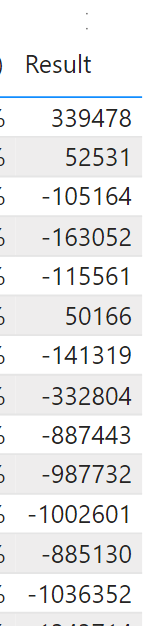
      Here is the result:
      There is discrepancy with your expected result, but applying your formula in Excel gives the same result.
      If I missed anything, let me know.
      Checked by yourself in the pbix uploaded

      ITERATORĀ  ITERATORĀ 

      ——————————
      Marc Schroyen
      LiĆØge Belgium
      ——————————
      ——————————————-

    • Tom Paulson

      Member

      June 29, 2022 at 5:40 PM

      Amazing! The discrepancy is caused by my rounding the E1 value in my calculations whereas your solution doesn’t. Thank you!

      ——————————
      Tom Paulson
      ——————————
      ——————————————-

    DSC Communities replied 3 years, 9 months ago 1 Member · 0 Replies
  • 0 Replies

Sorry, there were no replies found.

The discussion ‘How to reference within a calculated column?’ is closed to new replies.

Start of Discussion
0 of 0 replies June 2018
Now

Welcome to our new site!

Here you will find a wealth of information created for peopleĀ  that are on a mission to redefine business models with cloud techinologies, AI, automation, low code / no code applications, data, security & more to compete in the Acceleration Economy!