


Power Platform
Public Group
Active 19 hours ago
Power Platform
Organizer:
- JOSE Organized by
-
-

Hiding Dates in a Date Drop Down filter
-
Hiding Dates in a Date Drop Down filter
Posted by DSC Communities on February 13, 2020 at 9:21 pm-

Sharry Mah
MemberFebruary 13, 2020 at 9:21 PM
Hi Folks,I have a requirement in my month end report that from the date selector drop down I need to hide dates prior to Dec 2019 as we rolled out this new solution in Dec.
However this report is dependent upon the transactional data starting from 1st Oct 2019 so I can not just filter this data out of my solution.
What I would like to do is just hide Anything prior to Dec 2019 on my presentation layer’s drop down.
Is there a way I can achieve this?
Currently it is showing on drop down like below :
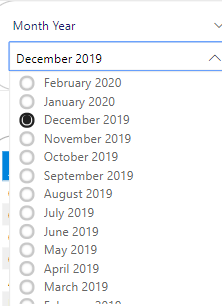
I want to be able to show like below (show Dec 2019 and onwards dates) without impacting/filtering any data :
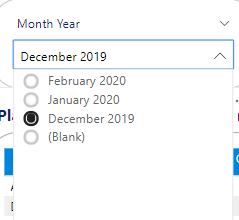
Also, is there a way to hide Blank from the drop down?
——————————
Sharry Mah | Data Analyst
Brisbane
—————————— -
Mark Beedle
MemberFebruary 13, 2020 at 9:44 PM
If you add the Date field to the filter panel on “Filters on this visual”, you can limit the visual to whatever date range you want and remove blanks. Picture below to help: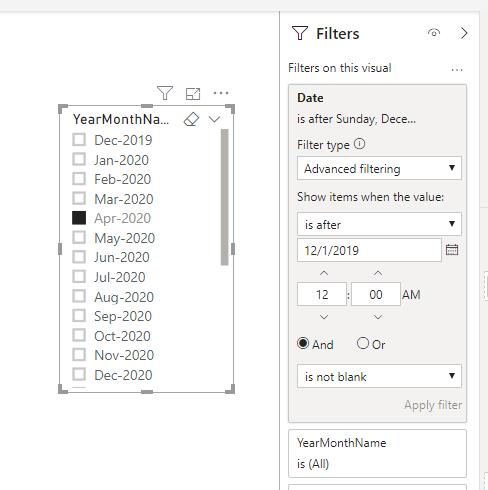
——————————
Mark Beedle
Business Intelligence Developer and Administrator
TempurSealy Inc.
Lexington KY
——————————
——————————————- -
Sharry Mah
MemberFebruary 13, 2020 at 11:07 PM
Hi appreciate your response but at the first place I can’t bring date in the visual level filter.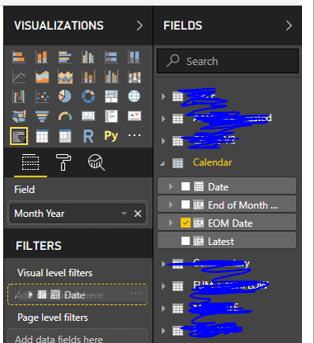
?
——————————
Sharry Mah | Data Analyst
Brisbane
——————————
——————————————- -
Mark Beedle
MemberFebruary 13, 2020 at 11:15 PM
I could definitely be wrong here, but based on the icon next to date, I believe PBI is creating an invisible date table behind the scenes, and so it would make sense that you can’t drag that entire date table into Visual level filters.
Can you try clicking the drop down next to date, where you should see PBI’s date hierarchy that it created. From there, you can pick Day and drag that into the Visual Level filters.
Another route, and something I always recommend is to turn off Power BI’s auto date/time, under Time Intelligence (in the options menu). Turning this off will stop PowerBI from creating these invisible date tables/hierarchies. If you go this route, you can also mark your Calendar table as a date table.
Hope this helps.
——————————
Mark Beedle
Business Intelligence Developer and Administrator
TempurSealy Inc.
Lexington KY
——————————
——————————————- -
Sharry Mah
MemberFebruary 13, 2020 at 11:38 PM
Hi I was able to mark my calendar table as a date table without turning off the options below, anyhow I turned it off now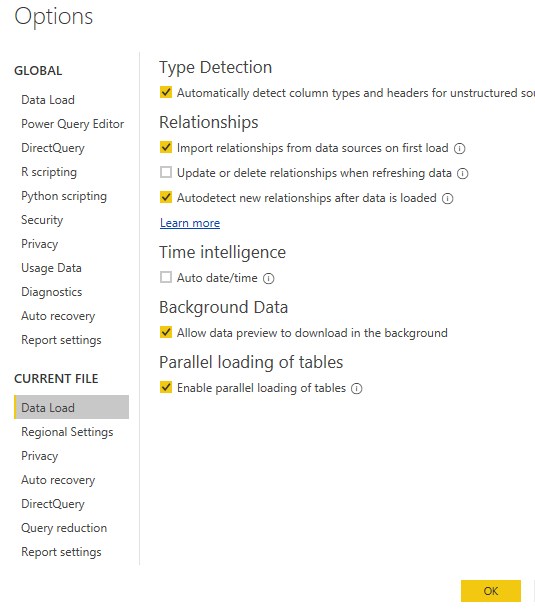
But my problem remained the same I couldn’t add date in my visual level filter wither ways (expanding the date hierarchy or marking as a date table)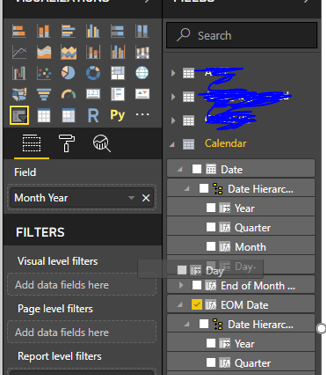
?
——————————
Sharry Mah | Data Analyst
Brisbane
——————————
——————————————- -
Mark Beedle
MemberFebruary 13, 2020 at 11:44 PM
It’s hard to tell what is happening in the screenshot. After turning off auto date/time and marking Calendar as a date table, what happens when you try to drag Date and dropping it in Visual level filters?Another thought, based on the screenshot, it looks like you might have a fairly old version of Power BI Desktop, as indicated by the black/dark color scheme. Maybe the behavior I am experiencing is due to an updated feature in PBI Desktop. This might likely be, as in the newer versions of PBI desktop, there is now a whole Filter Pane, which doesn’t appear to be present in your screenshot. Are you able to update your version of PBI desktop?
——————————
Mark Beedle
Business Intelligence Developer and Administrator
TempurSealy Inc.
Lexington KY
——————————
——————————————- -
Sharry Mah
MemberFebruary 13, 2020 at 11:55 PM
The visual level filter simply won’t accept the date.This is mid of 2019 version and we are unable to upgrade it yet.
——————————
Sharry Mah | Data Analyst
Brisbane
——————————
——————————————- -
Mark Beedle
MemberFebruary 14, 2020 at 12:05 AM
If you can’t upgrade, can you try dragging date to page level filters to see if that works?——————————
Mark Beedle
Business Intelligence Developer and Administrator
TempurSealy Inc.
Lexington KY
——————————
——————————————- -
Sharry Mah
MemberFebruary 14, 2020 at 12:50 AM
Thank You so much Putting the EOM Date in report level filter has worked out for me..I am now trying to work out on my other problem. in my recent post, if You could provide your help there??? 🙂
——————————
Sharry Mah | Data Analyst
Brisbane
——————————
——————————————- -
Lotta Carlsson
MemberFebruary 17, 2020 at 1:33 AM
Hi,If you don’t use a cube, you could try add a second date column as:
Date2 = IF(‘Date'[Date] <= DATE(2019;12;1); DATE(2019;12;31); ‘Date'[Date]) And use this just for the date filter.If working with a cube, add the second date column in sql instread.
Could that work?
——————————
Lotta Carlsson
BI Developer
Analyskuben
+46 736 60 66 96
——————————
——————————————-
DSC Communities replied 6 years, 1 month ago 1 Member · 0 Replies -
-
0 Replies
Sorry, there were no replies found.
The discussion ‘Hiding Dates in a Date Drop Down filter’ is closed to new replies.
