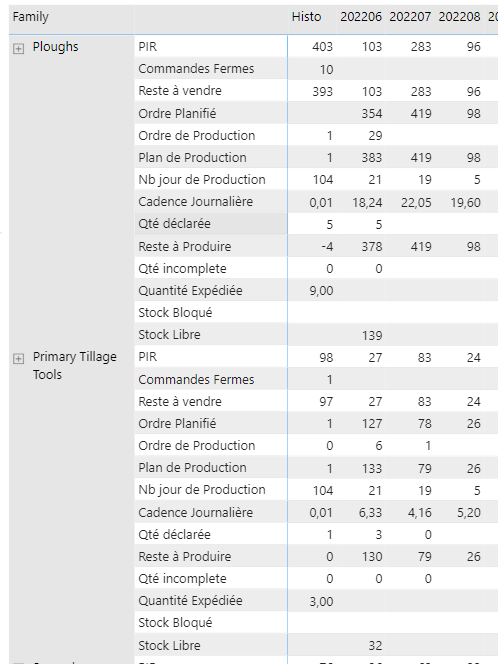
Ā I try to develop a such report where I can select measure that I want to show in the matrix. Ā I know to do when measures are in columns but it doesn’t work when I switch measures in rows.
Ā Is somebody already find a solution? BR
—————————— david Tanchon Bi Manager ——————————
Shungu Dhlamini
Member
July 2, 2022 at 9:55 AM
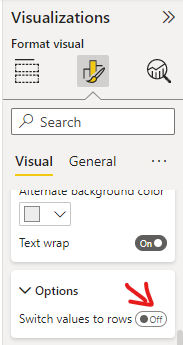
If I understood your question well, have you tried switching on the option to show values on Rows?
—————————— Shungu Dhlamini Power BI Consultant shungud@gmail.com —————————— ——————————————-
david Tanchon
Member
July 4, 2022 at 5:23 AM
Hi,
As you can see on my screenshot, I already switched on the option to show values on Rows. But I would lile to show or Hide measure with a visual filter.
BR David
—————————— David Tanchon Bi Manager —————————— ——————————————-
Ā what do you mean? Ā Could you provide an example, please?
BR
—————————— david Tanchon Bi Manager —————————— ——————————————-
Shungu Dhlamini
Member
July 4, 2022 at 11:49 AM
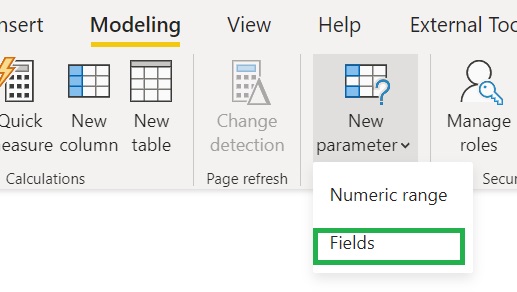
My bad David with regards showing the measures on rows versus column. I think what is pointing to is the new feature which allows for exactly what you are looking for. Field parameters “allow users to dynamically change the measures or dimensions being analyzed within a report. This feature can help your end-users explore and customize the analysis of the report by selecting the different measures or dimensions they are interested in.”
Please note:
This action will also remove this member from your connections and send a report to the site admin.
Please allow a few minutes for this process to complete.
Report
You have already reported this .
Welcome to our new site!
Here you will find a wealth of information created for peopleĀ that are on a mission to redefine business models with cloud techinologies, AI, automation, low code / no code applications, data, security & more to compete in the Acceleration Economy!