Help with Date Slicer

  • Help with Date Slicer

    Posted by DSC Communities on April 27, 2020 at 3:02 am
    • Maria Serra

      Member

      April 27, 2020 at 3:02 AM

      Hi there,

      I have been found the same problem throw time and I have no idea how to solve it. I need to have the value selected on my slicer update on the current day. If I have published a report I want that the value on my slicer is showing always today’s date and I want to be able to expand my slicer and chose any different date. So what I would really need is that the selection of the slicer has to be updated dinamically.

      Could this be possible? I am not referring to the possible days that the slicer is showing I need the selection of the slicer.

      Thanks in advance

      ——————————
      Maria Serra
      08008
      ——————————

    • Neville Howard

      Member

      April 28, 2020 at 2:52 AM

      ,

      Hi Maria,Ā  Yes that is really annoying that you can’t dynamically set a default date.

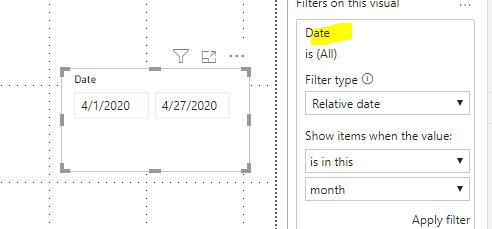
      The only work around I have come up with, is to set a filter on the slicer (is in the last 1 days including today), then teach your users to expand the filter pane, and change that filter instead of just using the slicer.

      regards, ?

      ——————————
      Neville Howard
      Consultant
      Brisbane
      0732228400
      ——————————
      ——————————————-

    • Christopher Majka

      Member

      April 28, 2020 at 7:59 AM

      Hi Maria –Ā 

      With the date visual selected, try setting a relative date filter in the filters panel to the right

      ——————————
      Christopher Majka
      Manager, Business Intelligence
      4018682000
      ——————————
      ——————————————-

    • Lutz Bendlin

      Member

      April 29, 2020 at 8:52 AM

      This can be done, and the answer is actually that you want the filter to be STATIC, not DYNAMIC.

      Basically, in Power Query you find the largest date (or “today”)Ā  and then map it to a static string like “Latest”.Ā  Map all other dates to their string representation.Ā  Keep the original date column around, you need it for sorting.

      In Power BI change the slicer to use the newly mapped column, with “Latest”Ā  as the default value.

      That’s it – now every time the dataset is refreshed the Power BI slicer will automatically filter by the latest date.

      ——————————
      Lutz
      ——————————
      ——————————————-

    DSC Communities replied 5 years, 11 months ago 1 Member · 0 Replies
  • 0 Replies

Sorry, there were no replies found.

The discussion ‘Help with Date Slicer’ is closed to new replies.

Start of Discussion
0 of 0 replies June 2018
Now

Welcome to our new site!

Here you will find a wealth of information created for peopleĀ  that are on a mission to redefine business models with cloud techinologies, AI, automation, low code / no code applications, data, security & more to compete in the Acceleration Economy!