


Power Platform
Public Group
Active a day ago
Power Platform
Organizer:
- JOSE Organized by
-
-

Getting “Not Enough Memory To Complete This Operation”
-
Getting “Not Enough Memory To Complete This Operation”
Posted by DSC Communities on May 5, 2018 at 9:21 am-

Vishal Vaghasiya
MemberMay 5, 2018 at 9:21 AM
Hi All,I am getting below error while “DAX Formula” is Running into the Power BI Desktop.
“There’s not enough memory to complete this operation, please try again later when there may be more memory available.”There is a number of records are 11,77,150. In “DAX Formula” where I mark duplicates with a sequential number.
My System Configuration is 12-GB RAM & 64-Bit Processor.So, Please Help Me.
Thanks
——————————
Vishal Vaghasiya
BI Developer
9722111919
—————————— -
KAMAL MARU
MemberMay 7, 2018 at 2:57 AM
Hi Friend,i think there must be joining issue, that may be multiplying records, please check that
Thanks
Kamal
+91 9810376859——————————
KAMAL MARU
Team Lead – Power BI/MSBI/SQL
HCL America
New Delhi
9810376859
——————————
——————————————- -
Arjan Fraaij
MemberMay 7, 2018 at 3:31 AM
Hi,Could have to do with how you have you data model created in Power BI.
To debug this do the following:- Download and install Dax Studio http://daxstudio.org/
- In you Power BI report create a blank report page and save the desktop file with this page open/selected
- Close All Power BI desktop sessions
- Start Power BI desktop again and open only this report LEAVE IT on the blank page!
- Start DAX Studio and connect it to the Power BI Desktop file you have issues
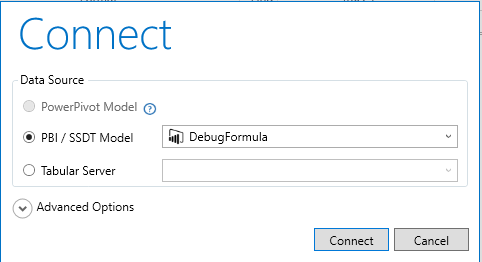
- In DAX Studio click the ALL Queries button

- Wait until output windows shows
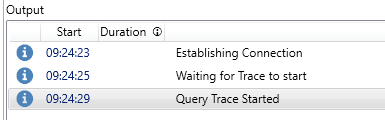
- Now go to Power BI and start doing what you do while you are getting the memory error…
- When you have it return to DAX Studio and see what is on the All Queries page of your query trace…
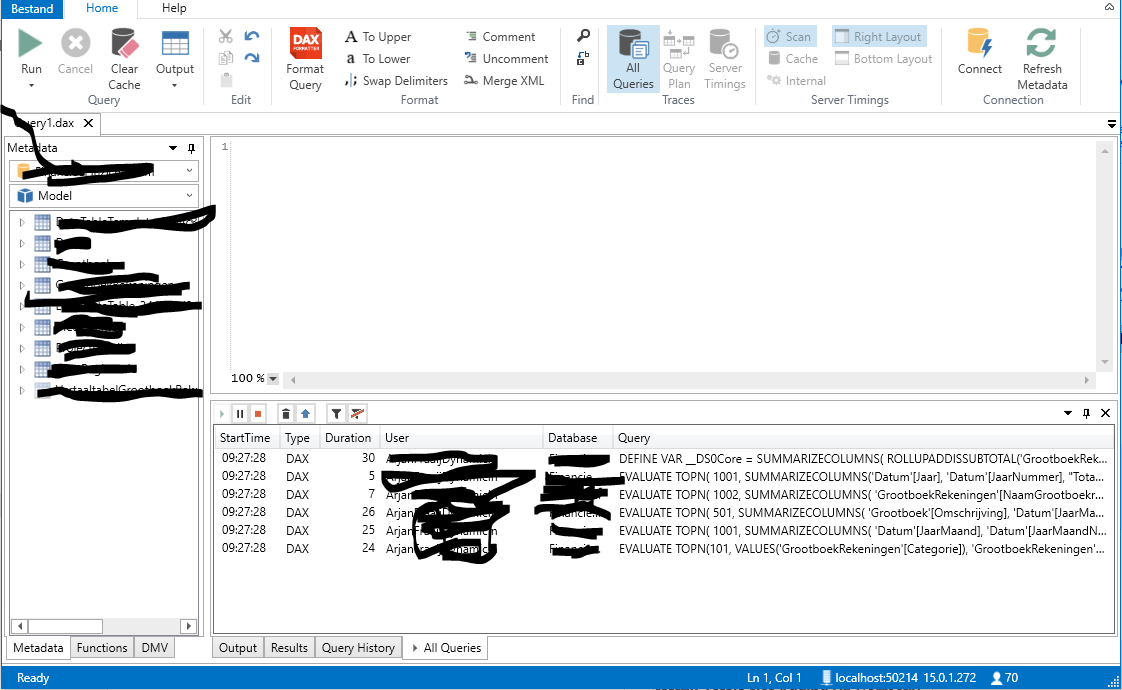
- Find your longest running queries and analyze them…
Regards,
——————————
Arjan Fraaij
Data Scientist
Oosterhout The Netherlands
+31162695354
——————————
——————————————- -
Vishal Vaghasiya
MemberMay 7, 2018 at 10:10 AM
Hi
Thanks for the suggestions. There is no any joining issue or multiplying records and as well as I analyze the queries and it’s work properly with “DAX Studio” there is no any issue with DAX.
Another way I tried this “DAX Formula” in another table where less amount of records then it’s executed. but when I try with more amount of record, it gives me a memory error. after then I run the DAX and see the “Task manager” then there is i found the issue of memory overflow even I have 12-GB RAM, so what I next to Do?
——————————
Vishal Vaghasiya
BI Developer
9722111919
——————————
——————————————- -
Audrey Abbey
MemberMay 7, 2018 at 2:01 PM
Post your DAX so that we can troubleshoot.
Just because it works on a smaller data set doesn’t mean it is efficient enough to handle larger ones.——————————
Audrey Abbey
SR. BI Developer/Analyst
New Seasons Market
Portland OR
——————————
——————————————- -
Vishal Vaghasiya
MemberMay 9, 2018 at 1:19 AM
=CALCULATE(COUNTROWS(Query), ALLEXCEPT(Query, Query[OPPORTUNITY_ID]), EARLIER(Query[RID]) >= Query[RID])This is my DAX.
——————————
Vishal Vaghasiya
BI Developer
9722111919
——————————
——————————————- -
Carl Loew
MemberMay 8, 2018 at 10:01 AM
If you are using Power BI Desktop, try increasing the Maximum allowed to 16000 under File / Options and Settings / Options / Global / Data Load. Data Cache Management Options.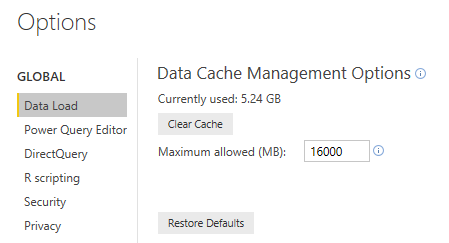
I ran into this issue once and this helped me.——————————
Carl Loew
Commercial Credit Support
TCF Bank
——————————
——————————————- -
Vishal Vaghasiya
MemberMay 9, 2018 at 1:34 AM
@CarlLoew : I already try in “Data Cache Management” and increased the cache size but DAX still cannot execute.——————————
Vishal Vaghasiya
BI Developer
9722111919
——————————
——————————————- -
Audrey Abbey
MemberMay 8, 2018 at 6:53 PM
I wonder if you are running into the background loading issue.File –> Options –> Current File –> Data Load.
Turn off Background data.Another potential cause:
PBIX file –> Query Editor –> Right Click on Table –> Un-check Enable Load.
http://radacad.com/performance-tip-for-power-bi-enable-load-sucks-memory-upBest,
Audrey——————————
Audrey Abbey
SR. BI Developer/Analyst
New Seasons Market
Portland OR
——————————
——————————————- -
Vishal Vaghasiya
MemberMay 9, 2018 at 1:38 AM
@Audrey Abbey: I try with your solution but still getting “memory Issues” and DAX can’t Execute.——————————
Vishal Vaghasiya
BI Developer
9722111919
——————————
——————————————-
DSC Communities replied 7 years, 11 months ago 1 Member · 0 Replies -
-
0 Replies
Sorry, there were no replies found.
The discussion ‘Getting “Not Enough Memory To Complete This Operation”’ is closed to new replies.
