


Power Platform
Public Group
Active 14 hours ago
Power Platform
Organizer:
- JOSE Organized by
-
-

Finding Duplicates
-
Finding Duplicates
Posted by DSC Communities on November 3, 2022 at 9:24 am-

Calen Butler
MemberNovember 3, 2022 at 9:24 AM
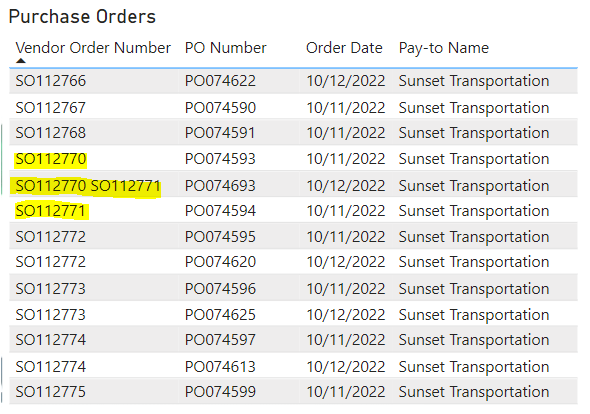
Hello everyone!I thought it might be helpful to provide a little context before asking my question. Retailers order items my company makes and we ship it to them. Then the shipping company sends us an invoice. We create a Purchase Order (PO) for that invoice and tie it to the Sales Order (SO) the customer sent in so we can keep track of shipping costs by customer. Very often, we get multiple multiple Purchase Orders for the same Sales Order and we need to delete one out of the system.
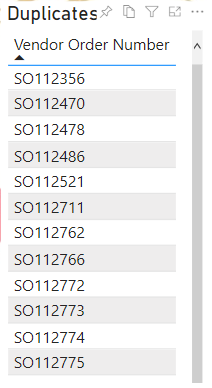
Now my question! I have a simple report that calls out the duplicates so we can easily find and delete them. I’ve attached screen shots below of the Purchase Order list and the list where it calls out the duplicates. As you can see it works well except for SO112770 and SO112771 which are both duplicates but not picked up on the duplicate list because they were combined on one PO. The order number has to be EXACTLY the same to catch the duplicate which does not always happen. Is there a way in Power BI to catch these duplicates too?
 Thanks,
Calen Butler -
Vilmar Santos
MemberNovember 3, 2022 at 10:34 PM
Olá
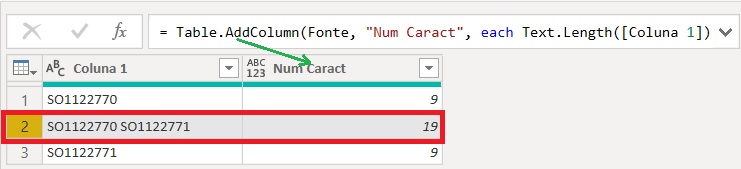
Se não há critérios para remover os duplicados, uma alternativa no Power Query seria:- Adicionar uma coluna contando a quantidade de caracteres;
- Em seguida fazer um filtro para manter apenas aquelas linhas que contêm 9 caracteres
——————————
Vilmar Santos
——————————
——————————————- -
Can you in the power query area filter for a space, and generate a second row or rows separating the purchase orders? That would transform your single row with two items to two rows with one item each. If it’s possible for three items to come together you might have to repeat that step.
——————————
Elena Schott
Sr. Business Analyst
Aon – San Francisco, CA
——————————
——————————————- -
Calen Butler
MemberNovember 8, 2022 at 10:18 AM
I tried this and it worked well. Thank you for the suggestion!——————————
Calen Butler
Director of FP&A
Garner Foods
Winston-Salem NC
——————————
——————————————- -
Tomas Torp
MemberNovember 4, 2022 at 6:32 PM
Let’s try to solve it with DAX first. With CONTAINSSTRING we can search for sales orders as substrings of other sales orders:Sales Order Count = VAR CurrentSO = SELECTEDVALUE ( Table[Vendor Order Number] ) VAR AllSO = ALL ( Table ) VAR FilteredSO = FILTER ( AllSO, CONTAINSSTRING ( CurrentSO, Table[Vendor Order Number] ) || CONTAINSSTRING ( Table[Vendor Order Number], CurrentSO ) ) VAR Result = IF ( ISINSCOPE ( Table[Vendor Order Number] ), COUNTROWS ( FilteredSO ) ) RETURN Result?This gives the following result:
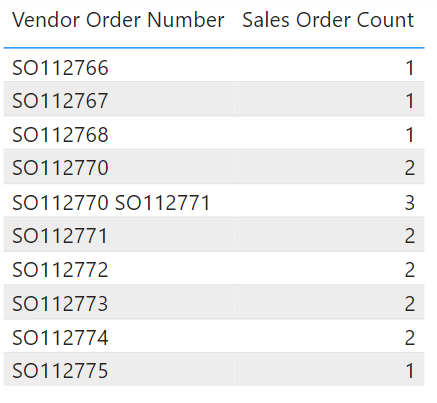 There is one serious limitation with this solution. If a SO that is a part of a string of SO’s has a duplicate in another non-identical string of SO’s it will not be counted twice.
To overcome this, I agree with the others that we will need to do some transformations in the query editor. My suggestion is to use to use the Text.Split function to convert the strings of sales orders into lists. Then the lists can be expanded into new rows:
#"Split Text by Delimiter" = Table.TransformColumns(
    Source,
    {"Vendor Order Number", each Text.Split(_, " ")}
  ),
  #"Expanded Vendor Order Number" = Table.ExpandListColumn(
    #"Split Text by Delimiter",
    "Vendor Order Number"
  )?
Both methods are demonstrated in the attached file.
——————————
Tomas
——————————
——————————————- -
Calen Butler
MemberNovember 8, 2022 at 10:22 AM
Thank you so much for the suggestion and the code. I was able to use your code in the 2nd suggestion to edit my query and now it’s working!——————————
Calen Butler
Director of FP&A
Garner Foods
Winston-Salem NC
——————————
——————————————-
DSC Communities replied 3 years, 4 months ago 1 Member · 0 Replies -
-
0 Replies
Sorry, there were no replies found.
The discussion ‘Finding Duplicates’ is closed to new replies.
