
I am new to Power BI. I am working on HR report where it is require to find employee head count by month. I have only one table where I have ‘Hire Date’ and ‘Terminated Date’. Can you please help me calculating head count of emp by month? Also I need to find How many projects are active. I dont have sample data.
Thanks in advance! Pearl
—————————— Pearl Patodia ——————————
Sergio Murru
Member
January 8, 2020 at 4:57 PM
Hi Pearl,
Here is a simple sample model with a Date table and a table with the two dates for hire and termination.
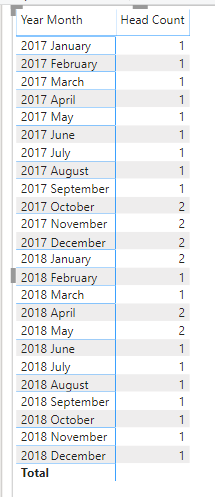
The following DAX code is a straightforward implementation for the head count in the selected months interval. Selecting a matrix visual with “year month” per rows you can get the head count per month. Please, note that I chose to include partial months, so I had to calculate the first day of the month and the last one.
—————————— Sergio Murru TORINO —————————— ——————————————-
Sergio Murru
Member
January 9, 2020 at 3:21 PM
Hi Pearl,
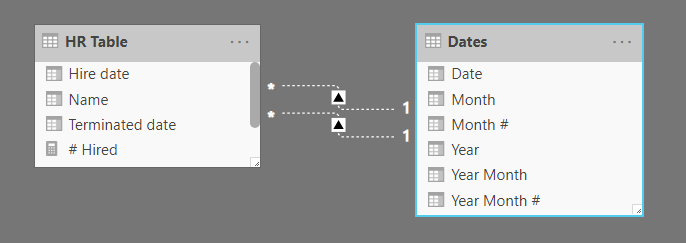
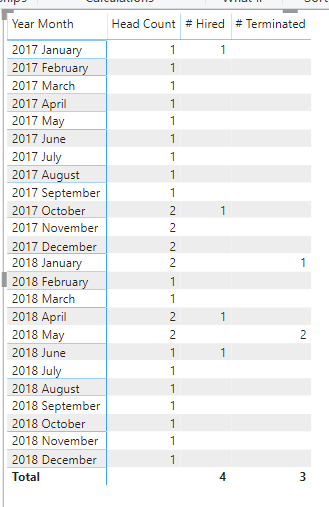
to have the monthly count of hires and terminations you can create 2 disabled relationship in the model, between the date table and the dates in you HR table. Then you can create two measures to count the hires and the terminations in the selected period (the month, in our matrix) using the corresponding relationships
this is the model
and the following are the two measures written in DAX
Please note:
This action will also remove this member from your connections and send a report to the site admin.
Please allow a few minutes for this process to complete.

Report
You have already reported this .
Welcome to our new site!
Here you will find a wealth of information created for peopleĀ that are on a mission to redefine business models with cloud techinologies, AI, automation, low code / no code applications, data, security & more to compete in the Acceleration Economy!