


Power Platform
Public Group
Active 10 hours ago
Power Platform
Organizer:
- JOSE Organized by
-
-

Edit Screen Data Card Value Issue (Drop Down Setup) Excel
-
Edit Screen Data Card Value Issue (Drop Down Setup) Excel
Posted by DSC Communities on January 26, 2020 at 1:19 pm-

Stuart Marshall
MemberJanuary 26, 2020 at 1:19 PM
I am trying to get dropdowns working in the edit screen. I have inputed them manually from the menu and changed the setup of the originals. I can make them locate the relevant data in Excel to populate the drop down lists in both cases but I can not get the to save the data to excel no matter what I do. -
Warren Belz
MemberJanuary 26, 2020 at 6:30 PM
Hi Stuart,Without seeing all the code, this is a guess, but you might start with the Update properties of the card containing the drop-down. It should be YourDropDownName.Selected.
——————————
Warren Belz
Ventia Utility Services Pty Ltd
Rockhampton Qld Australia
+61 409 315 509
——————————
——————————————- -
Stuart Marshall
MemberJanuary 26, 2020 at 10:13 PM
OK, Thank you for this. Still not working. How is the best way to show the code? Thanks Again.——————————
Stuart Marshall
N0M2E0
——————————
——————————————- -
Warren Belz
MemberJanuary 26, 2020 at 10:27 PM
What are the value of the “items” of the drop-down and the “update” of the card it is in?——————————
Warren Belz
Ventia Utility Services Pty Ltd
Rockhampton Qld Australia
+61 409 315 509
——————————
——————————————- -
Stuart Marshall
MemberJanuary 26, 2020 at 10:49 PM
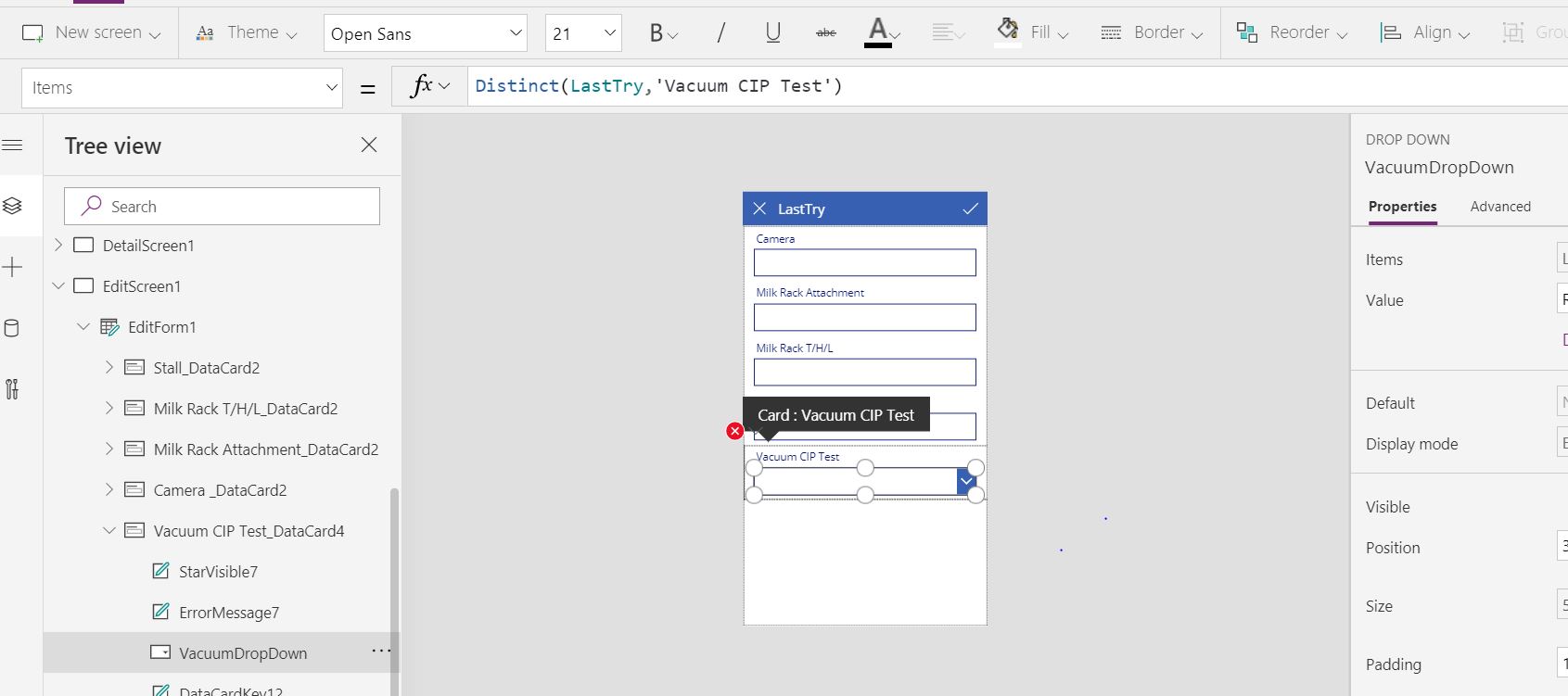
——————————
Stuart Marshall
N0M2E0
——————————
——————————————- -
Warren Belz
MemberJanuary 26, 2020 at 11:19 PM
A Distinct formula – the update properties of the card will be VacuumDropdown.Result——————————
Warren Belz
Ventia Utility Services Pty Ltd
Rockhampton Qld Australia
+61 409 315 509
——————————
——————————————- -
Stuart Marshall
MemberJanuary 27, 2020 at 11:26 AM
Thank you sir.——————————
Stuart Marshall
N0M2E0
——————————
——————————————- -
Stuart Marshall
MemberJanuary 27, 2020 at 11:00 PM
Ok, so it works mostly. If I leave one of the original text labels on the edit sheet it will save whatever data I have selected on the drop down menu if I make a change to the text label however if I remove all the text label inputs it no longer saves anything. It behaves like it never recognized a change at all. I have all the Updates formulas set to their respective drop down menus.——————————
Stuart Marshall
N0M2E0
——————————
——————————————- -
Warren Belz
MemberJanuary 28, 2020 at 12:30 AM
I am no authority on Excel backends (I only use them for static reference tables), but if you are referring to the Excel headings “Text Labels”, these are what I believe Excel uses as data column names. I know every time I change anything in the structure of mine (including added columns), I have to disconnect and reconnect to the file.——————————
Warren Belz
Ventia Utility Services Pty Ltd
Rockhampton Qld Australia
+61 409 315 509
——————————
——————————————- -
Brian Scott
MemberJanuary 29, 2020 at 7:26 AM
When you say “make a change to the text label” are you meaning in the Excel sheet? It is rarely a good idea to make changes to an excel sheet that you are using in PowerApps. If you need to make changes to the table I would suggest making the changes you need and then saving it as a different sheet and using that new sheet in the PowerApp – you will need to reset the calls to the sheet.
Since PowerApps adds data a column to the sheet if you manually edit you can mess with the sync.——————————
Brian Scott
Chief Creative Officer
Concord NC
——————————
——————————————-
DSC Communities replied 6 years, 2 months ago 1 Member · 0 Replies -
-
0 Replies
Sorry, there were no replies found.
The discussion ‘Edit Screen Data Card Value Issue (Drop Down Setup) Excel’ is closed to new replies.
