


Develop Power BI Dashboard in Workspace from on-prem SQL DB

  • Develop Power BI Dashboard in Workspace from on-prem SQL DB
    Posted by DSC Communities on June 29, 2020 at 12:24 pm
    • Waseem Dar

      Member

      June 29, 2020 at 12:24 PM

      HelloĀ 

      Case – 1

      I have BI Pro license and want to develop a Power BI dashboard / Report using Power BI App through my Office 365 account. Then share the reports / dashboard in multiple workspaces my organization has so that multiple users can access through those workspaces. When I click on ‘Get Data’ and select ‘Database’ option, BI gives me the option to select from Azure SQL DB but no option to select DB from on-prem SQL DB.Ā 

      Is there a way I can create Power BI dashboards / reports in Office 365 by connecting to my on-prem SQL DB ?Ā 

      Case – 2

      I created a Power BI report in Power BI desktop using on-prem DB and then released it in my workspace and shared across multiple workspaces. The report does not get refreshed though I have set scheduled refresh.Ā 

      What am I missing here ?

      Thanks in advance for the help.

      ——————————
      Waseem Dar
      Business Analyst
      ——————————

    • Steve James

      Member

      June 30, 2020 at 5:36 AM

      To access an on-prem data source, the Power BI service needs to use an on-prem data gateway which needs to be installed on an on-prem machine which is always on (ideally the server on which the DB is running). Take a look atĀ https://docs.microsoft.com/en-us/power-bi/connect-data/service-gateway-onpremĀ to get started.

      ——————————
      Steve James
      Director
      ——————————
      ——————————————-

    • Christopher Majka

      Member

      June 30, 2020 at 8:01 AM

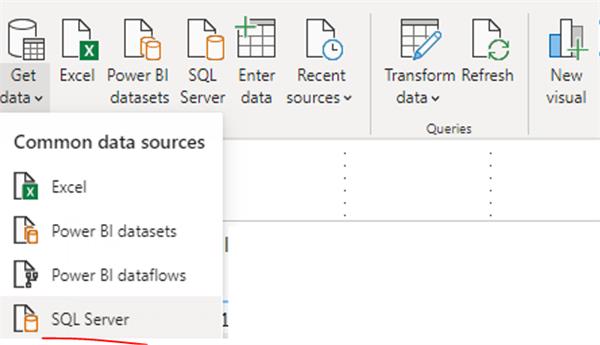
      You should have an option for SQL server. And as Steve mentioned, you will need to install the on prem data gateway.

      ——————————
      Christopher Majka
      Manager, Business Intelligence
      4018682000
      ——————————
      ——————————————-

    • Jeremy Slade

      Member

      June 30, 2020 at 10:39 AM

      You need to setup a gateway in order to access your on-prem databases.Ā  It requires you to install the gateway software on one of your servers that has access to your database and then you will need to setup a data source for each of your workspaces.Ā  Ā I’ve found the easiest way to setup the gateway is to log into PowerBI.com on the server you want to run the Gateway on and then click on the download icon and download and install the Data Gateway.Ā  Once your gateway is installed you can add data sources for each of your workspaces/ databases through the gear icon/ Manage Gateway.

      ——————————
      Jeremy Slade
      Developer
      Edwards
      ——————————
      ——————————————-

    • Waseem Dar

      Member

      July 1, 2020 at 7:52 PM

      Thanks to all for the valuable input, appreciated.

      ——————————
      Waseem Dar
      Business Analyst
      ——————————
      ——————————————-

    DSC Communities replied 5 years, 9 months ago 1 Member · 0 Replies
  • 0 Replies

Sorry, there were no replies found.

The discussion ‘Develop Power BI Dashboard in Workspace from on-prem SQL DB’ is closed to new replies.

Start of Discussion
0 of 0 replies June 2018
Now

Welcome to our new site!

Here you will find a wealth of information created for peopleĀ  that are on a mission to redefine business models with cloud techinologies, AI, automation, low code / no code applications, data, security & more to compete in the Acceleration Economy!
