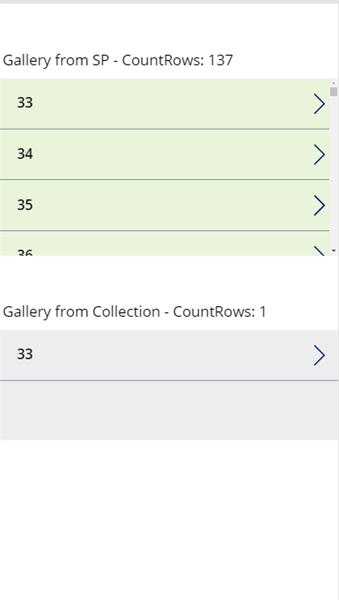
First time posting here as I’m usually able to solve my problems from other’s posts. I couldn’t find any discussion related to this specific issue and I feel like I’m missing something obvious, so I’m hoping someone can shed some light…
Situation: I want to collect all rows from a SP list (less than 500 rows). It is a simple list and I want to filter by a Number column so I shouldn’t have any delegation issues.Ā My intention is to use the Collection to populate a Dropdown.Ā
However, when the ClearCollect runs (onStart) it only returns one row (I have the limit set at 1 for non-delegable queries). No delegation warning shows anywhere. I tried populating a Gallery directly from the SP list and it works perfectly, all items are returned.Ā
Not sure what you mean you have the filter set at 1 for non delegable queries?Ā Ā Do you mean you have changed the 500 to 1?Ā You should note that the dropdown will never hold anymore that 2000 records (if the advanced has been changed to that) as this is the maximum records that can ever be returned at any time (delegable or Non Delegable)Ā
In relation to the number column why use a dropdown?Ā I would just use a text input with something like:
Simply that will filter teh list based on any number or leave the list alone.Ā You can add multiple textinputs and dropdowns to this approach to seach on more columns at the same time or individually)
—————————— Mark Pearson National Operations Manager 61409321547 —————————— ——————————————-
The ClearCollect command cannot be delegated when used with a data source, This is why the direct query to the data source is working and not the ClearCollect method.Ā
Is there a reason you have this set to 1? Alternatively you may simply have to run your query against the SP list rather than a collection.
—————————— Luke Burgess SharePoint Administrator/Developer —————————— ——————————————-
Enrique Carrasquillo
Member
July 6, 2020 at 12:10 PM
Thank you Luke. For some reason I did not see that note on the documentation and I figured I would get some sort of delegation warning in Powerapps if that was the case.Ā
Only reason to have the limit set to 1 was to make sure delegation wasn’t an issue through the app. For this specific case changing it back to the 500 limit will solve my problem as that specific list will never reach that limit.Ā
Please note:
This action will also remove this member from your connections and send a report to the site admin.
Please allow a few minutes for this process to complete.
Report
You have already reported this .
Welcome to our new site!
Here you will find a wealth of information created for peopleĀ that are on a mission to redefine business models with cloud techinologies, AI, automation, low code / no code applications, data, security & more to compete in the Acceleration Economy!