


Power Platform
Public Group
Active a day ago
Power Platform
Organizer:
- JOSE Organized by
-
-

Dax query – Converting row to Columns
-
Dax query – Converting row to Columns
Posted by DSC Communities on August 25, 2019 at 10:24 am-

Akitnava P
MemberAugust 25, 2019 at 10:24 AM
Dear AllNeed an urgent help with an analysis i was doing on mutual funds using power bi. I have given the raw input and expected output. Please note that the rows with unique dates are converted to columns. (Enclosed excel file as well for ready ref)
Really struggling with this. Request help
Regards
APInput table name: inputfiles
Group Scheme Code Net Asset Value Repurchase Price Sale Price Date Cat_1 Cat_2 Cat_3 Open 1 43.79 43.35 43.79 30-Apr-18 Open Growth Dividend Open 2 31.67 31.35 31.67 30-Apr-18 Open Growth Dividend Open 3 51.995 51.995 51.995 30-Apr-18 Open Equity Scheme – Multi Cap Fund Growth Open 4 17.019 17.019 17.019 30-Apr-18 Open Equity Scheme – Multi Cap Fund Dividend Open 5 48.142 48.142 48.142 30-Apr-18 Open Equity Scheme – Multi Cap Fund Growth Open 1 44.6658 44.217 44.6658 30-May-18 Open Growth Dividend Open 2 32.3034 31.977 32.3034 30-May-18 Open Growth Dividend Open 3 53.0349 53.0349 53.0349 30-May-18 Open Equity Scheme – Multi Cap Fund Growth Open 4 17.35938 17.35938 17.35938 30-May-18 Open Equity Scheme – Multi Cap Fund Dividend Open 5 49.10484 49.10484 49.10484 30-May-18 Open Equity Scheme – Multi Cap Fund Growth Open 1 45.11246 44.65917 45.11246 29-Jun-18 Open Growth Dividend Open 2 32.62643 32.29677 32.62643 29-Jun-18 Open Growth Dividend Open 3 53.56525 53.56525 53.56525 29-Jun-18 Open Equity Scheme – Multi Cap Fund Growth Open 4 17.53297 17.53297 17.53297 29-Jun-18 Open Equity Scheme – Multi Cap Fund Dividend Open 5 49.59589 49.59589 49.59589 29-Jun-18 Open Equity Scheme – Multi Cap Fund Growth Output:
Scheme Code Group Cat_1 Cat_2 Cat_3 30-Apr-18 30-May-18 29-Jun-18 Deltavs30AP Deltavs30Ma 1 Open Open Growth Dividend 43.79 44.6658 45.11246 3% 1% 2 Open Open Growth Dividend 31.67 32.3034 32.62643 3% 1% 3 Open Open Equity Scheme – Multi Cap Fund Growth 51.995 53.0349 53.56525 3% 1% 4 Open Open Equity Scheme – Multi Cap Fund Dividend 17.019 17.35938 17.53297 3% 1% 5 Open Open Equity Scheme – Multi Cap Fund Growth 48.142 49.10484 49.59589 3% 1% Regards
AP——————————
Akitnava P——————————
-
Andrew Simmans
MemberAugust 26, 2019 at 3:26 AM
Looks to me as though the “Pivot” command in Power Query will do what you want – see https://community.powerbi.com/t5/Community-Blog/Pivot-your-Data-using-Power-Query/ba-p/224019——————————
Andrew Simmans
——————————
——————————————- -
Vishesh Jain
MemberAugust 26, 2019 at 7:00 AM
Hi ,Please check the file for your desired solution.?
Just a pointer, these are all explicit calculations and Power BI is probably not the right tool for this.
Hope this helps.
Thank you,
——————————
Vishesh Jain
Owner
VR Construction
——————————
——————————————- -
Akitnava P
MemberAugust 26, 2019 at 12:19 PM
Thank you. It works——————————
Akitnava P
Partner
9820631595
——————————
——————————————- -
Gopa Kumar Sivadasan
MemberAugust 26, 2019 at 4:20 PM
HiI suppose you have got the solution from
Below is another take on it. The below solution assumes the following:
- You may have multiple dates coming in future;
- You may have to dynamically select dates to compare;
- The maximum date you select in the slicer is the base date against which the deltas are calculated;
The only downside to the solution is that extra space is created between the comparing periods by the additional blank columns. Since now, we cannot have conditional column headers, I am not sure whether we can do anything about it. If the additional blank space is not an issue, please see if the following helps you:
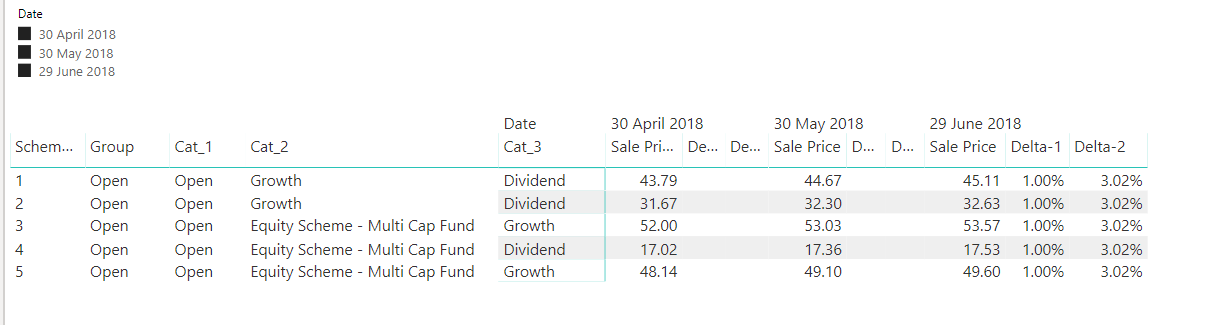 The DAX for Delta for the base date -1 period is below:
Delta Latest Selected Month -1 = ----------------------------------------------------------------------- //dates calculations VAR _maxslicerDate = CALCULATE ( MAX ( InputTable[Date] ), ALLSELECTED ( InputTable[Date] ) ) --maximum of the slicer selected date. This is the base date VAR _rlvntDate = SELECTEDVALUE ( InputTable[Date] ) --date in the current context VAR __selectedSlicerDates = CALCULATETABLE ( VALUES ( InputTable[Date] ), ALLSELECTED ( InputTable[Date] ) ) --all the dates selected in the slicer, ignoring date filters coming in from the visual itself --------------- //since we are looking back at the immediately preceding period from the base date, we select the top2 dates VAR __top2Dates = TOPN ( 2, __selectedSlicerDates, InputTable[Date], DESC ) --------------- VAR _maxdateminus1 = CALCULATE ( MIN ( InputTable[Date] ), __top2Dates ) --the minimum date from the above top2 table will be the immediately preceding date ------------------------------------------------------------------------ //delta calcualtion VAR _baseSalePrice = SELECTEDVALUE ( InputTable[Sale Price] ) --get the saleprice for the base date VAR _rlvntSalePrice = CALCULATE ( MAX( InputTable[Sale Price] ), ALLSELECTED ( InputTable[Date] ), InputTable[Date] = _maxdateminus1 ) --get the saleprice of the immediately preceding date VAR _deltaminus1 = DIVIDE ( _baseSalePrice - _rlvntSalePrice, _rlvntSalePrice ) -- calculate the delta ------------------------------------------------------------------------- RETURN //we show the values only for the base date, other columns return blank IF ( _rlvntDate = _maxslicerDate, _deltaminus1, BLANK () ) ?You can create additional deltas by changing the TOPN value accordingly as has been done for the delta –2 measure.
PFA the pbix file for your reference.
???
——————————
Gopa Kumar
Limner Consulting
——————————
——————————————-
DSC Communities replied 6 years, 7 months ago 1 Member · 0 Replies -
-
0 Replies
Sorry, there were no replies found.
The discussion ‘Dax query – Converting row to Columns’ is closed to new replies.
