


DAX for Current week, Last one week, Last two weeks, Last three weeks ,Last four Weeks

  • DAX for Current week, Last one week, Last two weeks, Last three weeks ,Last four Weeks
    Posted by DSC Communities on June 29, 2022 at 12:46 pm
    • Phaneendra Adusumilli

      Member

      June 29, 2022 at 12:46 PM

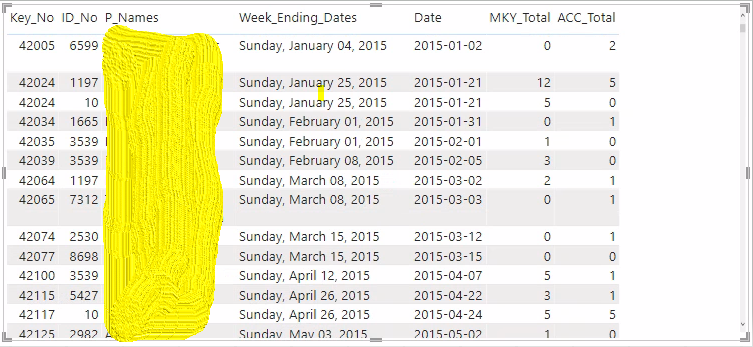
      I have table like this

      Now I want to show current Current week, Last one week, Last two weeks, Last three weeks ,Last four Weeks “ACC_Total”.Ā How to write dax for this I’m taking date from Date column
      ——————————
      Phaneendra Adusumilli
      ——————————

    • david Tanchon

      Member

      June 30, 2022 at 2:08 AM

      Hi Phaneendra ,

      I think the best way is to create a calendar table first, where you can define specific columns like current week, last week, … based on current date.
      Linked to the date of your table you’re be able to apply dax measure filtering on calendar columns.

      Create a Date Dimension in Power BI in 4 Steps – Step 1: Calendar Columns – RADACAD

      The advantage of that solution is your are more flexible.

      BR
      David

      ——————————
      david Tanchon
      Bi Manager
      ——————————
      ——————————————-

    • Phaneendra Adusumilli

      Member

      June 30, 2022 at 3:32 AM

      Already I have calendar column is there no

      ——————————
      Phaneendra Adusumilli
      ——————————
      ——————————————-

    • Hugh Johnson

      Member

      June 30, 2022 at 9:08 AM

      Hi Phaneendra, the way that I would tackle that problem is to drive this from your ‘Dates’ table with a Dates[RelativeWeek] column where 0 is this week, -1 is last week, 1 is next week and so on.Ā  It is then very simple to add Dates[RelativeWeek] as a filter condition in a CALCULATE function.

      ——————————
      Hugh Johnson
      Dublin, Ireland
      ——————————
      ——————————————-

    • Bob Parsons

      Member

      July 4, 2022 at 3:52 PM

      Agree with …
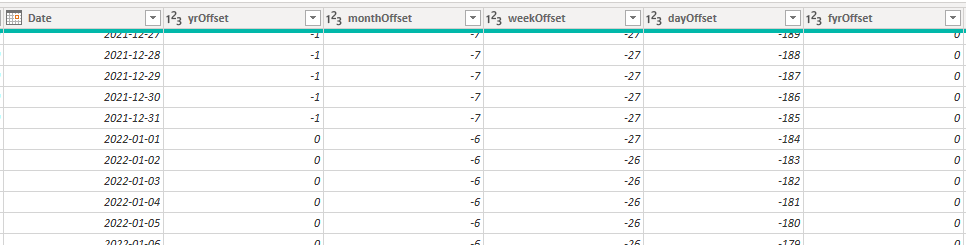
      Setup up your calendar with ‘Offset’ columns. I always include Days offset, Weeks Offset, Months Offset, and Years Offset.? Makes it easy then to specify exactly what time-period you want to calculate in the measure.Ā 

      here are a few DAX examples:
      – Sales total for 2 years ago,Ā 

      Sales -2Yr = CALCULATE (SUM ( 'Sales'[Sales] ),'Date'[yrOffset] = -2)

      – Same Month, 2 years agoĀ 

      Sales Same Month -2yrs = CALCULATE (SUM ( 'Sales'[Sales] ),'Date'[monthOffset] = -24)

      – Sales 17 weeks ago

      Sales 17 weeks ago = CALCULATE (SUM ( 'Sales'[Sales] ),'Date'[weekOffset] = -17)
      

      … etcĀ 

      you get the idea – extremely flexible especially with weeks which is not included in the time intelligence calculations.

      ——————————
      Bob Parsons
      Business Intelligence Manager
      Star Produce
      ——————————
      ——————————————-

    DSC Communities replied 3 years, 9 months ago 1 Member · 0 Replies
  • 0 Replies

Sorry, there were no replies found.

The discussion ‘DAX for Current week, Last one week, Last two weeks, Last three weeks ,Last four Weeks’ is closed to new replies.

Start of Discussion
0 of 0 replies June 2018
Now

Welcome to our new site!

Here you will find a wealth of information created for peopleĀ  that are on a mission to redefine business models with cloud techinologies, AI, automation, low code / no code applications, data, security & more to compete in the Acceleration Economy!
