


Power Platform
Public Group
Active a day ago
Power Platform
Organizer:
- JOSE Organized by
-
-

Create filter based on record exclusions
-
Create filter based on record exclusions
Posted by DSC Communities on August 28, 2019 at 6:15 am-

Leonard Levine
MemberAugust 28, 2019 at 6:15 AM
Hi, I have a table with 800000 rows which are claims for 2000+ patients, so multiple rows per patient. One row per claim event. One field is procedure code. If the field has any one of four procedure codes, then I do NOT want to include that PATIENT in one of the filters for the report. The issue is that I can filter the patient’s record out with the undesired procedure code but NOT all of their records (and thus the filter the PATIENT) since a patient may have additional records that have a procedure code that is not excluded. I am currently trying a workaround that filters for the procedure code to exclude. Export the resulting data from the visual to excel, remove duplicates and then build a filter that does not contain those unique patients. Would prefer to have the filter as an option in the report without a workaround for each new month of data.Thanks,Len -
Riccardo Perico
MemberAugust 28, 2019 at 8:49 AM
Hi Leonard,could you share the model you’re using to help us to better understand?
——————————
Riccardo Perico
Data Platform & BI Specialist @ SolidQ
——————————
——————————————- -
Hasham Niaz
MemberAugust 28, 2019 at 7:19 PM
Hi Len !If i understand properly you are looking for a selection control through which you can exclude the selected value without need to select all other values. Please check following section of this MS docs;
Selection Controls options (list slicers only) :
Show Select All is Off by default. Turn it to On to add a Select All item to the slicer that selects or deselects all items when toggled. When all items are selected, clicking or tapping one item deselects it, allowing an “is-not”-type filterRegards,
——————————
Hasham Bin Niaz
Director Data & Analytics
Karachi, Pakistan
——————————
——————————————- -
Vishesh Jain
MemberAugust 29, 2019 at 5:49 AM
Hi ,My apologies if I have not understood your problem but here is a something that you can try.
Also, this is based on the understanding that you want to filter out multiple codes together and not individually.Using the DISTINCT() function you can make a Dim table of your procedure code (if you don’t have one already). Add another column to it using the IF() or SWITCH() and TRUE() functions for the codes that you want to filter out. Use 0 and 1 as results as numbers have better compression than text.
Filter = if(‘Facttable'[Procedurecode]=”ABC123″ || ‘Facttable'[Procedurecode]=”XYZ456″ ,0,1) //you can use the || symbol instead of using the OR() function, this way you can filter out multiple procedures in a single code.Create a relationship between your Procedure code table and your fact table.
Then all you have to do is put the column on the filter pane of any visual and then just toggle check or uncheck on the value 0, to filter out the respective procedure codes. Or you can add it to a slicer visual; since it has only 2 values it should not take up much space on your page.
Please let me know if I am missing something out here.
Thank you,
——————————
Vishesh Jain
Owner
VR Construction
——————————
——————————————- -
Leonard Levine
MemberAugust 29, 2019 at 6:34 AM
Hi Vinesh,
Thanks. Unfortunately I do not have access to P BI until Tuesday. One issue is that there are actually two fields in play for this problem. Procedure and Member ID. The member can have multiple rows in the fact table. Some with the desired procedure codes and some with the undesired codes ( the rows represent separate medical claims for members). While your solution, I believe will create a filter for procedure, it will still allow visuals on the page to include the member if the member has claims with each type of procedure. The procedure codes in question refer to diabetes screening. I want to include the members who have not had a screening. Maybe best described as a two step process. I currently created a table with the members filtered to include only those with a screening code, export to excel, unique members , import back to P BI and filter report using list with “blanks” so it only uses members not on list. Very convoluted indeed but I think it works just not the way I would want in production.
Thanks,
Len——————————
Leonard Levine
02048
Mansfield MA
339 364 2798
——————————
——————————————- -
Gopa Kumar Sivadasan
MemberAugust 29, 2019 at 7:11 AM
HiIf I understand you correctly, a patient should be marked as ineligible if he has at anytime done an undesired procedure code. If my understanding is correct, please see if the following helps you (in this example Procedure Codes A,B,C,and D are undesired):
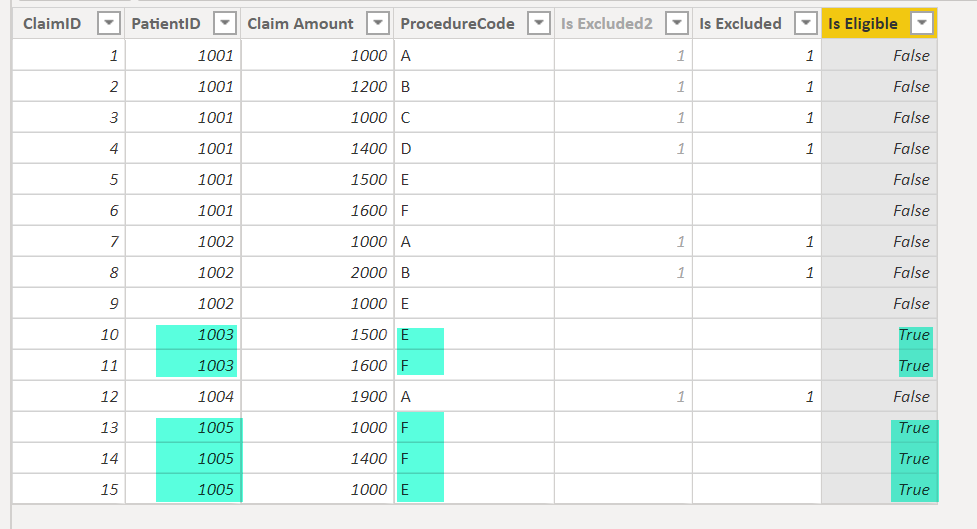
?
You can use the [Is Eligible] column to filter the relevant patients in your visual.Basically, I have added two calculated columns using the following DAX:
Is Eligible =
--total the "is excluded" values for each patient, ignoring the row context filters from other columns
VAR _totalIsExcuded =
    CALCULATE (
        SUM ( 'Claims Table'[Is Excluded] ),
        ALLEXCEPT ( 'Claims Table', 'Claims Table'[PatientID] )
    )
RETURN
    --the total isexcluded value will be blank only for those patients who never had an excluded procedure
    IF (
        ISBLANK ( _totalIsExcuded ),
        TRUE (),
        FALSE ()
    )?
Is Excluded = --based on seperate table for ineligible procedures IF ( 'Claims Table'[ProcedureCode] IN VALUES ( 'Excluded Procedures Table'[ProcedureCode] ), 1, BLANK () )?Column [IsExcluded] is added twice just to show the different approach to store the Undesired procedure code. Either hardcoded into the DAX or keep a separate table for the undesired codes which is easy to maintain, should there be changes in the undesired codes in future. If you ask me; if you anticipate changes, then better to maintain in a separate table.
Apologies if I have misunderstood your issue.
PFA the pbix file for your reference.
——————————
Gopa Kumar
Limner Consulting
——————————
——————————————- -
Leonard Levine
MemberSeptember 2, 2019 at 8:38 AM
Thanks everyone. Gopa, it looks like you may have the solution to my problem. Unfortunately I am away from work for a week or so. I will try to work on it then and probably have a followup as I have not used a variable yet. Thanks again and I am excited to try the solution. Len——————————
Leonard Levine
02048
Mansfield MA
339 364 2798
——————————
——————————————-
DSC Communities replied 6 years, 7 months ago 1 Member · 0 Replies -
-
0 Replies
Sorry, there were no replies found.
The discussion ‘Create filter based on record exclusions’ is closed to new replies.
