


Power Platform
Public Group
Active 26 minutes ago
Power Platform
Organizer:
- JOSE Organized by
-
-

Balance sheet / Receivable debtor/creditor
-
Balance sheet / Receivable debtor/creditor
Posted by DSC Communities on November 25, 2019 at 4:07 pm-

Rob Parti
MemberNovember 25, 2019 at 4:07 PM
Hi to all,Thank you for this rich forum which helped me a lot.
I am stuck on a balance sheet model issue.Here is a simplified example :
– I have 3 tables :
1) Accountancy entries
2) Trial balance with a code matching the account number with the balance sheet codes
(relation with table 1 between columns “Account #”)
3) Balance sheet hierarchy
(relation with table 3 between columns “Financial statement Code” & “To”)
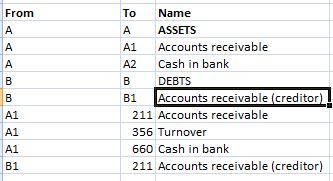
– The aim is to get the following report (with drill down from Asset/Debts level to accountancy entry) :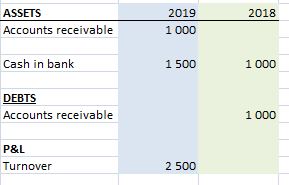
As you can see, the field “Accounts receivable” can appear both in assets or in debts depending of the YTD.
If the YTD is positive like in 2019 (our clients owes us money), it appears in assets while if its negative like in 2018 (advances received from clients), it will appear in debts.
I tried many solutions without success :
– I don’t see a measure working since I would lose the ability to drill down to the accountancy entries and I also lose the hierarchy subtotals.– I tried to make relations between 2 columns in table #2 and table #3 but it won’t work. Also, I would have to have as many table as year since the reporting position (between Assets/debts) might change every year.
Many thanks in advance for your help !
——————————
Rob Parti
—————————— -
Nicholas Johnson
MemberNovember 26, 2019 at 4:51 AM
Hi Rob,Not sure that I understand your requirement in its entirety, however two things might help:
- The creation of an extra calculated column on Table 1 like “Amt = Table1[Credit]-Table1[Debit]” will create a single column with all transactions, with Debits showing as negative entries which can then be used for your top line report
- You can indeed create a relationship between two columns in table 2 and table 3 by again creating a calculated column in both such that “Table2PK = Table2[Account #] & “-” & Table2[Financial Statement Code]” and likewise “Table3PK = Table3[From] & “-” Table3[To]” then using these as a join (again, apologies if I’m not quite understanding the requirement or indeed the semantics of the data!)
Hope that helps in some way
Nick
?——————————
Nicholas Johnson
Solutions Architect
Dublin
——————————
——————————————- -
Gopa Kumar Sivadasan
MemberNovember 26, 2019 at 9:25 AM
HiPlease see if the following helps you:
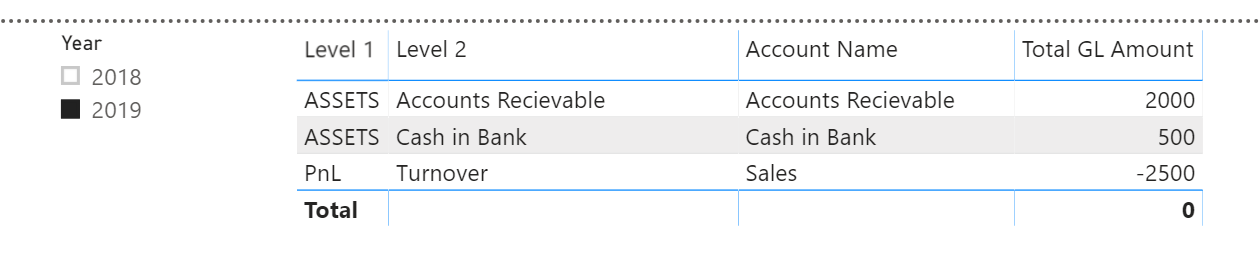
?

However, to achieve the above, there are some changes to be made to your data model. I am not sure whether these changes will be allowed / possible in your environment. The solution is subject to this.1. In the ‘Balance Sheet Hierarchy Table, you will need to classify the alternate account – ‘Accounts Receivable (Creditor) as a separate ‘To’ value as shown below (that is the ‘TO’ column should have unique values):
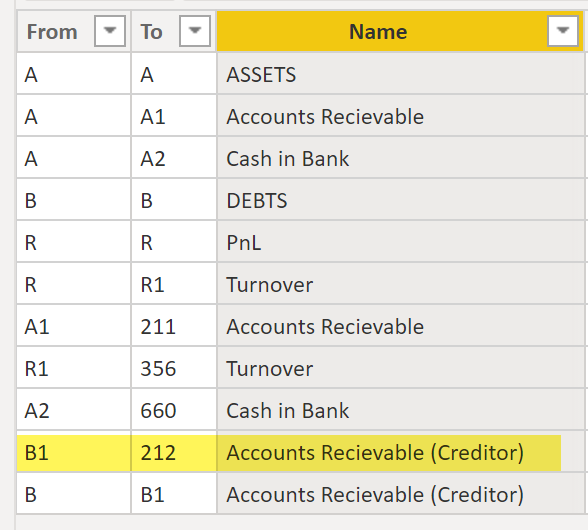
2. Then, you will need to expand this table with additional calculated columns for the proper hierarchy as below:
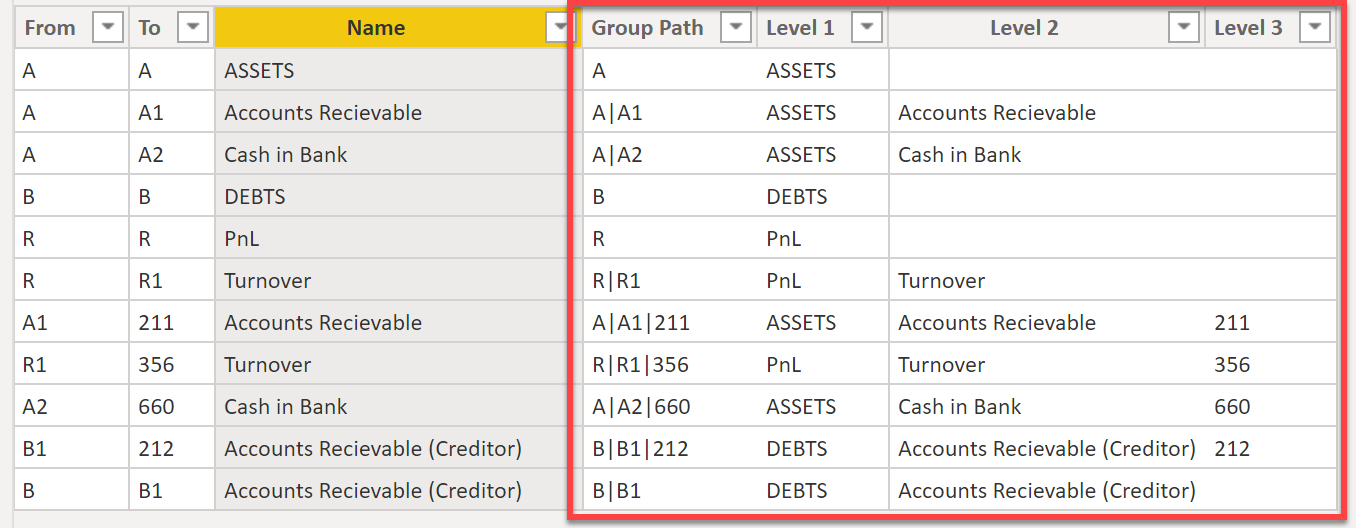
DAX for the above columns:
Group Path =
PATH (
    'Balance Sheet Hierarchy Table'[To],
    'Balance Sheet Hierarchy Table'[From]
)
?
Level 1 = VAR _Pathitem = PATHITEM ( 'Balance Sheet Hierarchy Table'[Group Path], 1, TEXT ) RETURN CALCULATE ( VALUES ( 'Balance Sheet Hierarchy Table'[Name] ), ALL ( 'Balance Sheet Hierarchy Table' ), 'Balance Sheet Hierarchy Table'[To] = _Pathitem )?Level 2 = VAR _Pathitem = PATHITEM ( 'Balance Sheet Hierarchy Table'[Group Path], 2, TEXT ) RETURN CALCULATE ( VALUES ( 'Balance Sheet Hierarchy Table'[Name] ), ALL ( 'Balance Sheet Hierarchy Table' ), 'Balance Sheet Hierarchy Table'[To] = _Pathitem )Level 3 = PATHITEM ( 'Balance Sheet Hierarchy Table'[Group Path], 3, TEXT )
3. You must add an additional column for the alternate account in the COA table:
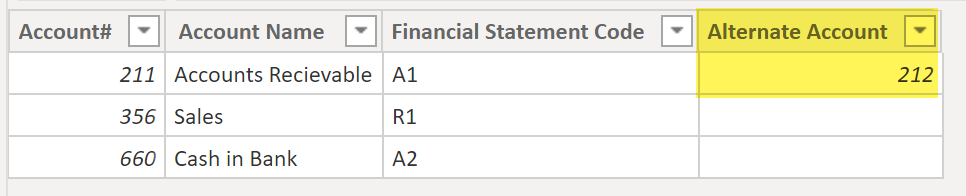
4. You have to create a new mapping table in the following format:
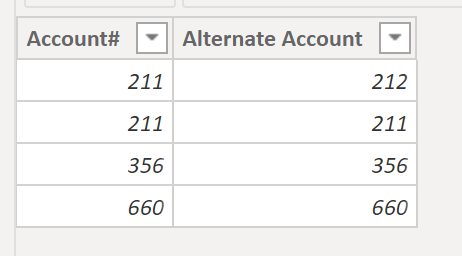
5. Create the relationships:
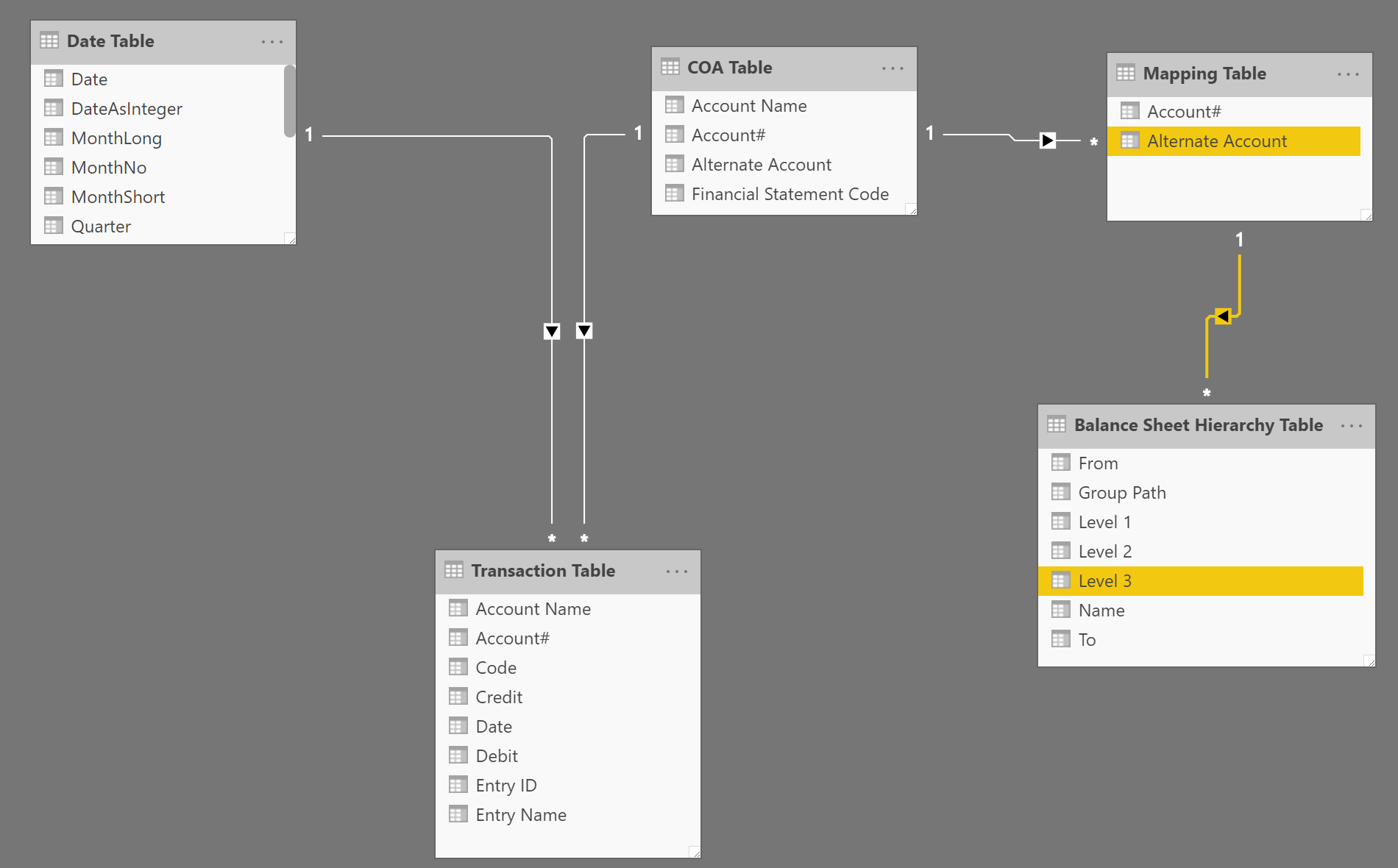
6. Finally, the measure for the total GL amount:
Total GL Amount =
-------------------------------------------------
--initial Variables
VAR _alternateAccount =
    SELECTEDVALUE ( 'COA Table'[Alternate Account] )
VAR _selectedGL =
    SELECTEDVALUE ( 'COA Table'[Account#] )
VAR _totalAmt =
    SUM ( 'Transaction Table'[Debit] ) - SUM ( 'Transaction Table'[Credit] ) --credit balances will be -ve and debits +ve
-------------------------------------------------
//create a virtual table with the alternate account where applicable
VAR __rlvntable1 =
    ADDCOLUMNS (
        'COA Table',
        "NewAccount", IF (
            _totalAmt < 0
                && ISBLANK ( 'COA Table'[Alternate Account] ) = FALSE (),
            'COA Table'[Alternate Account],
            'COA Table'[Account#]
        )
    ) //create a one column virtual table with the account changes
VAR __rlvntable2 =
    SELECTCOLUMNS ( __rlvntable1, "New Account2", [NewAccount] )
--------------------------------------------------
RETURN
    //calculate the total amount based on the account changes
    CALCULATE (
        CALCULATE (
            SUM ( 'Transaction Table'[Debit] ) - SUM ( 'Transaction Table'[Credit] ),
            TREATAS ( __rlvntable2, 'Balance Sheet Hierarchy Table'[Level 3] )
        ),
        CROSSFILTER ( 'COA Table'[Account#], 'Mapping Table'[Account#], BOTH ),
        CROSSFILTER ( 'Mapping Table'[Alternate Account], 'Balance Sheet Hierarchy Table'[Level 3], BOTH )
    )
?
If this is a working model for you, you can use the same process for other accounts which needs the same treatment.
PFA the pbix file for your reference.
——————————
Gopa Kumar
Limner Consulting
——————————
——————————————- -
Rob Parti
MemberNovember 26, 2019 at 2:34 PM
Hi,Thanks Nicholas and Gopar for your help.
Gopa, thank you so much for taking the time to give me such a thorough answer.
I didn’t know about the virtual table function.I got to the same result with a measure on 2 columns in the COA table. (without a secondary table for alternate accounts).
In both case, the setback is we lose the hierarchy in the process (and the subtotals in level 1 & 2).
In your PBIX file, the debts total is gone since PowerBI isn’t able to find the hierarchy. (Alas, I absolutely need to have a total of assets/debts)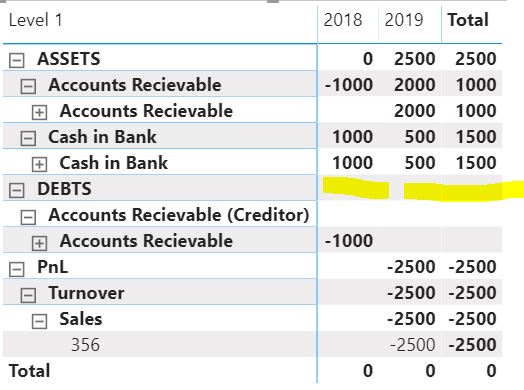
As for your solution, Nicholas, I if merge the two columns in table 2, I then won’t be able to create a relation with table 3. (It won’t match).
Thanks again for your help.
——————————
Rob Parti
Accountant
——————————
——————————————- -
Gopa Kumar Sivadasan
MemberNovember 26, 2019 at 11:53 PM
HiPlease see if the following helps you:
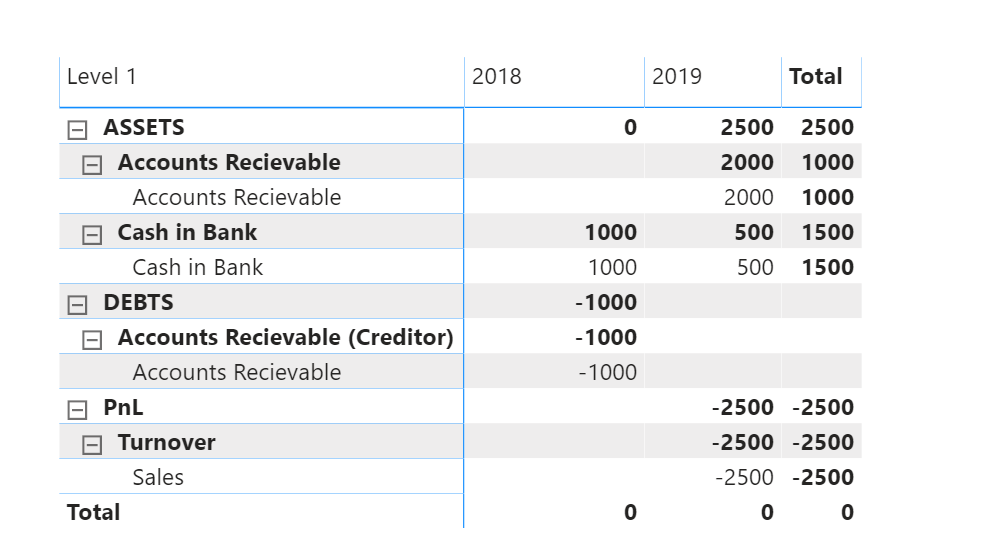
?Slight change in the DAX for the GL Amount Measure:
Total GL Amount =
-------------------------------------------------
--initial Variables
VAR _alternateAccount =
    SELECTEDVALUE ( 'COA Table'[Alternate Account] )
VAR _selectedGL =
    SELECTEDVALUE ( 'COA Table'[Account#] )
VAR _totalAmt =
    SUM ( 'Transaction Table'[Debit] ) - SUM ( 'Transaction Table'[Credit] ) --credit balances will be -ve and debits +ve
-------------------------------------------------
//create a virtual table with the alternate account where applicable
VAR __rlvntable1 =
    ADDCOLUMNS (
        'COA Table',
        "NewAccount", IF (
            _totalAmt < 0
                && ISBLANK ( 'COA Table'[Alternate Account] ) = FALSE (),
            'COA Table'[Alternate Account],
            'COA Table'[Account#]
        )
    ) //create a one column virtual table with the account changes
VAR __rlvntable2 =
    SELECTCOLUMNS ( __rlvntable1, "New Account2", [NewAccount] )
--------------------------------------------------
RETURN
    //calculate the total amount based on the account changes

        CALCULATE (
            SUM ( 'Transaction Table'[Debit] ) - SUM ( 'Transaction Table'[Credit] ),
            TREATAS ( __rlvntable2, 'Balance Sheet Hierarchy Table'[Level 3] )
        )
?
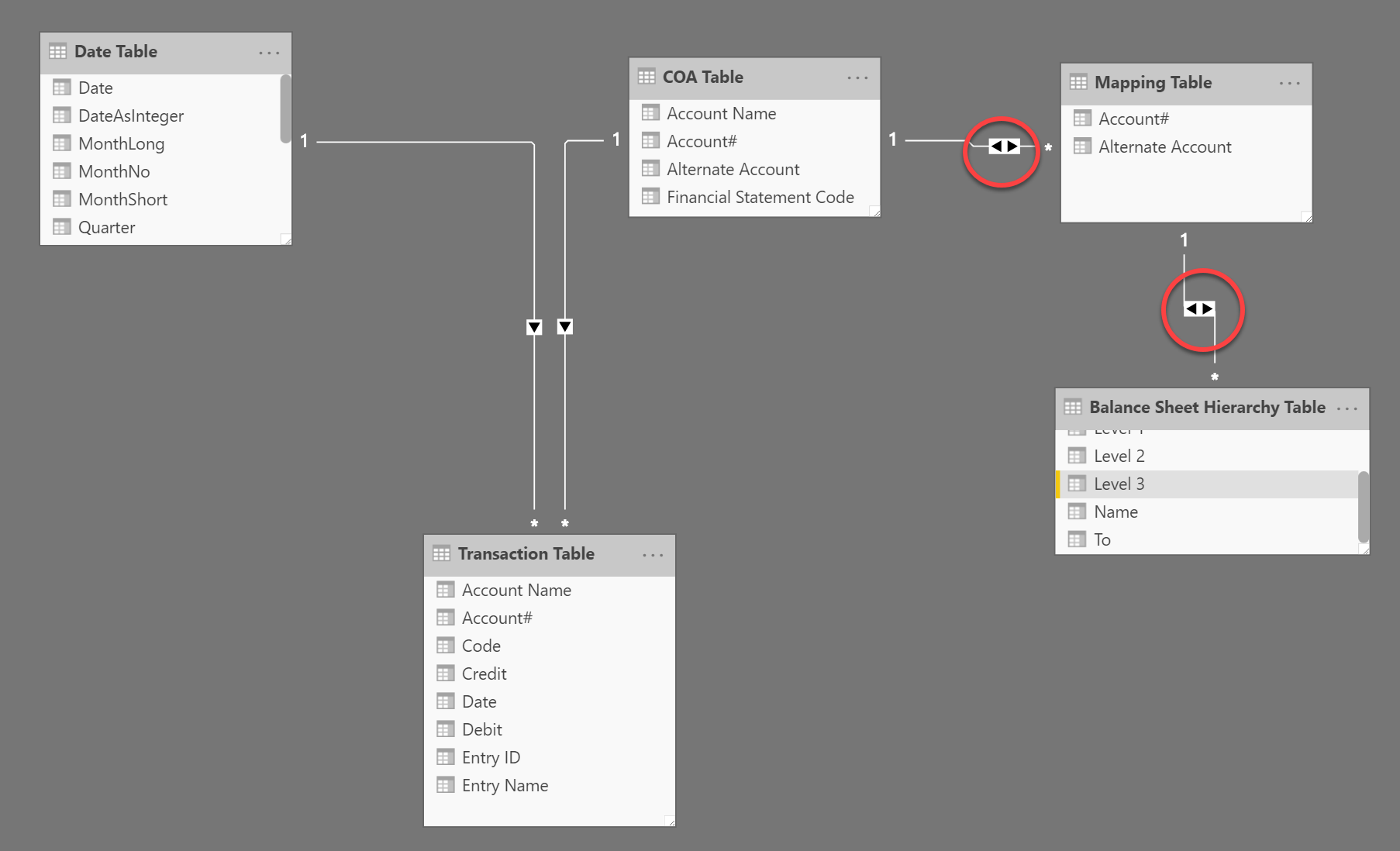
And a change in the relationship:
QUOTE
I got to the same result with a measure on 2 columns in the COA table. (without a secondary table for alternate accounts).
UNQUOTE
If I understand you correctly, you are saying that you have created 2 ‘calculated columns’ in the COA table for the two years? If so, when a third year comes, a new column is to be created and so on? If you require dynamic slicing by months etc, how will you achieve it?
If you are saying it is through two ‘measures‘, please share your solution as it would be good to know and learn alternate methods to solving the same issue.
PFA the revised pbix file for your reference.
——————————
Gopa Kumar
Limner Consulting
——————————
——————————————- -
Rob Parti
MemberNovember 27, 2019 at 4:53 PM
Hi Gopa,Thank your for your answer.
Unfortunately, this edit generates a null total asset in 2018 (instead of 1 000 for the cash in bank) & a null debt in 2019. It seems we can’t have both the assets & debts totals right at the same time.
As for the measure on 2 columns, I can’t seem to make it work on your model yet. I will work on it this week-end and hopefully can send it to you. But, I think your way is more elegant.
——————————
Rob Parti
——————————
——————————————- -
Gopa Kumar Sivadasan
MemberDecember 1, 2019 at 1:27 PM
HiHope I am third time lucky!!??
Hope you had a good Thanksgiving holiday.
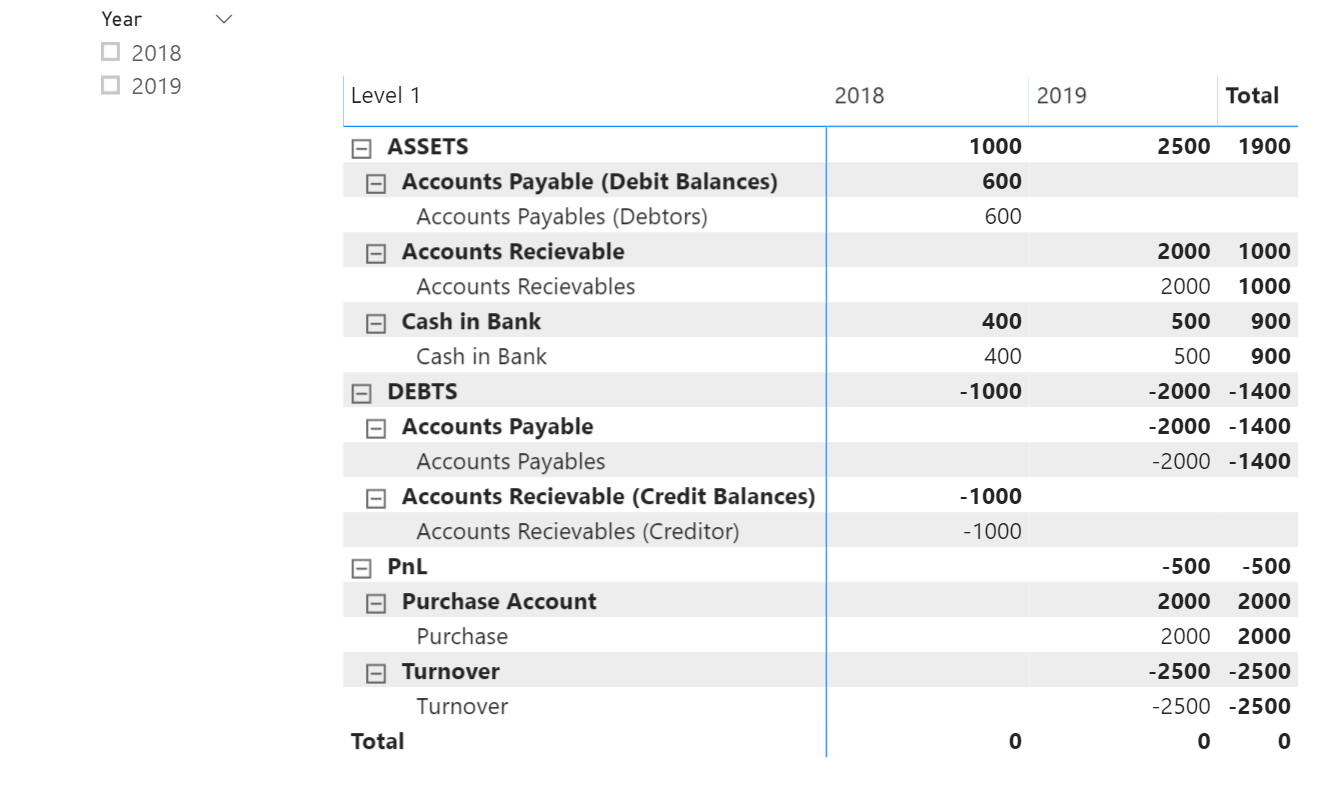
Please see if the following helps you. In the worked-out example, I have included a case where an Accounts Payable becomes debit and shown on the Asset side.
?
There are some changes to be made:
- You will need to add a ‘Type’ in the COA table to identify between Assets, Liabilities etc. This will be required to generate the correct alternate account. Also, ensure that the alternate account is ‘null’ if there are no alternate account (I have forced null in query editor):

- Create a new column for [Link Type] in ‘Balance Sheet Hierarchy’ table and change the level 3 formula to give the text in level 3;
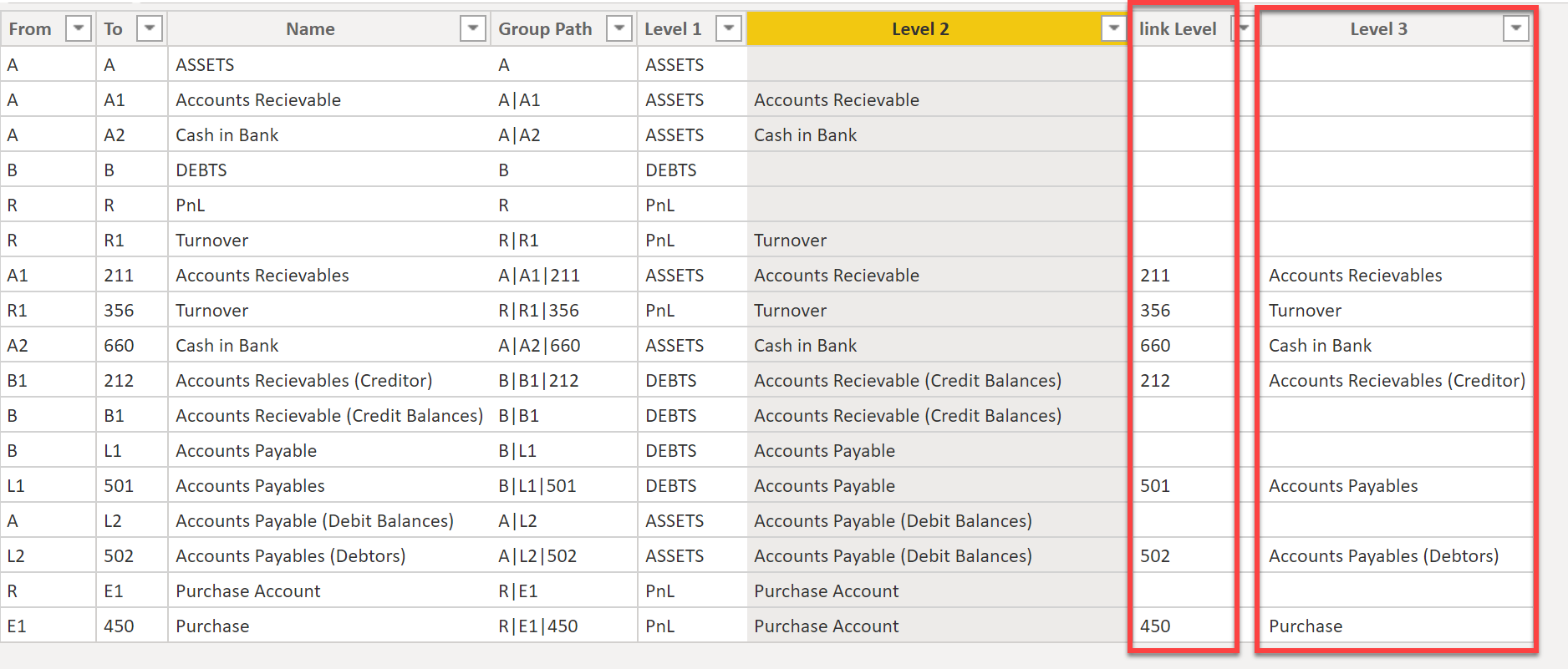
DAX for the above:
Level 3 =
VAR _Pathitem =
    PATHITEM ( 'Balance Sheet Hierarchy Table'[Group Path], 3, TEXT )
RETURN
    CALCULATE (
        VALUES ( 'Balance Sheet Hierarchy Table'[Name] ),
        ALL ( 'Balance Sheet Hierarchy Table' ),
        'Balance Sheet Hierarchy Table'[To] = _Pathitem
    )
link Level = PATHITEM ( 'Balance Sheet Hierarchy Table'[Group Path], 3, TEXT)
- Ensure that you use the hierarchy levels from ‘Balance Sheet Hierarchy’ table to build your matrix visual;
- Finally change the DAX for the measure to the below:
-
Total GL Amount =
---------------------------------------------------------------------------------
//get the list of accounts applicable in the relevant context
--first sumarrize the the COA table with account wise total for the relevant context
VAR __rlvntable =
    SUMMARIZE (
        'COA Table',
        'COA Table'[Account#],
        'COA Table'[Alternate Account],
        'COA Table'[Type],
        "TotalAmount", SUM ( 'Transaction Table'[Debit] ) - SUM ( 'Transaction Table'[Credit] )
    )
--second add a column to the above with the correct account based on the given logic. Assets and Liabilities needs to be treated differently
VAR __rlvntable1 =
    ADDCOLUMNS (
        __rlvntable,
        "NewAccount", SWITCH (
            TRUE (),
            [TotalAmount] < 0
                && 'COA Table'[Type] IN { "Asset" }
                && ISBLANK ( 'COA Table'[Alternate Account] ) = FALSE (), 'COA Table'[Alternate Account],
            [TotalAmount] > 0
                && 'COA Table'[Type] IN { "Liability" }
                && ISBLANK ( 'COA Table'[Alternate Account] ) = FALSE (), 'COA Table'[Alternate Account],
            'COA Table'[Account#]
        )
    )
--third filter the above table only for those GL accounts with an amount
VAR __rlvntable2 =
    FILTER ( __rlvntable1, ISBLANK ( [TotalAmount] ) = FALSE () ) --fourth make a one column distinct GL accounts list from the above
VAR __rlvntable3 =
    SUMMARIZE ( __rlvntable2, [NewAccount] )
    ----------------------------------------------------------------------------------
//filter the balance sheet hierarchy table only for the valid GL accounts in the above table
VAR __BSHtable1 =
    CALCULATETABLE (
        'Balance Sheet Hierarchy Table',
        TREATAS ( __rlvntable3, 'Balance Sheet Hierarchy Table'[link Level] )
    )
--for the filtered BSH table add a column with the net amounts. (due to the bi-directional filters, the amounts will flow to both the original GL account and the alternate account in BSH table. But since we have filtered the BSH table for only those GL accounts which are required, the amounts will show against the correct accounts and if alternate, against it.)
VAR __BSHtable2 =
    CALCULATETABLE (
        SUMMARIZE (
            'Balance Sheet Hierarchy Table',
            'Balance Sheet Hierarchy Table'[link Level],
            "BSAmount", SUM ( 'Transaction Table'[Debit] ) - SUM ( 'Transaction Table'[Credit] )
        ),
        __BSHtable1
    )
-----------------------------------------------------------------------------------
RETURN
    SUMX ( __BSHtable2, [BSAmount])
Please note that the formula should be modified to take care of the Balance Sheet items where the balance as on a date is inclusive of the opening balances and not the totals of the transactions for that period alone.
PFA the pbix file for your reference.
——————————
Gopa Kumar
Limner Consulting
——————————
——————————————- - You will need to add a ‘Type’ in the COA table to identify between Assets, Liabilities etc. This will be required to generate the correct alternate account. Also, ensure that the alternate account is ‘null’ if there are no alternate account (I have forced null in query editor):
-
Rob Parti
MemberDecember 1, 2019 at 3:02 PM
Hi Gopa,I hope your week-end was great too. This was a productive one for me.
Thank you for your message. I will test it.
In the meantime, enclosed, is a partial solution I came up with yesterday :
1- I am creating an additional table (called virtual table) where I duplicate all accounts with a column “Type” to distinguish between Debit and Credit with the UNION function.
This allows me to join this new table with the balance sheet table.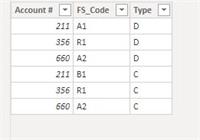
2- I created a measure that will sum the Transaction table entries depending on wether the account total is debtor or creditor and on the date.
It seems to do the trick :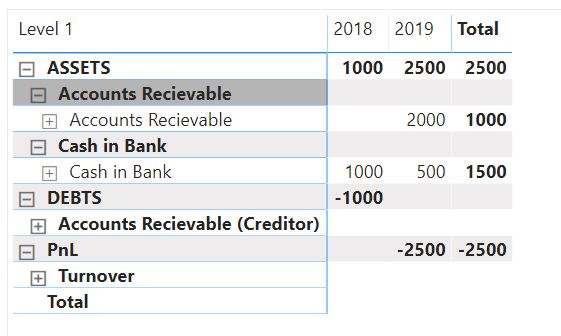
However, I still have a few issues when testing with a more complex set of datas : the drill down the to transaction entries can be wrong. The limitation is that a debtor balance will correctly appear in the assets. Yet, the balance is comprised of debtors & creditor entries. So, when drilling down to transactions entries, the individual creditor entries will appear in debts.
Also, this might not be the most efficient way to do it.——————————
Rob Parti
——————————
——————————————- -
Rob Parti
MemberDecember 1, 2019 at 3:06 PM
OK, here is the file.——————————
Rob Parti
——————————
——————————————- -
Gopa Kumar Sivadasan
MemberDecember 2, 2019 at 1:35 AM
HiGood that you have also come up with a solution.???
——————————
Gopa Kumar
Limner Consulting
——————————
——————————————-
DSC Communities replied 6 years, 4 months ago 1 Member · 0 Replies -
-
0 Replies
Sorry, there were no replies found.
The discussion ‘Balance sheet / Receivable debtor/creditor’ is closed to new replies.
