


Dynamics GP
Public Group
Active 23 hours ago
Dynamics GP
Organizer:
- JOSE Organized by
-
-

VST Controls. A free .NET development tool for GP
-
VST Controls. A free .NET development tool for GP
Posted by DSC Communities on March 30, 2017 at 9:04 pm-

Andrew Dean
MemberMarch 30, 2017 at 9:04 PM
From the creative team at Envisage Software / Precipio Services, who brought you the ‘hit’ song I want my MVP, we are excited to announce the release of VST Controls, afree . NET tool that allows developers to add any windows control onto any GP window with just a few lines of code.Add images, textboxes, labels, URL pages, hyperlinks, 3rd party controls etc… onto any GP window, and get full access to the control’s properties, methods and events.
Go to the Envisage website to read more about the tool and download the software.
Regards
Andrew Dean
Envisage Software Solutions -
Thanks Andrew for developing VST Controls!
Here is a demonstration of the capabilities of the free utility based on a real world example I am working on right now:
I have a customer that would like to import employee expense reports from a cloud based expense system into Dynamics GP as vouchers. I asked if they wanted to see the receipt that the employee submitted with the expense report. They said, “Sure!”
Using VST Controls, I created this working prototype in 30 minutes. The image on the right is displaying a JPEG image file associated with the voucher.
VST Controls can add any .NET control to any GP window–you just need to know the name of the window and where you want the control to be displayed.
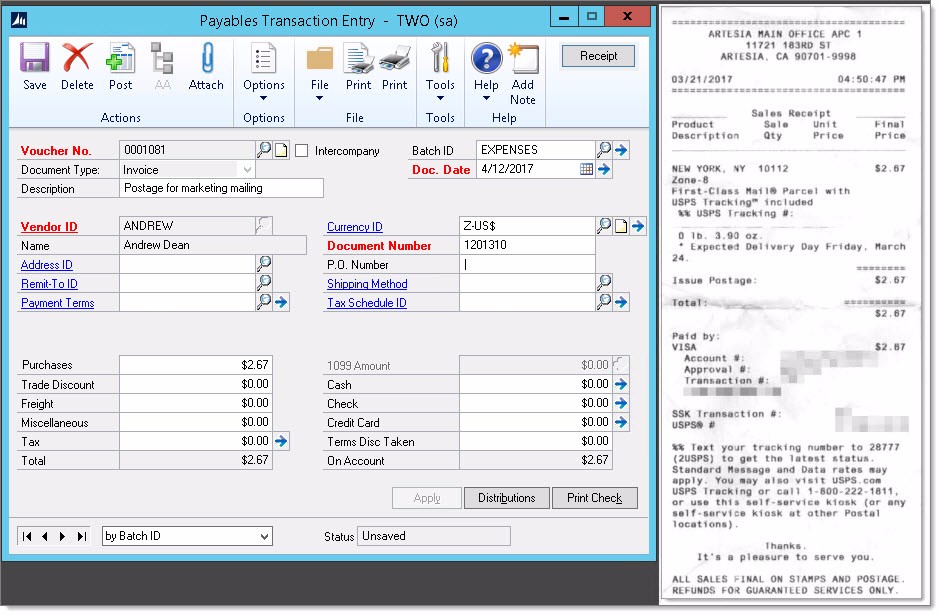
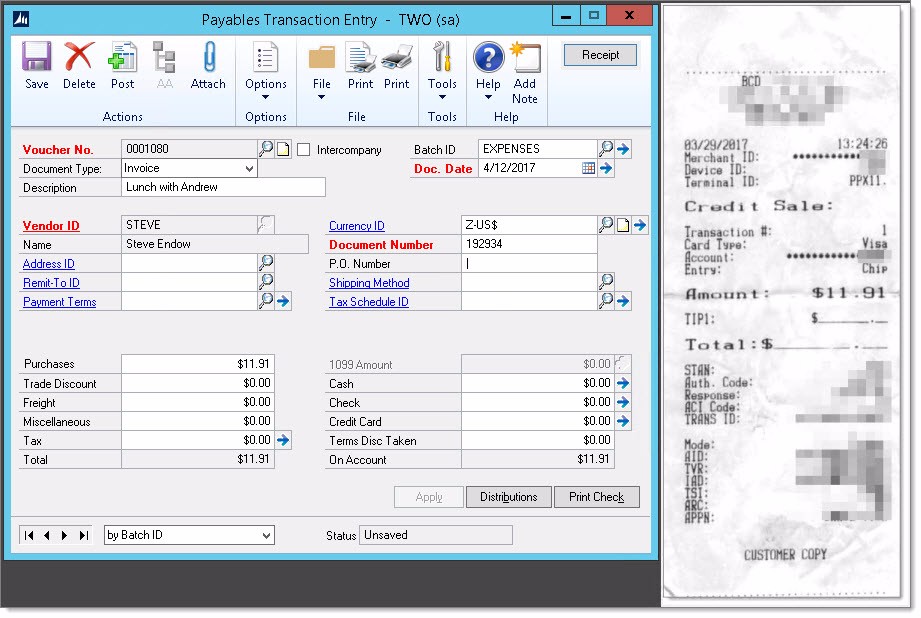
Here is the code to display the controls in GP:
//********************************************************
//Instantiate controls
PictureBox pictureBox2 = new PictureBox();
Button btnShowReceipt = new Button();//********************************************************
//Picture Box on PM Transaction Entry
pictureBox2.Size = new System.Drawing.Size(200, 150);
pictureBox2.BorderStyle = BorderStyle.None;
pictureBox2.SizeMode = PictureBoxSizeMode.StretchImage;
pictureBox2.Visible = false;
pictureBox2.Click += new EventHandler(pictureBox2_Click);
vstControls.Add(new VstControl(“Payables Transaction Entry”, 650, -8, pictureBox2));//********************************************************
//Receipt Button on PM Transaction Entry
btnShowReceipt.Text = “Receipt”;
btnShowReceipt.AutoSize = true;
btnShowReceipt.Click += new EventHandler(btnShowReceipt_Click);
vstControls.Add(new VstControl(“Payables Transaction Entry”, 550, 30, btnShowReceipt));——————————
Steve Endow, Microsoft MVP
Precipio Services
Los Angeles, CA
——————————
——————————————- -
Nice guys, great to see Envisage/Precipio making tools like this open to developers! Just curious, from a technical perspective it looks like the library creates a WinForm and simply positions it over the GP Window? Very interesting approach!
——————————
Matthew Arp
Business Systems Developer
Hunton Group
Houston TX
——————————
——————————————- -
Guillaume Simard
MemberMarch 31, 2017 at 2:06 PM
So I assume that it will not work on the WebClient ?——————————
Guillaume Simard
Negotium Technologies Inc.
Montréal QC
——————————
——————————————- -
No it would not.
——————————
Matthew Arp
Business Systems Developer
Hunton Group
Houston TX
——————————
——————————————- -
Andrew Dean
MemberMarch 31, 2017 at 4:30 PM
Correct in both cases Matthew.Controls are placed on a Winform and that Winform is linked to the handle of the GP window. When the GP window opens,
moves, resizes or closes, an event is raised that notifies the Winform to take action.And because it works this way, it will not work in a Web Client environment.
——————————
Regards
Andrew Dean
——————————
——————————————- -
Jeffery Southworth
MemberApril 3, 2017 at 12:59 AM
Hi Andrew,Good job! Do you see this tool allowing a GP window on a touch-screen tablet to capture a signature and attaching it to a GP record note as a .jpg file?
Thanks,
Jeff——————————
Jeffery Southworth
Director, Product Development
PureLogic Incorporated
Dallas TX
——————————
——————————————- -
To capture those touch events you’d need to subscribe to the WM_TOUCH message, there is a sample from MS on doing this HERE. You will need to update the sample to use the form handle that the library creates for you, VSTControls.Utilities gpWindows.
Might be a bit tricky, but it should be doable.
——————————
Matthew Arp
Business Systems Developer
Hunton Group
Houston TX
——————————
——————————————- -
Andrew Dean
MemberApril 4, 2017 at 1:28 AM
Hi JeffAlong with standard Windows controls, you can also add UserControls to a GP window by using VST Controls. This means you could develop a UserControl that has all the necessary controls (i.e. buttons, signature area, process logic), add the UserControl to the VSTControls array list, with the end result being signatures recorded, saved and capable of being retrieved.
If you would like some assistance with the task, send me your details via the Envisage Contact Us page
——————————
Andrew Dean
Envisage Software
——————————
——————————————-
DSC Communities replied 9 years ago 1 Member · 0 Replies -
-
0 Replies
Sorry, there were no replies found.
The discussion ‘VST Controls. A free .NET development tool for GP’ is closed to new replies.
