


Dynamics GP
Public Group
Active 2 days ago
Dynamics GP
Organizer:
- JOSE Organized by
-
-

View Checkbook ID for Unpaid Document
-
View Checkbook ID for Unpaid Document
Posted by DSC Communities on April 14, 2020 at 12:29 pm-

Mwalimu Phiri
MemberApril 14, 2020 at 12:29 PM
Hi all, on a SQL view, is there a way to bring the Checkbook ID that is typically selected on the Batch Entry window while creating Invoice transactions that are in unpaid statuses (Work (Unposted) or Open (Posted))? Just to be clear, this would be an invoice that is entered or posted with no payment applied to it (Not in ‘History’). I’ve been searching through tables (PM10000, PM10300, PM20000) and I’m seeing that the checkbook ID column/field is not captured until the payment processing starts. I understand the checkbook ID shows up once the invoice has a payment applied to it, but I’m trying to understand, where that checkbook ID is captured from the Batch Entry window for our reporting purposes. Are there tables that I’m not aware of that include this information? I’m perplexing how I’m not seeing it captured; why include a field if its not necessarily captured in tables? I hope that was clear.Regards,
——————————
Mwalimu Phiri
Financial Systems Analyst
—————————— -
George Kuntz, MSc
MemberApril 15, 2020 at 11:22 AM
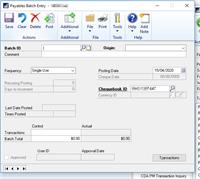
Hello Mwalimu,I might be able to assist. Are you basing your data off of the Payables Batch Entry window? If so I have an idea.
——————————
George
Support Analyst
Calgary
——————————
——————————————- -
Mwalimu Phiri
MemberApril 15, 2020 at 12:06 PM
Hi George, That’s exactly the window I was referring to. The tables in GP don’t seem to record this Checkbook ID field upon entering the Invoice Transaction in a permanent manner. The Checkbook ID only shows when the payment is applied to it, which doesn’t makes sense; why have the field available and not record it?——————————
Mwalimu Phiri, MSc
Financial Systems Analyst
——————————
——————————————- -
George Kuntz, MSc
MemberApril 15, 2020 at 12:26 PM
Great ! Are you building this in SQL/SSMS or Smartlist Builder?Also, if within the window you click Tools-> Table finder you should be able to find all associated tables for the window:
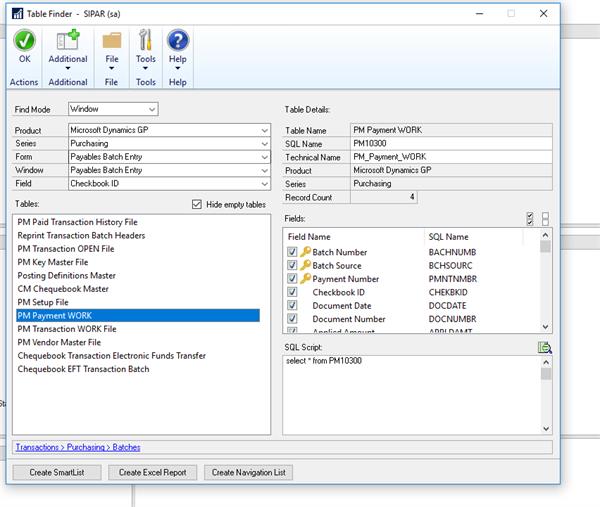
Check out PM10300, as an example. Give this a go and if you need more help, I or someone else on here will jump in.George
——————————
George
Support Analyst
Calgary
——————————
——————————————- -
Mwalimu Phiri
MemberApril 15, 2020 at 12:48 PM
Hi George, also validated my thought process on the functionality of the field.?? I hope this helps anyone else who maybe creating reports or views wondering why the Checkbook ID field is empty. See statements in our correspondence from ‘s amazing site: https://victoriayudin.com??“The Checkbook ID entered on the batch window is stored in the SY00500 while the batch is not posted. However, that is simply the DEFAULT Checkbook ID that will be used IF you happen to enter payments in that batch. Even with this being the default, you can still change the Checkbook ID on any payment you enter in the batch. A Checkbook ID is not actually associated with any non-payment transaction in any way. Once the batch is posted, the default Checkbook ID that was on the batch (and in the SY00500 table) is not stored anywhere and is not associated with any transactions that were in that batch. Even if there were payments entered in the batch, those would have the actual Checkbook ID entered for them saved, not the default Checkbook ID from the batch” Victoria Yudin
Reference Site: https://victoriayudin.com??
——————————
Mwalimu Phiri, MSc
——————————
——————————————- -
George Kuntz, MSc
MemberApril 15, 2020 at 1:14 PM
Interesting – thanks for sharing!——————————
George
Support Analyst
Calgary
——————————
——————————————-
DSC Communities replied 5 years, 11 months ago 1 Member · 0 Replies -
-
0 Replies
Sorry, there were no replies found.
The discussion ‘View Checkbook ID for Unpaid Document’ is closed to new replies.
